
Introducció
Gràcies per la compraasing the Sharp XL-70-H Compact Stereo System. This manual provides essential information for the safe and efficient operation of your audio system. Please read it thoroughly before use and keep it for future reference.
Informació de seguretat
Per garantir un funcionament segur i evitar danys, observeu les precaucions següents:
- No exposeu la unitat a la pluja ni a la humitat per evitar incendis o descàrregues elèctriques.
- No bloquegeu les obertures de ventilació. Assegureu-vos que hi hagi prou espai al voltant de la unitat per a un flux d'aire adequat.
- Col·loqueu la unitat sobre una superfície estable i plana.
- No col·loqueu objectes plens de líquids, com ara gerros, a la unitat.
- Unplug the unit from the wall outlet during lightning storms or when unused for long periods.
- Demaneu tot el servei a personal de servei qualificat.
Contingut del paquet
Verifiqueu que tots els elements siguin presents al paquet:
- Sharp XL-70-H Main Unit (Tower)
- Two 2-way MDF Speakers
- Cable d'alimentació
- Remote Control (if included, not explicitly mentioned but common)
- Cables d'altaveus
Producte acabatview
The Sharp XL-70-H is a compact stereo system designed for versatile audio playback. It features a CD player with a glass lid, a full logic cassette deck, and an auxiliary input for connecting external devices. The system includes two 2-way MDF speakers for clear sound reproduction.
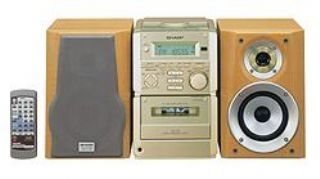
Figura 1: Davant view of the Sharp XL-70-H Compact Stereo System, showing the main unit and two speakers. The main unit features a central display, control buttons, and the CD tray.
Configuració
1. Connexió d'altaveus
Connect the included 2-way MDF speakers to the main unit. Ensure that the positive (+) and negative (-) terminals on the speakers match the corresponding terminals on the main unit. Incorrect polarity can affect sound quality.
2. Connexió d'alimentació
Plug the AC power cord into the power input on the rear of the main unit, then plug the other end into a standard wall outlet (AC 230V, 50Hz).
3. Engegada inicial
Press the Power button on the main unit or remote control to turn on the system. The display will illuminate.
Instruccions de funcionament
Funcionament del reproductor de CD
- Premeu el botó CD botó per seleccionar la funció CD.
- Premeu el botó OBRIR/TANCAR button. The glass lid will open via motor assistance.
- Place a CD (CD-DA format) with the label side up on the disc tray.
- Premeu el botó OBRIR/TANCAR button again to close the lid.
- Premeu el botó REPRODUCCIÓ/PAUSA per iniciar la reproducció.
- Utilitza el SALTAR botons per navegar entre pistes.
Funcionament del reproductor de cassets
- Premeu el botó CINTA button to select the cassette function.
- Premeu el botó OBRIR/EXPULSAR button to open the cassette deck.
- Inseriu una cinta de casset.
- Premeu el botó JUGAR per iniciar la reproducció.
- Utilitza el REBOBINAR i AVANT RÀPID botons de navegació.
- Premeu el botó PARAR/EXPULTAR button to stop playback and eject the tape.
Operació d'entrada AUX
Connect an external audio device (e.g., smartphone, MP3 player) to the AUX input jack on the main unit using a 3.5mm audio cable. Press the AUX button to select the auxiliary input. Audio from the connected device will play through the system speakers.
Control de volum i to
- Volum: Rotate the motorized SERVO VOLUME knob or use the volume buttons on the remote control to adjust the sound level.
- Gravs/Aguts: Utilitzeu el dedicat BASS i AGUTS controls to adjust the low and high frequency response of the audio.
Clock, Timer, and Sleep Functions
The system includes a clock display, a timer function for scheduled operations, and a sleep function to automatically turn off the system after a set period. Refer to the on-screen menu and Multi Jog Control for setting these features.
Manteniment
Neteja de la unitat
Wipe the exterior of the unit with a soft, dry cloth. Do not use abrasive cleaners, waxes, or solvents as they may damage the finish. For stubborn stains, lightly dampNetegeu el drap amb aigua i detergent suau i després eixugueu-lo.
CD Player Care
Manipuleu els CD per les vores per evitar empremtes dactilars. Si un CD està brut, netegeu-lo suaument des del centre cap a fora amb un drap suau i sense borrissol. No utilitzeu dissolvents ni netejadors abrasius en els CD.
Cassette Deck Care
Periodically clean the tape heads and pinch rollers using a specialized cassette head cleaning kit to ensure optimal sound quality and prevent tape damage.
Resolució de problemes
| Problema | Causa possible | Solució |
|---|---|---|
| Sense poder | Cable d'alimentació no connectat; Presa de corrent no activa. | Ensure power cord is securely plugged in; Check the wall outlet with another device. |
| Sense so | Volume too low; Speakers not connected; Incorrect input selected. | Increase volume; Check speaker connections; Select the correct input source (CD, TAPE, AUX). |
| El CD no es reprodueix | CD inserit incorrectament; CD brut o ratllat; Format de disc no compatible. | Insert CD with label side up; Clean or replace CD; Ensure CD is CD-DA format. |
| Cassette tape not playing | Tape inserted incorrectly; Tape heads dirty. | Ensure tape is inserted correctly; Clean tape heads. |
Si el problema persisteix després de provar aquestes solucions, poseu-vos en contacte amb l'atenció al client.
Especificacions
- Model: XL-70-H
- Marca: Afilat
- Output Power (DIN 45324):
- Peak Music Power: 120W (Total)
- Music Power: 60W (30W + 30W)
- Sine Wave Power: 40W (20W + 20W)
- Dimensions (L x A x P):
- Main Unit (Tower): 160mm x 241mm x 298mm
- Speakers: 160mm x 240mm x 189mm
- Pes de l'article: 8 kg
- Connectivitat: Auxiliar
- Tipus d'altaveu: 2-way MDF speaker system
- Font d'alimentació: AC-adapter (connected to a standard wall outlet)
- Dispositius compatibles: Cassette player, AUX device
- Format d'àudio compatible: CD-DA
- Nombre de parlants: 2
- Mode de sortida d'àudio: Estèreo (2.0 canals)
- Color: Plata
- Suport Bluetooth: Sí
Garantia i Suport
This product comes with a standard manufacturer's warranty. For detailed warranty information, please refer to the warranty card included with your purchase or visit the official Sharp website. For technical support or service inquiries, please contact Sharp customer service.