
Introducció
This manual provides instructions for the operation and maintenance of your Franklin NIV-450 Pocket Bible. Please read this manual thoroughly before using the device to ensure proper function and longevity.

Image: The Franklin NIV-450 Pocket Bible in its closed state, showing its compact design.
Configuració
1. Instal·lació de la bateria
The Franklin NIV-450 requires two CR2032 coin cell batteries for operation. Follow these steps to install or replace batteries:
- Localitzeu la tapa del compartiment de la bateria a la part posterior del dispositiu.
- Using a small screwdriver or coin, gently pry open the battery compartment cover.
- Insert two new CR2032 batteries, ensuring the positive (+) side faces upwards as indicated inside the compartment.
- Torneu a col·locar la tapa del compartiment de la bateria, assegurant-vos que encaixi correctament al seu lloc amb un clic.
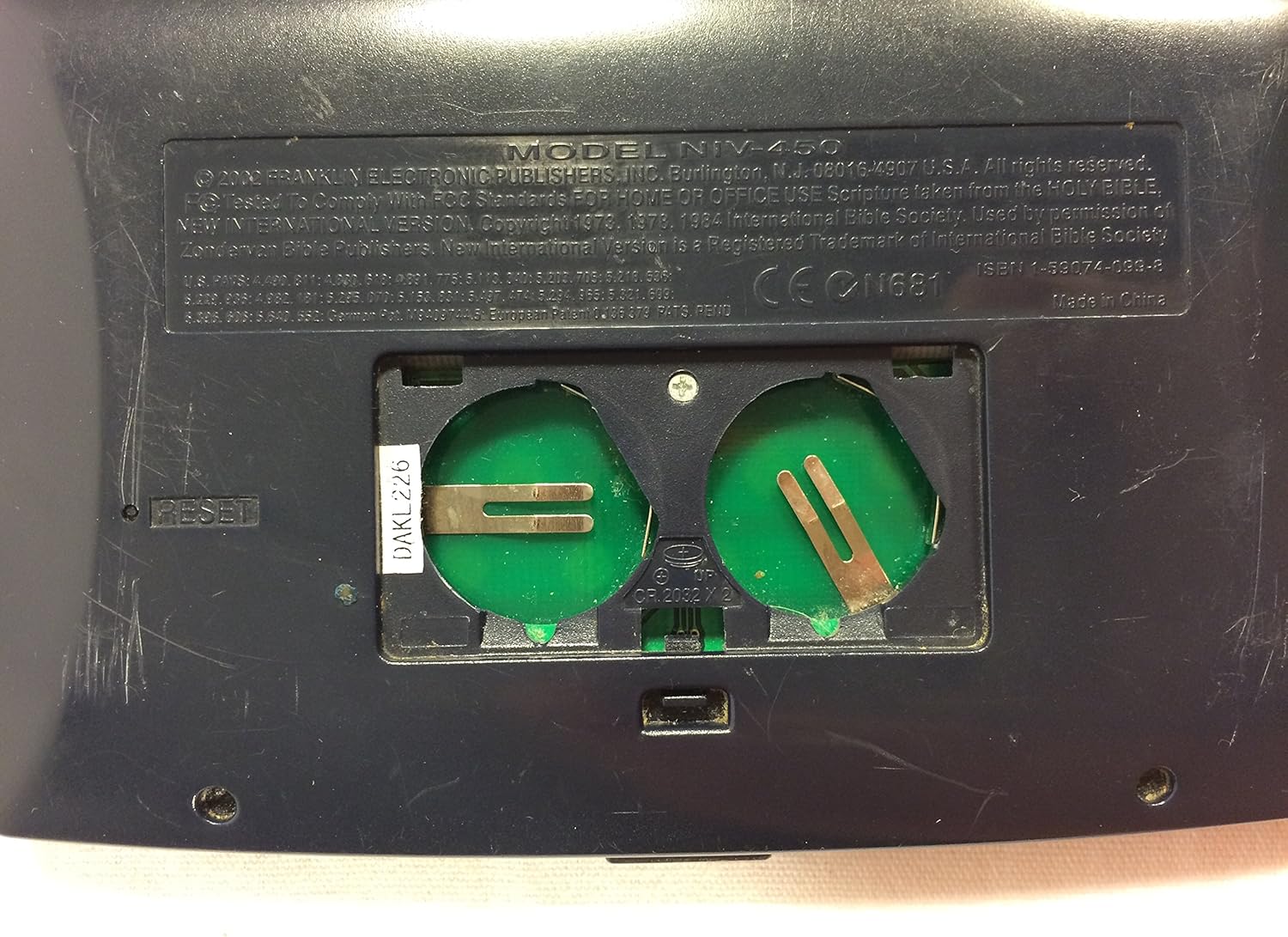
Imatge: Primer pla view of the open battery compartment on the back of the Franklin NIV-450, showing where to insert two CR2032 batteries.
2. Engegada inicial
After installing the batteries, open the device. The screen should illuminate, and the device will be ready for use. If the device does not power on, ensure batteries are correctly installed and charged.
Instruccions de funcionament
The NIV-450 features a compact keyboard and a monochrome display for navigation and text viewing.

Image: The Franklin NIV-450 Pocket Bible opened, displaying its keyboard, screen, and internal instructions for use.
Navegació bàsica
- Tecles direccionals: Use the arrow keys to scroll through text, menu options, and search results.
- Tecla ENTER: Selecciona una opció o confirma una acció.
- CLEAR Key: Clears input or returns to the previous screen/menu.
- Botó ON/OFF: Encén o apaga el dispositiu.
Searching for Verses and Words (Concordance)
The device includes a concordance feature to quickly locate specific words or phrases within the Bible text.
- Premeu el botó TROBAR botó.
- Type the word or phrase you wish to search for using the keyboard.
- Premeu ENTRAR to initiate the search.
- Use the directional keys to navigate through the search results.
Bookmarking Passages
You can bookmark passages for quick reference:
- Navigate to the desired passage.
- Premeu el botó MARC botó.
- Follow the on-screen prompts to save the bookmark.
- To access saved bookmarks, press MARC again and select from the list.
Adjusting Text Size
The device allows for adjustment of text size for improved readability. Refer to the on-screen menu options, typically accessed via the MÉS button, to find text size settings.
Using Organizer and Clock Functions
The NIV-450 may include additional features such as an organizer and clock. To access these functions, press the MÉS button and navigate through the menu options. Specific instructions for these features are typically displayed on the device's internal cover or within the on-screen help menu.
Manteniment
Neteja
To clean the device, use a soft, dry cloth. Do not use liquid cleaners, aerosols, or abrasive materials, as these can damage the screen or casing.
Canvi de bateria
Replace batteries when the screen dims or the device fails to power on. Refer to the "Battery Installation" section under Setup for detailed instructions.
Cura i emmagatzematge
Store the device in a cool, dry place away from direct sunlight and extreme temperatures. Avoid dropping the device or exposing it to moisture.
Resolució de problemes
- El dispositiu no s'encén:
- Ensure batteries are correctly installed with the positive (+) side facing up.
- Replace old batteries with new CR2032 batteries.
- La pantalla està tènue o il·legible:
- Substituïu les piles.
- Check for text size settings in the menu.
- Els botons no responen:
- Proveu de prémer RESET button. The reset button is a small pinhole located near the battery compartment. Use a paperclip to gently press it. This will restart the device without losing saved data.
- Pixel loss or display issues:
- While some pixel loss can occur over time with electronic displays, ensure the device has not been subjected to physical impact or extreme temperatures. If the issue persists after a reset, it may indicate a hardware fault.

Imatge: Part posterior view of the Franklin NIV-450, highlighting the location of the reset button and battery compartment.
Especificacions
- Model: NIV-450
- Marca: Franklin
- Bible Version: New International Version (NIV)
- Font d'alimentació: 2 piles CR2032
- Material: Leather (case), Plastic (device body)
- Color: Negre
- GTIN/UPC: 084793993800
- Fabricant: Franklin Electronics
Informació de la garantia
This Franklin NIV-450 Pocket Bible comes with a Un any de garantia from the date of purchase. This warranty covers manufacturing defects under normal use. It does not cover damage caused by misuse, accidents, unauthorized repairs, or normal wear and tear. Please retain your proof of purchase for warranty claims.
Suport
For further assistance or inquiries regarding your Franklin NIV-450 Pocket Bible, please refer to the official Franklin Electronics website or contact their customer support. Contact details are typically provided with the product packaging or on the manufacturer's weblloc.