
Introducció
The Kyocera Finecam L4V is a compact 4-megapixel digital camera designed for capturing high-quality images and video. It features a 3x optical zoom lens, a large 2.5-inch LCD screen, and various shooting modes to suit different photographic situations. This manual provides essential information for setting up, operating, maintaining, and troubleshooting your Finecam L4V camera.
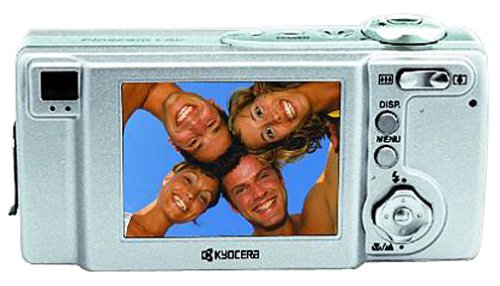
Figura 1: A silver Kyocera Finecam L4V digital camera, viewed from a slight angle, showing the lens, flash, and the 'Finecam L4v' branding on the front, and the battery/card compartment on the side.
Configuració
1. Instal·lació de la bateria
The Finecam L4V operates using a CR-V3 lithium battery (included). For extended use and cost-effectiveness, two AA-sized rechargeable NiMH batteries are recommended as an alternative.
- Locate the battery compartment door on the side of the camera.
- Feu lliscar el pestell per obrir el compartiment.
- Insert the CR-V3 battery or two AA NiMH batteries, ensuring correct polarity (+/-) as indicated inside the compartment.
- Close the compartment door securely until it clicks into place.
2. Instal·lació de la targeta de memòria
The camera uses Secure Digital (SD) or MultiMedia (MMC) memory cards for image and video storage. A 16 MB SD card is included with your camera.
- Open the battery/card compartment door.
- Insert the SD or MMC card into the designated slot with the metal contacts facing the correct direction (usually towards the front of the camera).
- Push the card gently until it locks into place. To remove, push the card in again, and it will spring out.
- Tanqueu la porta del compartiment de manera segura.
3. Connexió a un ordinador
To transfer images and videos, connect your Finecam L4V to a computer using the supplied USB cable.
- Assegureu-vos que la càmera estigui apagada.
- Connect one end of the USB cable to the camera's USB port.
- Connect the other end to an available USB 1.1 port on your Windows or Mac computer.
- Install the imaging software and USB drivers from the included CD-ROM if prompted by your operating system.
Funcionament de la càmera
1. Encès / apagat
Press the power button (usually located on the top of the camera) to turn the camera on or off. The 2.5-inch LCD screen will activate upon power-on.
2. Fer fotos
- Enquadrament: Use the 2.5-inch LCD screen or the optical viewcercador per compondre la teva presa.
- Zoom: Use the zoom controls (typically a rocker switch near the shutter button) to adjust the 3x optical zoom and 4x digital zoom (for a total 12x zoom).
- Focus: The camera features autofocus. Half-press the shutter button to focus, then fully press to capture the image.
- Modes de tir: Select from various modes such as macro for close-ups, landscape for wide scenes, and color modes (color, sepia, black & white) via the camera's menu.
- Modes de flaix: Adjust flash settings for different lighting conditions: auto flash, red-eye reduction auto flash, fill-in flash, flash-off, or night-time portrait.
3. Gravació de vídeos
The Finecam L4V supports AVI movie recording with sound for up to 120 seconds.
- Switch the camera to movie mode (refer to your camera's specific button or menu option).
- Premeu el botó de l'obturador per començar a gravar.
- Torneu a prémer el botó de l'obturador per aturar la gravació.
4. Enregistrament de veu
You can attach up to a 30-second voice message to each image. Consult the camera's on-screen menu for options to record and attach voice memos.
Manteniment
- Neteja de la lent: Feu servir un drap suau i sense borrissol dissenyat específicament per a objectius de càmera. Eviteu productes químics agressius.
- Neteja de la pantalla LCD: Gently wipe the screen with a microfiber cloth.
- Emmagatzematge: When not in use, store the camera in a dry, dust-free environment, away from extreme temperatures. Remove batteries if storing for extended periods.
- Cura de la bateria: If using rechargeable NiMH batteries, follow the manufacturer's charging instructions. Avoid overcharging.
Resolució de problemes
Problemes comuns i solucions:
- La càmera no s'encén:
- Assegureu-vos que les piles estiguin inserides correctament amb la polaritat adequada.
- Check if batteries are fully charged or replace with fresh ones.
- If using a CR-V3 battery, note that it is not rechargeable and will need replacement when depleted. Consider using rechargeable AA NiMH batteries for long-term use.
- Les imatges són borroses:
- Assegureu-vos que la lent estigui neta.
- Make sure the camera has focused correctly before fully pressing the shutter button.
- Check lighting conditions; use flash if necessary.
- Error de la targeta de memòria:
- Assegureu-vos que la targeta de memòria estigui inserida correctament.
- Try reformatting the card (this will erase all data, so back up first).
- Try a different compatible SD or MMC card.
- No es poden transferir fotos a l'ordinador:
- Verifiqueu que el cable USB estigui connectat correctament tant a la càmera com a l'ordinador.
- Ensure the camera is powered on when connected.
- Install the necessary drivers from the included CD-ROM.
- Proveu un port USB diferent a l'ordinador.
Especificacions
| Característica | Detall |
|---|---|
| Nom del model | Finecam L4V |
| Resolució de fixes efectius | 4 MP |
| Zoom òptic | 3x |
| Zoom digital | 4x |
| Mida de la pantalla | 2.5 polzades |
| Tipus de sensor | CCD |
| Admet File Format | JPEG |
| Resolució de vídeo | 320 x 240 up to 120 sec |
| Tipus de memòria flash | Targeta SD/MMC |
| Tipus de bateria | CR-V3 Lithium (included), AA NiMH (recommended) |
| Tecnologia de connectivitat | USB 1.1 |
| Pes de l'article | 0.49 lliures (aprox. 222 g) |
| Dimensions (aprox.) | 4.4 x 2.1 x 1.4 polzades (11.2 x 5.3 x 3.6 cm) |
| Interval ISO | Automàtic, 100, 200, 400 |
| Velocitat d'obturació mínima | 8 segons |
| Velocitat màxima d'obturació | 1/2000 segons |
| Aperture Modes | F2.8-F4.7 |
| Té temporitzador automàtic | Sí |
Garantia i Suport
For information regarding warranty coverage, technical support, or service for your Kyocera Finecam L4V camera, please refer to the documentation included with your purchase or visit the official Kyocera support weblloc.
You can also visit the Kyocera brand store for additional product information: Botiga Kyocera a Amazon.