
1. Introducció
Welcome to your new Pentax SMC 28-90mm f3.5-5.6 FA Silver Zoom Lens. This manual provides essential information for the proper use, care, and maintenance of your lens. Please read this manual thoroughly before using your lens to ensure optimal performance and longevity.
2. Producte acabatview
The Pentax SMC 28-90mm f3.5-5.6 FA Silver Zoom Lens is a versatile lens designed for Pentax cameras, offering a flexible zoom range suitable for various photographic situations, from wide-angle landscapes to medium telephoto portraits.
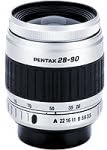
This image displays the Pentax SMC 28-90mm f3.5-5.6 FA Silver Zoom Lens. It features a silver barrel with black rubberized zoom and focus rings, and aperture markings visible on the front.
3. Configuració
3.1 Fixació de la lent
- Ensure your camera is powered off to prevent damage to the sensor or lens contacts.
- Traieu la tapa posterior de l'objectiu i la tapa del cos de la càmera.
- Align the red or white index mark on the lens barrel with the corresponding mark on your camera's lens mount.
- Introduïu suaument l'objectiu a la muntura de la càmera.
- Rotate the lens clockwise until it clicks into place, indicating it is securely locked. Do not force the lens.
3.2 Desmuntatge de la lent
- Assegureu-vos que la càmera estigui apagada.
- Press and hold the lens release button located on your camera body.
- Mentre manteniu premut el botó, gireu l'objectiu en sentit antihorari fins que es desprengui de la muntura.
- Immediately attach the rear lens cap to protect the lens elements and the camera body cap to protect the sensor.
4. Funcionament de l'objectiu
4.1 Ampliació
To adjust the focal length, rotate the zoom ring (the wider, ribbed ring) on the lens barrel. Rotate towards the camera body for a wider angle (28mm) and away from the camera body for a telephoto view (90mm). The focal length markings are indicated on the lens barrel.
4.2 Enfocament
This lens supports both autofocus (AF) and manual focus (MF).
- Enfocament automàtic: Set your camera to AF mode. The lens will automatically adjust focus when the shutter button is half-pressed. Ensure the AF/MF switch on your camera (if present) is set to AF.
- Enfocament manual: Set your camera to MF mode. Rotate the focus ring (the narrower ring closer to the front of the lens) until your subject appears sharp in the viewfinder or on the LCD screen.
4.3 Control d'obertura
The aperture (f-number) controls the amount of light entering the lens and the depth of field. This lens has a variable maximum aperture of f/3.5 at 28mm and f/5.6 at 90mm, and a minimum aperture of f/22-32 depending on the focal length. Aperture is typically controlled via the camera body's settings.
5. Manteniment i cura
5.1 Neteja de la lent
- Elements de la lent: Use a soft lens brush or a blower to remove loose dust particles. For smudges or fingerprints, use a clean microfiber lens cloth and a small amount of lens cleaning solution specifically designed for optical surfaces. Apply the solution to the cloth, not directly to the lens element. Wipe gently in a circular motion from the center outwards.
- Barril de la lent: Wipe the exterior of the lens with a soft, dry cloth. Avoid using harsh chemicals, solvents, or abrasive materials, as these can damage the lens finish.
5.2 Emmagatzematge
When not in use, always store the lens with both front and rear caps securely attached. Keep the lens in a dry, dust-free environment, away from direct sunlight, extreme temperatures, and high humidity. Consider using a lens pouch or case for added protection during transport.
6. Solució De Problemes
- La lent no està ben fixada: Ensure the index marks on the lens and camera body are perfectly aligned. Rotate the lens until a distinct click is heard. Check for any foreign objects or debris on the lens mount or camera mount that might obstruct proper attachment.
- L'enfocament automàtic no funciona: Verify that your camera is set to autofocus (AF) mode. Ensure the lens is properly attached and the camera's battery has sufficient charge. Autofocus may struggle in very low light conditions or with subjects lacking sufficient contrast. Try switching to manual focus if AF fails.
- Dust or spots visible in images: Clean the front and rear lens elements as described in the Maintenance section. If spots persist, the dust may be on your camera's image sensor, which typically requires a sensor cleaning procedure, often best performed by a professional service center.
For further assistance, consult your camera's instruction manual or contact Pentax customer support.
7. Especificacions
| Característica | Detall |
|---|---|
| Número de model | 27697 |
| Distància focal | 28-90 mm |
| Apertura màxima | f/3.5-5.6 |
| Obertura mínima | f/22-32 |
| Tipus de lent | Objectiu de zoom |
| Tipus de muntatge | SMC Mount |
| Pes de l'article | 7 unces (aproximadament 198 grams) |
| Dimensions del paquet | 4.8 x 3.78 x 3.7 polzades |
| Fabricant | Pentax |
Nota: Les especificacions estan subjectes a canvis sense previ avís.
8. Garantia i Suport
For information regarding warranty coverage, service, and technical support for your Pentax SMC 28-90mm f3.5-5.6 FA Silver Zoom Lens, please refer to the warranty card included with your product or visit the official Pentax website. Keep your proof of purchase for any warranty claims. Contact details for customer support can typically be found on the manufacturer's weblloc.