1. Introducció
Gràcies per la compraasing the SANYO DC-M1(S) Set Stereo. This compact audio system is designed to provide high-quality sound with versatile playback options, including CD-R/RW and MP3 support, and features a powerful deep bass output. This manual provides essential information for the safe and efficient operation of your stereo system. Please read it thoroughly before use and retain it for future reference.
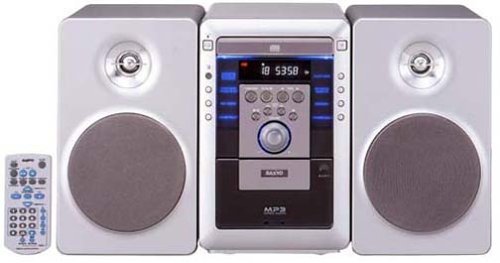
Figure 1: SANYO DC-M1(S) Set Stereo (Silver) front view. This image shows the SANYO DC-M1(S) Set Stereo in silver, featuring its main unit with a CD tray, display, and control buttons, along with two matching speakers.
3. Configuració
3.1 Desembalatge
Carefully remove all components from the packaging. Retain the packaging materials for future transport or storage. Ensure all items listed below are present:
- Main Unit (CD Player/Amplifier/Tuner)
- Unitats d'altaveus (2)
- Control remot
- Cable d'alimentació
- Manual d'usuari (aquest document)
3.2 Connexions d'altaveus
Connect the speaker wires to the corresponding terminals on the main unit and the speakers. Ensure correct polarity (+ to + and - to -) for optimal sound quality. Incorrect polarity can result in poor bass response.
- Localitzeu els terminals d'altaveu a la part posterior de la unitat principal i a cada altaveu.
- Strip approximately 1 cm of insulation from the ends of the speaker wires.
- Connect the red wire to the red (+) terminal and the black wire to the black (-) terminal on both the main unit and the speakers.
- Ensure the wires are securely fastened and no stray strands are touching other terminals.
3.3 Connexió d'alimentació
After all other connections are made, plug the power cord into the AC IN socket on the rear of the main unit, then plug the other end into a suitable wall outlet.
3.4 Encès inicial
Premeu el botó PODER button on the front panel or the remote control to turn on the unit. The display will illuminate, indicating the system is ready for use.
4. Instruccions de funcionament
4.1 Controls bàsics
- Potència: Premeu el botó PODER botó per encendre o apagar la unitat.
- Volum: Utilitza el VOLUM +/- buttons on the unit or remote control to adjust the sound level.
- Function/Source: Premeu el botó FUNCIÓ or FONT button to switch between CD, Tuner, and other available inputs.
4.2 Funcionament del reproductor de CD
The SANYO DC-M1(S) supports playback of standard audio CDs, CD-R/RW discs, and MP3 files stored on CD-R/RW discs.
- Premeu el botó FUNCIÓ botó per seleccionar la font de CD.
- Premeu el botó OBRIR/TANCAR botó per obrir la safata de CD.
- Place a CD with the label side up into the tray.
- Premeu el botó OBRIR/TANCAR botó de nou per tancar la safata.
- La reproducció normalment començarà automàticament. Si no, premeu el botó REPRODUCCIÓ/PAUSA botó.
- Utilitza el SALTAR botons (<< / >>) per navegar entre pistes.
- For MP3 discs, the system will display folder and track information. Use navigation buttons to browse.
4.3 Radio Tuner Operation
The unit includes an FM/AM tuner for radio reception.
- Premeu el botó FUNCIÓ button to select the TUNER source.
- Utilitza el TUNE +/- botons per sintonitzar manualment una emissora.
- Mantén premut TUNE +/- for automatic scanning to the next strong station.
- Per predefinir emissores, sintonitzeu l'emissora desitjada i premeu MEMÒRIA seguit d'un botó de número preestablert.
4.4 Ús del control remot
The included remote control provides full logic control over all functions of the stereo system. Ensure batteries are correctly inserted (not included). Point the remote control directly at the main unit's remote sensor for optimal response.
4.5 Deep Bass Output
The SANYO DC-M1(S) features a deep bass output function for enhanced low-frequency sound. This feature is automatically engaged or can be toggled using a dedicated button on the remote control or front panel (refer to specific button labels on your unit for "BASS" or "DBASS").
5. Manteniment
5.1 Neteja
To maintain the appearance and performance of your stereo system:
- Desconnecteu sempre el cable d’alimentació abans de netejar-lo.
- Feu servir un drap suau i sec per netejar les superfícies exteriors.
- Per a les taques tossudes, lleugerament dampNetegeu el drap amb aigua o un netejador suau i no abrasiu i, a continuació, eixugueu-lo immediatament.
- No utilitzeu esponges abrasives, pols de fregar ni dissolvents com l'alcohol o el benzè, ja que poden danyar l'acabat.
- Clean the CD lens periodically with a commercially available CD lens cleaner disc.
5.2 Emmagatzematge
If you plan to store the unit for an extended period, disconnect the power cord and store it in a cool, dry place, away from direct sunlight and extreme temperatures. It is recommended to use the original packaging for protection.
8. Garantia i Suport
SANYO products are manufactured to the highest quality standards. For warranty information, please refer to the warranty card included with your product or visit the official SANYO website for details specific to your region. For technical support or service inquiries, please contact your local SANYO authorized service center.
You can find contact information and further support resources on the official SANYO weblloc: www.sanyo.com (Nota: Això és un marcador de posició) URL, please refer to your product documentation for the correct regional weblloc).