
Introducció
Welcome to your Sharper Image Travel Soother 20 Radio/Alarm Clock. This manual provides detailed instructions for the proper setup, operation, and maintenance of your device. Please read this manual thoroughly before use and retain it for future reference.
Informació de seguretat
- No exposeu la unitat a temperatures extremes, llum solar directa o humitat elevada.
- Eviteu deixar caure la unitat o sotmetre-la a impactes forts.
- No desmunteu la unitat. Encarregueu tot el manteniment a personal qualificat.
- Use only the specified power adapter (DC 6V) or batteries (4x AA 1.5V).
- Mantingueu la unitat allunyada de l'aigua o altres líquids.
Contingut del paquet
- Sharper Image Travel Soother 20 Unit
- Manual d'usuari
Producte acabatview
Familiarize yourself with the various parts of your Travel Soother 20 unit.
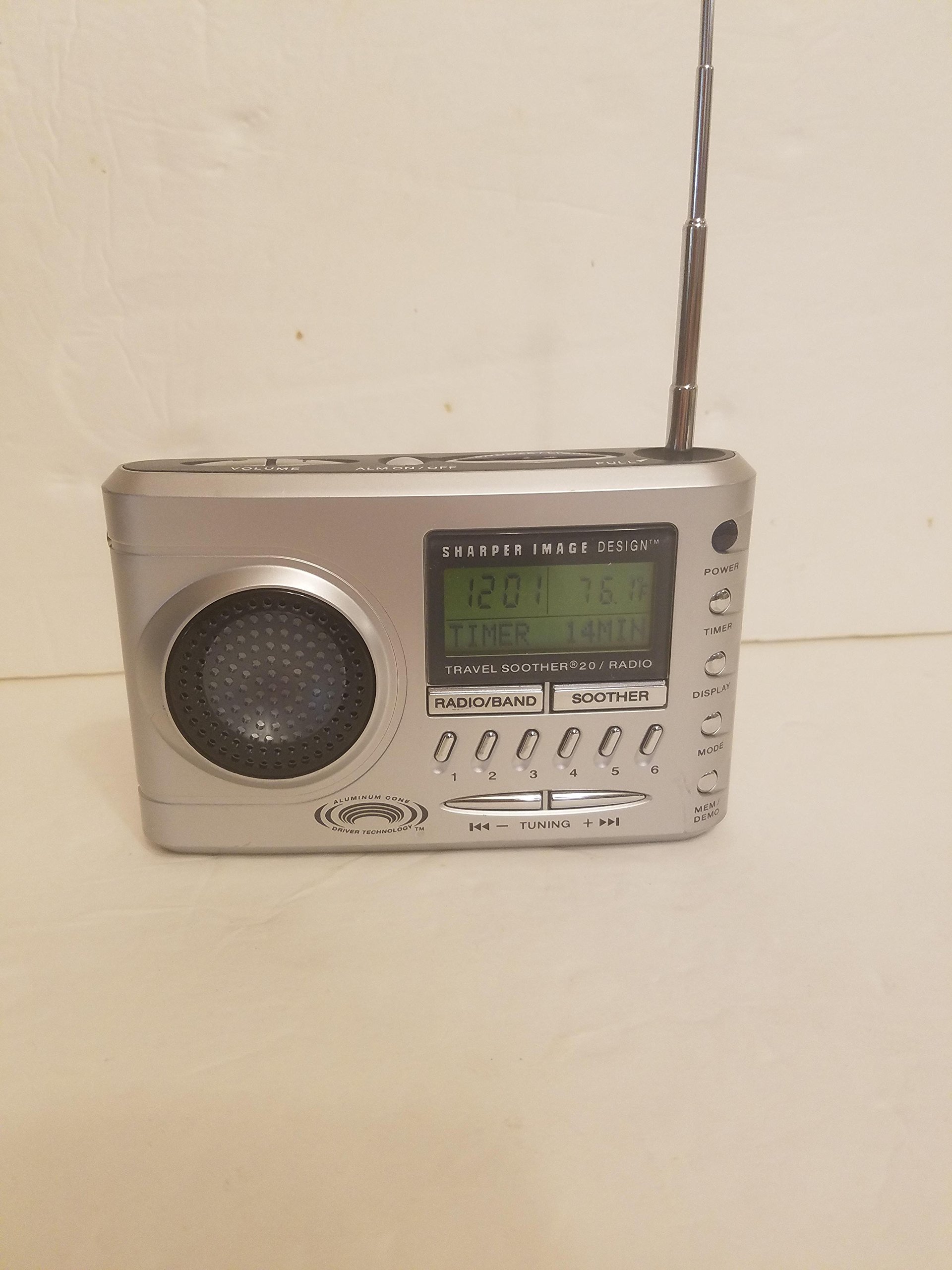
Imatge: Frontal view of the Sharper Image Travel Soother 20 Radio/Alarm Clock. This shows the display, speakers, and control buttons.
The back panel of the unit features the battery compartment, power input, and regulatory information. Specifically, it indicates the model number SI621, requires a DC 6V adapter, and uses four AA 1.5V batteries.
Configuració
Alimentació del dispositiu
Your Travel Soother 20 can be powered by either batteries or an AC adapter.
- Instal·lació de la bateria: Open the battery compartment on the back of the unit. Insert four (4) AA 1.5V batteries, ensuring correct polarity (+/-). Close the compartment securely.
- Connexió de l'adaptador de CA: Connect a DC 6V power adapter (not always included) to the DC IN jack on the back of the unit. Plug the adapter into a standard wall outlet.
Note: When both batteries and AC adapter are connected, the unit will primarily draw power from the AC adapter.
Establiment de l'hora
- Manteniu premut el botó HORA CONFIGURADA botó.
- Mentre aguanta HORA CONFIGURADA, utilitza el HORA i MINUT botons per ajustar l'hora actual.
- Allibera el HORA CONFIGURADA botó per confirmar.
Instruccions de funcionament
Operació de ràdio
- Premeu el botó RÀDIO botó per encendre la ràdio.
- Premeu AM/FM to select the desired band.
- Utilitza el TUNE +/- botons per sintonitzar manualment una emissora o manteniu premut per cercar automàticament la següent emissora disponible.
- To save a preset: Tune to the desired station, then press and hold a PRESET button (e.g., 1-5) until the display flashes.
- To recall a preset: Briefly press the corresponding PRESET botó.
Funcions del despertador
- Configuració de l'alarma: Manteniu premut el botó CONJUNT D'ALARMES button. While holding, use the HORA i MINUT buttons to set the alarm time. Release to confirm.
- Activació/desactivació de l'alarma: Premeu el botó ALARMA ON / OFF button to toggle the alarm. An alarm icon will appear on the display when active.
- Funció de posposar: Quan soni l'alarma, premeu el botó DORMITAR botó per silenciar-lo temporalment durant uns minuts.
- Aturar l'alarma: Premeu qualsevol botó que no sigui DORMITAR to stop the alarm for the day. It will reactivate the next day if still enabled.
Sound Soother Functions
- Premeu el botó SOOTHER button to activate the sound soother.
- Premeu el botó SOOTHER button repeatedly to cycle through available sound options (e.g., Rain, Thunderstorm, Summer Night, City).
- Utilitza el VOLUM +/- botons per ajustar el nivell de so.
- Premeu el botó SOOTHER button until the display shows 'OFF' to deactivate.
Manteniment
- Neteja: Netegeu la unitat amb un drap suau i sec. No utilitzeu productes de neteja abrasius ni dissolvents.
- Substitució de la bateria: Replace all four AA batteries simultaneously when the display dims or the unit malfunctions on battery power. Do not mix old and new batteries.
- Emmagatzematge: Si guardeu la unitat durant un període prolongat, traieu-ne les piles per evitar fuites.
Resolució de problemes
| Problema | Solució |
|---|---|
| La unitat no s'encén. | Check battery installation and polarity. Ensure AC adapter is securely connected and the outlet is functional. |
| Mala recepció de ràdio. | Extend the antenna fully. Reposition the unit for better signal. Try tuning manually. |
| L'alarma no sona. | Ensure the alarm is activated (alarm icon visible). Verify alarm time is set correctly. Check volume level. |
| Sound soother not working. | Ensure the sound soother is turned on and a sound is selected. Check volume level. |
Especificacions
- Model: SI621
- Entrada d'alimentació: DC 6V (adapter, not always included)
- Bateria: 4x AA 1.5V (UM-3)
- Dimensions del paquet: 6.4 x 6.3 x 3.7 polzades
- Pes de l'article: 15.7 unces
- ASIN: B00013891I
- Data de primera disponibilitat: 26 de febrer de 2010
Declaració de compliment de la FCC
AQUEST DISPOSITIU COMPLEIX LA PART 15 DE LES NORMES DE LA FCC. EL FUNCIONAMENT ESTÀ SUBJECTE A LES DUES CONDICIONS SEGÜENTS: (1) AQUEST DISPOSITIU POTS CAUSAR INTERFERÈNCIES NOCIOSES, I (2) AQUEST DISPOSITIU HA D'ACCEPTAR QUALSEVOL INTERFERÈNCIA REBADA, INCLOSANT LES INTERFERÈNCIES QUE POGUEN CAUSAR UN FUNCIONAMENT NO DESITJAT.
Garantia i Suport
For warranty information or technical support, please refer to the original product packaging or contact Sharper Image customer service. Keep your purchase receipt as proof of purchase.