
1. Introducció
This manual provides instructions for the setup, operation, maintenance, and troubleshooting of the InFocus LP540 Multimedia Video Projector. The LP540 is designed for presenting visual content with an XGA 1024x768 native resolution and 1700 ANSI lumens brightness. It features a zoom lens with manual focus and zoom adjustment, and includes a 2-watt speaker for audio output.
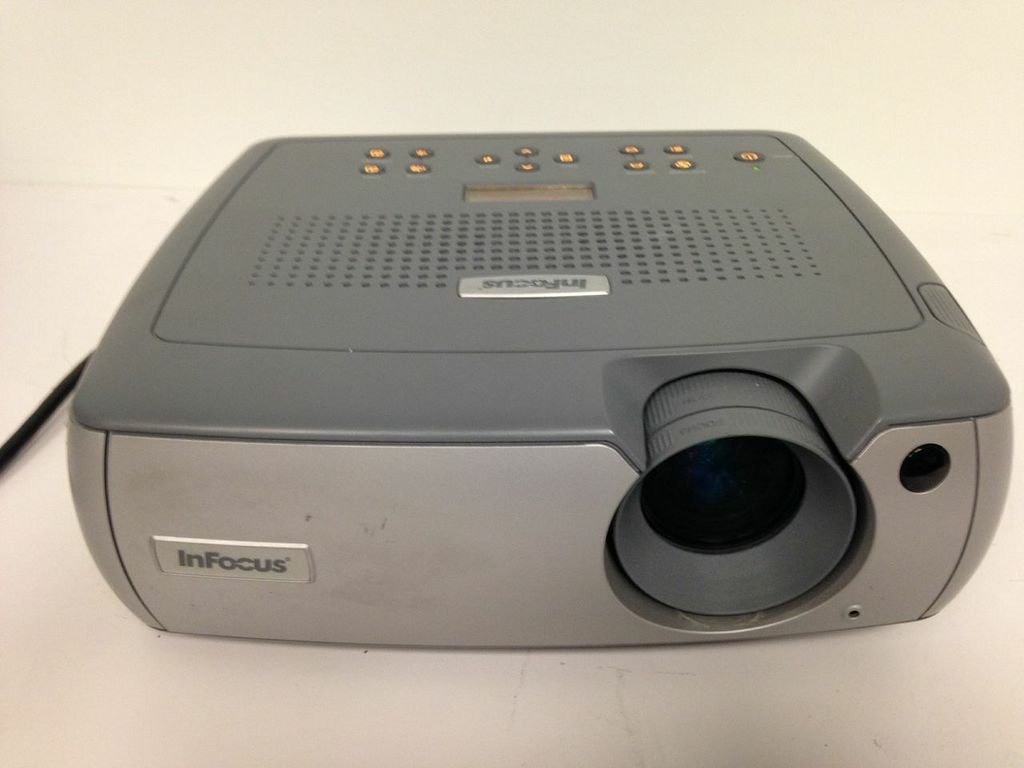
Figura 1: Part frontal view of the InFocus LP540 Projector, showing the lens and InFocus branding.
2. Configuració
2.1 Desembalatge i contingut
Carefully unpack the projector and verify that all components are present:
- InFocus LP540 Projector
- Navigator remote control
- Cable d'alimentació
- M1-A computer cable with USB mouse
- 3.5mm computer audio cable
- Cable d'àudio/vídeo RCA
- Corretges de cable codificades per colors
- Estoig de transport suau
- User's guide and CD
2.2 Col·locació del projector
The LP540 supports front, rear, and ceiling projection methods. For optimal image quality, place the projector on a stable, flat surface or mount it securely. Ensure adequate ventilation around the unit.
2.3 Connexió de potència
- Connecteu el cable d'alimentació a l'entrada de corrent del projector.
- Connecteu l'altre extrem del cable d'alimentació a una presa de corrent amb connexió a terra.
2.4 Connexió de fonts de vídeo i àudio
The LP540 offers various input ports for video and audio connections. Refer to Figure 2 for port locations.

Figure 2: Rear panel of the InFocus LP540 Projector, displaying monitor out, computer in, audio in, video in, and serial control ports.
- Computer Input: Use the M1-A computer cable to connect your computer to the 'computer 1' or 'computer in' port. The M1-A cable also supports USB mouse functionality.
- Entrada de vídeo: Connect video sources (e.g., DVD player, VCR) using the RCA audio/video cable to the 'video in' ports (yellow for video, red/white for audio).
- Entrada d'àudio: For separate audio input from a computer, use the 3.5mm computer audio cable to connect to the 'audio in' port.
- Serial Control: The 'serial control' port (RS-232) allows for external control of the projector.
- Sortida del monitor: The 'monitor out' port allows you to connect an external monitor to display the same image as the projector.
2.5 Ajust de la imatge
After connecting and powering on, adjust the image:
- Focus: Gireu l'anell d'enfocament de l'objectiu fins que la imatge sigui nítida i clara.
- Zoom: Adjust the zoom ring on the lens to achieve the desired image size. The projector can display images from 40 inches to 300 inches diagonally.
3. Funcionament del projector
3.1 Engegada/apagada
- Per encendre: Press the power button on the projector's control panel or the remote control. The power indicator light will illuminate.
- Per apagar: Press the power button again. The projector will enter a cooling cycle before completely shutting down. Do not unplug the projector during the cooling cycle.
3.2 Ús del comandament a distància
The included navigator remote control allows for convenient operation of the projector from a distance. It provides access to menu navigation, input selection, volume control, and other functions.
3.3 Selecció de la font d'entrada
Use the 'Input' button on the projector's control panel or remote control to cycle through available input sources (e.g., Computer 1, Video). The projector will automatically detect active signals.
3.4 Menú de visualització en pantalla (OSD)
Press the 'Menu' button on the projector or remote to access the On-Screen Display. Use the arrow keys to navigate and 'Enter' to select options. The OSD allows adjustment of various settings:
- Configuració de la imatge: Ajusta la brillantor, el contrast, el color, el to i la nitidesa.
- Configuració de la pantalla: Change aspect ratio, keystone correction, and projection method.
- Configuració d'àudio: Control volume and mute.
- Configuració avançada: Accés lamp timer, language, and other system options.
3.5 Sortida d'àudio
The projector features a built-in 2-watt speaker. Adjust the volume using the remote control or the OSD menu. Ensure external audio sources are properly connected to the 'audio in' ports.
3.6 Wireless Connectivity (Optional)
The LP540 supports wireless connectivity with a LiteShow module (sold separately). Refer to the LiteShow module's documentation for installation and setup instructions.
4. Manteniment
4.1 Lamp Care and Replacement
El projector lamp té una vida útil finita. Quan la lamp life is nearing its end, a warning message may appear, or the image brightness may decrease significantly. Replace the lamp with an authorized InFocus replacement lamp only. Refer to the full user manual on the included CD for detailed lamp instruccions de substitució.
4.2 Neteja de la lent
Use a soft, lint-free cloth specifically designed for optical lenses to gently clean the projector lens. Avoid using abrasive cleaners or excessive force, as this can scratch the lens surface.
4.3 Neteja dels filtres d'aire
Regularly clean the projector's air filters to ensure proper ventilation and prevent overheating. Dust and debris can accumulate, reducing cooling efficiency. Refer to the full user manual for filter location and cleaning procedures.
4.4 Neteja general
Wipe the projector's exterior casing amb un suau, damp cloth. Do not use harsh chemicals or solvents. Ensure the projector is powered off and unplugged before cleaning.
5. Solució De Problemes
This section addresses common issues you may encounter with the InFocus LP540 projector. For more detailed troubleshooting, consult the complete user manual.
- Sense energia:
- Ensure the power cord is securely connected to both the projector and a working electrical outlet.
- Check if the power indicator light is on. If not, try a different outlet.
- Sense imatge a la pantalla:
- Verify that the correct input source is selected (e.g., Computer 1, Video).
- Check all video cables for secure connections.
- Ensure the computer or video source is powered on and outputting a signal.
- Adjust the projector's brightness and contrast settings via the OSD menu.
- Poor Image Quality (Blurry, Distorted, Incorrect Colors):
- Ajusteu els anells d'enfocament i zoom de l'objectiu.
- Check the resolution settings on your computer to ensure they are compatible with the projector's native resolution (1024x768).
- Feu una correcció trapezoïdal si la imatge és trapezoïdal.
- Adjust color, tint, and sharpness settings in the OSD menu.
- Sense so:
- Ensure audio cables are securely connected to the 'audio in' port.
- Check the volume level on the projector and the audio source.
- Verify that the projector is not muted.
- El control remot no funciona:
- Reviseu i substituïu les piles del comandament a distància.
- Assegureu-vos que no hi hagi obstacles entre el comandament a distància i el receptor d'infrarojos del projector.
6. Especificacions
The following table details the technical specifications for the InFocus LP540 Multimedia Video Projector:
| Característica | Especificació |
|---|---|
| Marca | Enfoc |
| Nom del model | LP540 |
| Tipus de visualització | LCD |
| Resolució nativa | 1024 x 768 (XGA) |
| Brillantor | 1700 ANSI Lumens (max.) |
| Relació de contrast | 400:1 |
| Mida de la imatge (diagonal) | 40 polzades a 300 polzades |
| Tecnologia de connectivitat | USB |
| Connectivitat de maquinari | USB |
| Característica especial | Altaveus incorporats |
| Sortida d'àudio | Dos altaveus de 2 watts |
| Lamp Wattage | 170 watts |
| Wattage (Total) | 260 watts |
| Mètode de control | Remote, Keypad, RS-232 |
| Factor de forma | Portàtil |
| Tipus de muntatge | Muntatge de taula |
| Pes de l'article | 14.6 lliures |
| Certificació de proves externes | UL |
| UPC | 797212604897 |
7. Informació de la garantia
The InFocus LP540 Projector comes with a 2-year projector warranty. Please retain your proof of purchase for warranty claims. For specific terms and conditions, refer to the warranty documentation included with your product or contact InFocus customer support.
8. Suport
For further assistance, technical support, or service inquiries regarding your InFocus LP540 Multimedia Video Projector, please visit the official InFocus weblloc web o poseu-vos en contacte amb el seu departament d'atenció al client. Normalment, podeu trobar la informació de contacte al fabricant website or in the full user manual provided on the included CD.