
Introducció
This manual provides detailed instructions for the safe and effective use of your Pentax Optio S4i 4MP Digital Camera. Please read this manual thoroughly before using the camera and keep it in a safe place for future reference. The Pentax Optio S4i is a compact digital camera featuring a 4-megapixel sensor, 3x optical zoom, and a 1.8-inch LCD monitor, designed for capturing high-quality still images and video.
Configuració
1. Instal·lació i càrrega de la bateria
The Pentax Optio S4i uses a rechargeable Lithium-Ion battery. Ensure the battery is fully charged before first use.
- Obriu la tapa del compartiment de la bateria que es troba a la part inferior de la càmera.
- Insert the Lithium-Ion battery with the correct orientation, matching the polarity indicators.
- Tanqueu bé la tapa del compartiment de la bateria.
- Connect the camera to the provided charger or use the external charger to recharge the battery. The charging indicator will show the charging status.

Figura 1: A baix view of the camera, illustrating the battery and SD card compartment. This is where the Lithium-Ion battery is inserted and secured.
2. Instal·lació de la targeta de memòria
The camera has 10 MB of built-in memory. For extended storage, an optional Secure Digital (SD) memory card is recommended.
- Open the battery/memory card compartment cover on the bottom of the camera.
- Insert the SD card into the designated slot until it clicks into place. Ensure the card is inserted in the correct direction.
- Tanqueu la coberta del compartiment de manera segura.
3. Engegada inicial
To power on the camera, press the ON/OFF button located on the top panel.

Figura 2: A dalt view of the camera, highlighting the ON/OFF button. Press this button to power the camera on or off.
Instruccions de funcionament
1. Taking Still Pictures
The camera features a 4-megapixel sensor and a 3x optical zoom lens for capturing detailed images.
- Turn on the camera. The lens will extend.
- Select your desired shooting mode using the MODE button on the rear panel. The camera offers 21 shooting modes, including automatic exposure control.
- Enquadra la teva foto amb el monitor LCD de 1.8 polzades.
- Use the zoom lever to adjust the 3x optical zoom. The 4x digital zoom can further extend the magnification up to 12x combined.
- Premeu el botó de l'obturador fins a la meitat per enfocar i, a continuació, premeu-lo completament per capturar la imatge.

Figura 3: Davant view of the Pentax Optio S4i with its 3x optical zoom lens extended, ready for capturing images.
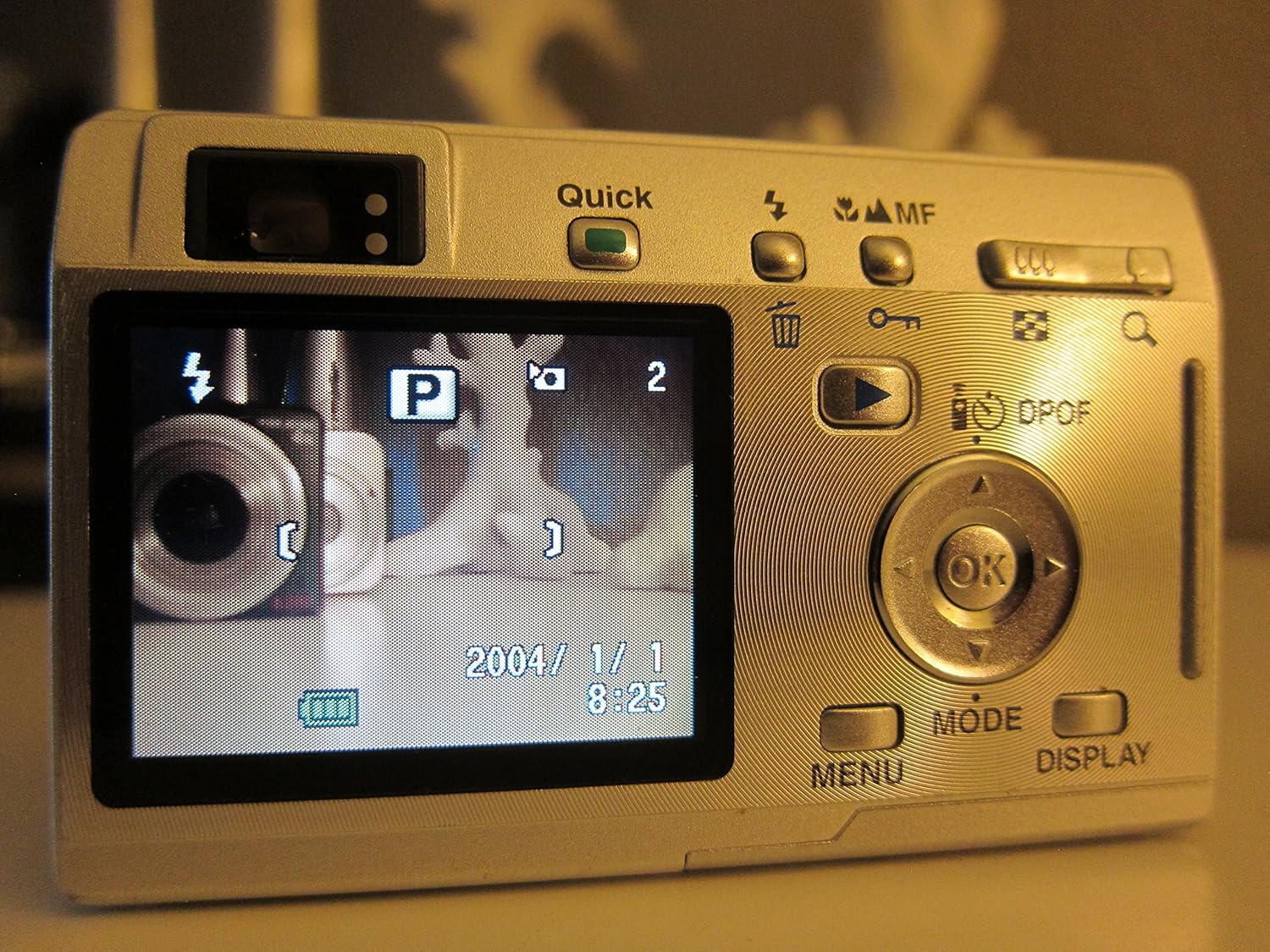
Figura 4: posterior view of the camera displaying the LCD screen in shooting mode, with various controls visible for mode selection and navigation.
2. Gravació de vídeos
The camera supports movie mode with sound, capturing video at 320 x 240 resolution at 15 frames per second.
- Switch to movie mode using the MODE button.
- Premeu el botó de l'obturador per començar a gravar.
- Torneu a prémer el botó de l'obturador per aturar la gravació.
3. Mode de reproducció
View your captured photos and videos on the 1.8-inch LCD screen.
- Press the Playback button (often indicated by a triangle icon) to enter playback mode.
- Feu servir el botó direccional per navegar per les imatges i els vídeos.
- Premeu el botó D'acord per view details or play videos.

Figura 5: posterior view of the camera with the LCD screen displaying an image in playback mode, showing navigation controls.
4. Connexió a un ordinador
Transfer your images and videos to a computer using the USB connection.
- Assegureu-vos que la càmera estigui apagada.
- Connect the camera to your computer using a compatible USB cable.
- Power on the camera. It should be recognized as a removable storage device.
- Transferència files as you would from any other external drive.
Manteniment
1. Neteja de la càmera
- Feu servir un drap suau i sec per netejar el cos de la càmera.
- Per a la lent i la pantalla LCD, feu servir un drap i una solució especials per netejar lents. Eviteu materials abrasius.
- Do not use organic solvents such as alcohol or paint thinner.
2. Cura de la bateria
- Traieu la bateria si la càmera no s'utilitzarà durant un període prolongat.
- Guardeu les piles en un lloc fresc i sec.
- Eviteu exposar les piles a temperatures extremes.
3. Emmagatzematge
- Guardeu la càmera en un entorn sec i sense pols.
- Use a protective case to prevent scratches and damage.
Resolució de problemes
- La càmera no s'encén: Assegureu-vos que la bateria estigui completament carregada i inserida correctament.
- Les imatges són borroses: Check that the lens is clean. Ensure the camera has focused correctly before taking the shot. Use appropriate shooting modes for different lighting conditions.
- Error de la targeta de memòria: Reinsert the memory card. If the issue persists, try a different compatible SD card. Ensure the card is not locked.
- Slow shot-to-shot performance: This camera may exhibit slower performance between shots, especially in certain modes or with larger image sizes. This is normal operation.
- No es pot connectar a l'ordinador: Verify the USB cable connection. Ensure the camera is powered on after connecting. Try a different USB port or cable.
Especificacions
| Característica | Especificació |
|---|---|
| Nom del model | Optio S4i |
| Resolució del sensor fotogràfic | 4 MP |
| Zoom òptic | 3x |
| Zoom digital | 4x (12x combinat) |
| Mida de la pantalla | 1.8 polzades |
| Tipus de sensor | CCD (1/2.5 polzades) |
| Estabilització d'imatge | Digital, Òptic |
| Admet File Format | JPEG, RAW |
| Resolució de vídeo | 320 x 240, 15 fps, audio |
| Velocitat d'obturació mínima | 4 segons |
| Velocitat màxima d'obturació | 1/2000 segons |
| Rang ISO ampliat | 50-400 |
| Mitjans d'emmagatzematge | SD/MMC card, 10 MB Internal |
| Tipus de bateria | Ió de liti (recarregable) |
| Connectivitat | USB |
| Pes de l'article | 0.26 lliures |
Garantia i Suport
For information regarding warranty coverage, technical support, or service, please refer to the official Pentax website or contact your local Pentax dealer. Specific warranty terms may vary by region and purchase date.
You can visit the official Pentax store for more information: Pentax Store