Introducció
This manual provides comprehensive instructions for the installation, operation, and maintenance of the HP DL489A Nvidia Quadro FX 1100 128MB DDR II SDRAM AGP 8x Graphics Card. Please read this manual thoroughly before installation and use to ensure proper functionality and to prevent damage.
Informació de seguretat
Observeu sempre les precaucions de seguretat següents:
- Ensure your computer is powered off and unplugged from the wall outlet before installing or removing the graphics card.
- Discharge any static electricity from your body by touching a grounded metal object before handling the card.
- Manegeu la targeta gràfica per les vores per evitar tocar els components sensibles.
- No exposeu la targeta a la humitat ni a temperatures extremes.
Configuració i instal·lació
Follow these steps to install the HP DL489A Nvidia Quadro FX 1100 graphics card into your computer system.
1. Prepareu el vostre sistema
- Power off your computer and disconnect all cables, including the power cord.
- Open the computer case. Refer to your computer's manual for specific instructions on how to open the case.
- Locate an available AGP 8x slot on your motherboard.
2. Install the Graphics Card
- Carefully align the graphics card with the AGP slot.
- Press down firmly and evenly on both ends of the card until it is securely seated in the slot. You may hear a click if your slot has a locking mechanism.
- Secure the card with a screw to the computer chassis, if applicable.
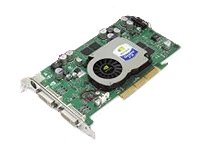
Image: The HP DL489A Nvidia Quadro FX 1100 Graphics Card. This image shows the physical card, highlighting its AGP connector and cooling solution, ready for installation into a compatible motherboard slot.
3. Close and Connect
- Tanqueu la caixa de l'ordinador.
- Reconnect all cables, including the power cord, monitor cables (DVI), and any peripherals.
- Enceneu l'ordinador.
4. Instal·lació del controlador
After the operating system loads, it may automatically detect the new hardware. If not, you will need to install the appropriate drivers. Drivers for the Nvidia Quadro FX 1100 can typically be found on the official Nvidia website or HP support weblloc. Seguiu les instruccions que apareixen a la pantalla que us proporciona l'instal·lador del controlador.
Funcionament de la targeta gràfica
Once installed and drivers are configured, the HP DL489A graphics card will manage your system's display output. It supports dual DVI-D monitors.
Configuració de la pantalla
To configure your display settings, including resolution, refresh rate, and multiple monitor setups:
- Windows: Right-click on the desktop and select "Display settings" or "NVIDIA Control Panel."
- Linux: Use your desktop environment's display settings utility or the NVIDIA X Server Settings application.
The card supports resolutions up to 1920x1200 per DVI output.
Manteniment
Un manteniment adequat garanteix la longevitat i el rendiment òptim de la targeta gràfica.
- Eliminació de pols: Obriu periòdicament la carcassa de l'ordinador i netegeu suaument la pols del dissipador de calor i del ventilador de la targeta gràfica amb aire comprimit. Assegureu-vos que el ventilador no giri ràpidament durant la neteja.
- Actualitzacions de controladors: Keep your graphics drivers updated. Check the official Nvidia or HP websites for the latest compatible drivers.
- Monitorització de la temperatura: Monitor the card's temperature, especially during heavy use, using system monitoring software. Ensure adequate airflow within your computer case.
Resolució de problemes
Aquesta secció tracta problemes comuns que podeu trobar.
Sense sortida de visualització
- Ensure the monitor cables are securely connected to both the graphics card and the monitor.
- Verifiqueu que el monitor estigui encès i configurat a la font d'entrada correcta.
- Check if the graphics card is fully seated in the AGP slot.
- Try connecting the monitor to the motherboard's integrated graphics (if available) to rule out other system issues.
Driver Installation Issues
- Download drivers only from official Nvidia or HP support webllocs.
- Ensure you are downloading the correct drivers for your operating system and the Quadro FX 1100.
- Uninstall any previous graphics drivers before attempting a new installation.
Inestabilitat o bloquejos del sistema
- Ensure your power supply unit (PSU) meets the minimum requirements for your system, including the graphics card.
- Check for overheating. Clean dust from the card's fan and heatsink.
- Verify that the graphics drivers are up to date and correctly installed.
Especificacions
Key technical specifications for the HP DL489A Nvidia Quadro FX 1100 Graphics Card:
| Característica | Detall |
|---|---|
| Número de model | DL489A |
| Processador gràfic | Nvidia Quadro FX 1100 |
| Mida de la memòria | 128 MB |
| Tipus de memòria | DDR II SDRAM |
| Interfície | AGP 8x |
| Ports de sortida | Dual DVI-D |
| Dimensions del producte | 12 x 9 x 3 polzades |
| Pes de l'article | 2 lliures |
Garantia i Suport
For warranty information and technical support, please refer to the documentation provided with your original computer system or contact Hewlett Packard customer support directly. Specific warranty terms may vary based on region and purchase date.
Suport d'HP Weblloc: https://www.hp.com/support