1. Introducció
This manual provides comprehensive instructions for the safe and efficient use of your InFocus X2 Multimedia DLP Projector. Please read this manual thoroughly before operating the projector and retain it for future reference. The InFocus X2 is designed for versatile use, suitable for both business presentations and home entertainment.
2. Producte acabatview
The InFocus X2 is a Digital Light Processing (DLP) projector featuring an 800x600 native resolution. It offers a bright display with up to 1500 ANSI lumens and a 2000:1 contrast ratio, ensuring clear and vibrant images. The projector includes a manual zoom and focus lens for image adjustment and a built-in 2.5-watt speaker for audio output.

Figura 2.1: Frontal esquerre view of the InFocus X2 Projector with the lens cap removed, showing the main lens and ventilation.
Característiques principals:
- Digital Light Processing (DLP) technology for consistent image quality.
- Native 800x600 (SVGA) resolution, compatible with resolutions up to XGA (1024x768).
- Up to 1500 ANSI lumens brightness.
- 2000:1 contrast ratio for sharp image detail.
- Manual zoom and focus lens (1.2x magnification).
- Multiple input options for computers, video sources, and audio.
- Integrated 2.5-watt speaker.
- Supports front, rear, and ceiling projection methods.
3. Configuració
3.1 Desembalatge i col·locació
Carefully remove the projector and all accessories from the packaging. Place the projector on a stable, flat surface or mount it securely according to the chosen projection method (front, rear, or ceiling). Ensure adequate ventilation around the projector.
3.2 Connexió del projector
The connection panel is located at the rear of the unit. All inputs are color-coded for ease of connection.

Figura 3.1: posterior view of the InFocus X2 Projector, highlighting the various input ports for computer, video, and audio connections.
- Computer Input: Connect your computer using the provided computer cable to the M1-DA port (which supports RGB, DVI, and HDTV signals) or the VGA port.
- Entrades de vídeo: For video sources, use the S-video port or the composite video jack.
- Entrades d'àudio: Connect audio sources to the stereo RCA audio inputs.
- Potència: Connect the power cord to the projector's power inlet and then to a suitable electrical outlet.
3.3 Engegada/apagada
- Per encendre: Press the power button on the projector's control panel or the remote control. The power indicator light will illuminate.
- Per apagar: Press the power button again. The projector will enter a cooling cycle before completely shutting down. Do not unplug the projector during the cooling cycle.
4. Funcionament
4.1 Tauler de control
The intuitive keypad on the top of the projector allows for easy navigation and control of various functions.
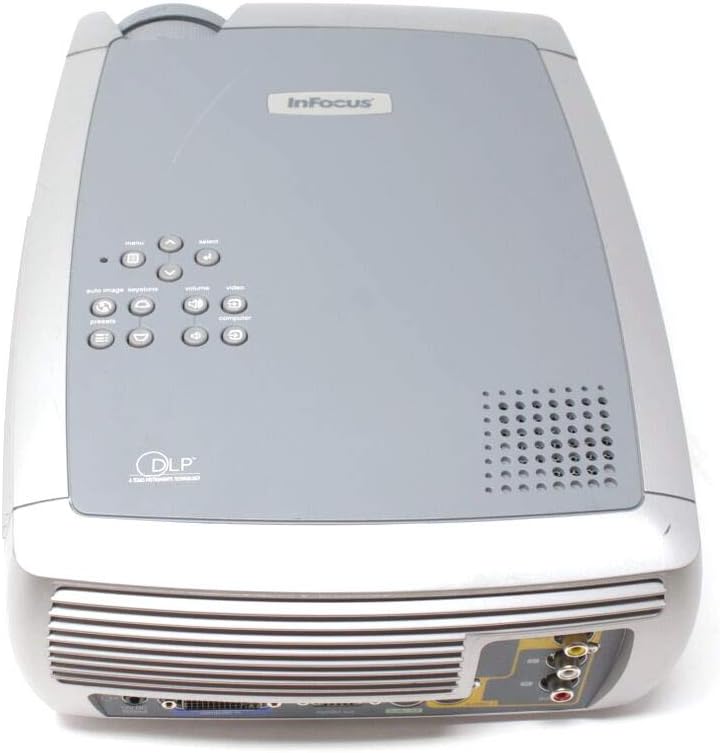
Figura 4.1: superior view of the InFocus X2 Projector, displaying the control panel with buttons for menu navigation, input selection, and image adjustments.
4.2 Ajust de la imatge
- Focus: Gireu l'anell d'enfocament de la lent del projector fins que la imatge sigui nítida i clara.
- Zoom: Ajusteu l'anell de zoom de la lent del projector per canviar la mida de la imatge.
- Correcció Keystone: Use the keystone correction function (accessible via the menu) to square the image if the projector is not perfectly perpendicular to the screen.
4.3 Selecció d'entrada
Use the 'Input' button on the control panel or remote control to cycle through available input sources (Computer, S-Video, Composite Video).
4.4 Ús del comandament a distància
The included wireless Navigator remote control provides full functionality for operating the projector from a distance. Refer to the remote control's specific instructions for detailed button functions.
5. Manteniment
5.1 Lamp Substitució
El projector lamp has an estimated life of up to 3,000 hours in low-power mode. When the lamp needs replacement, a warning indicator will appear. Always allow the projector to cool down for at least 30 minutes before attempting to open the lamp door or replace the lamp.

Figura 5.1: A baix view of the InFocus X2 Projector, showing the warning labels and the location of the lamp access panel. Refer to this area for lamp procediments de substitució.
WARNING: To replace the lamp, allow 30 minutes before opening the lamp door. Refer to instructions in the User's Guide to replace the lamp.
5.2 Neteja
- Lent: Use a soft, lint-free cloth and a lens cleaning solution specifically designed for optical surfaces.
- Exterior: Netegeu l'exterior del projector amb un drap suau iamp tela. No utilitzeu netejadors abrasius ni dissolvents.
- Vendes d'aire: Ensure air vents are clear of dust and obstructions to prevent overheating. Use compressed air to gently clean the vents if necessary.
6. Solució De Problemes
If you encounter issues with your InFocus X2 projector, refer to the following common problems and solutions:
| Problema | Causa possible | Solució |
|---|---|---|
| No hi ha imatge a la pantalla | Incorrect input selected; loose cable connection; projector not powered on. | Verify input source; check all cable connections; ensure projector is powered on. |
| La imatge és borrosa | Lent desenfocada. | Ajusteu l'anell de focus de la lent del projector. |
| La imatge és trapezoïdal | Projector no perpendicular a la pantalla. | Use keystone correction feature in the projector menu. |
| El projector s'sobreescalfa i s'apaga | Blocked air vents; excessive ambient temperature. | Clear air vents; ensure proper ventilation; operate in a cooler environment. |
| Sense àudio | Audio cables not connected; volume too low; incorrect audio input selected. | Connect audio cables; increase volume; select correct audio input. |
Si el problema persisteix després d'intentar aquestes solucions, poseu-vos en contacte amb l'atenció al client.
7. Especificacions
| Característica | Especificació |
|---|---|
| Tecnologia de visualització | DLP (Processament digital de la llum) |
| Resolució nativa | 800 x 600 (SVGA) |
| Brillantor | 1500 lúmens ANSI (màx.) |
| Relació de contrast | 2000:1 |
| Lamp La vida | Up to 3,000 hours (low power mode) |
| Relació d'aspecte | 4:3 (nadiu) |
| Mida de la imatge (diagonal) | 31" a 258" |
| Mètodes de projecció | Davant, darrere, sostre |
| Altaveu incorporat | 2.5-watt mono |
| Entrades | M1-DA (Computer RGB, DVI, HDTV), S-Video, Composite Video, Stereo RCA Audio |
| Dimensions del producte | 12.87 x 9.8 x 4.17 polzades |
| Pes de l'article | 12.39 lliures |
8. Què hi ha a la caixa
The InFocus X2 Multimedia DLP Projector package typically includes:
- InFocus X2 Projector
- Lent Cap
- Wireless Navigator Remote Control (with batteries)
- Cable de l’ordinador
- RCA Video and Audio Cable
- Cable d'alimentació
- Projector System CD (with multi-language user guide)
- Targeta d'inici ràpid
- Guia de l'usuari impresa
9. Garantia i Suport
For warranty information and technical support, please refer to the documentation included with your product or visit the official InFocus weblloc web. Conserveu el rebut de compra com a comprovant de compra per a reclamacions de garantia.