
Introducció
This manual provides detailed instructions for the setup, operation, and maintenance of your Pentax Optio MX4 Digital Camera. The Optio MX4 is a versatile 4.0-megapixel digital camera equipped with a powerful 10x optical zoom lens and a 1.8-inch swiveling LCD monitor, designed for capturing both high-quality still images and MPEG-4 video.
Please read this manual thoroughly before using your camera to ensure proper handling and to maximize its features.
Què hi ha a la caixa
Verify that all the following items are included with your Pentax Optio MX4 camera:
- Pentax Optio MX4 Camera
- CR-V3 Lithium Battery
- Lens Cap O-LC37
- Corretja (O-ST17)
- USB Cable (I-USB17)
- AV Cable (I-AVC7)
- CD-ROM de programari
- Manual de funcionament (aquest document)
- Serial Number Card
- Service Network Directory
Configuració
1. Instal·lació de la bateria
The Pentax Optio MX4 uses a CR-V3 Lithium Battery. Ensure the battery is inserted with the correct polarity as indicated inside the battery compartment.
- Locate the battery compartment door on the camera body.
- Slide the latch to open the compartment door.
- Insert the CR-V3 battery, aligning the positive (+) and negative (-) terminals correctly.
- Close the compartment door securely until it clicks into place.

Figura 1: lateral view de la càmera, que il·lustra la ubicació del compartiment de la bateria i de la targeta de memòria.
2. Instal·lació de la targeta de memòria
The camera supports SD memory cards (not included). A memory card is required to store photos and videos.
- Open the battery compartment door (as described above). The memory card slot is typically located adjacent to the battery.
- Insert the SD card into the slot with the label facing the correct direction, usually towards the front of the camera. Push gently until it clicks into place.
- Tanqueu la porta del compartiment de manera segura.
3. Attaching the Strap and Lens Cap
Attach the provided strap to prevent accidental drops. Secure the lens cap to protect the lens when not in use.
- Thread the camera strap through the strap lug on the camera body.
- Attach the lens cap to the lens using its tether, if available, or place it directly on the lens when the camera is off.
Instruccions de funcionament
1. Encès / apagat
Press the power button, usually located on the top or side of the camera, to turn the camera on or off. The lens will extend upon power-on.

Figura 2: De dalt a baix view highlighting the camera's controls, including the power button and mode dial.
2. Ús del monitor LCD i Viewcercador
The camera features a 1.8-inch swiveling LCD monitor for composing shots and reviewing images. An optical viewfinder is also available for traditional framing.
- Monitor LCD: Rotate the LCD monitor to your desired angle for comfortable shooting from various perspectives. Its low-glare control mechanism improves visibility in direct sunlight.
- Òptic Viewcercador: For situations where the LCD is difficult to see or to conserve battery, use the optical viewcercador.
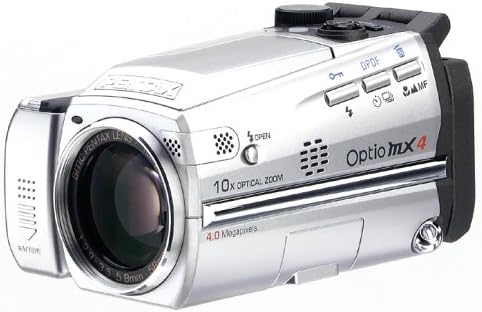
Figure 3: The Pentax Optio MX4 with its LCD monitor articulated upwards, demonstrating its swiveling capability.
3. Selecting Shooting Modes
Use the mode dial to select from various shooting modes:
- Mode d'imatge: Standard automatic shooting.
- Mode de programa: Camera sets aperture and shutter speed, but allows other adjustments.
- Prioritat de l'obturador: Tu ajustes la velocitat d'obturació, la càmera ajusta l'obertura.
- Prioritat d'obertura: Tu ajustes l'obertura del diafragma, la càmera ajusta la velocitat d'obturació.
- Mode manual: Full control over both aperture and shutter speed.
- Enregistrament de veu: Per a l'enregistrament d'àudio.
- Modes d'imatge: Includes Landscape, Flower, Portrait, Self-Portrait, Surf & Snow, Sunset, Night Scene, Soft, Illustration, and Panorama Assist for specific scene optimization.
4. Focusing and Zooming
- Enfocament automàtic: The camera uses a TTL contrast detection autofocus system with 5-point wide-focus, spot focus, and infinity landscape mode. Half-press the shutter button to engage autofocus.
- Enfocament manual: For precise control, switch to manual focus mode.
- Zoom: Use the zoom lever to adjust the 10x optical zoom (38mm-380mm equivalent). The camera also features 10x digital zoom.
- Supermacro: Capture subjects from as close as 0mm (up to 5.9 inches) for detailed close-up shots.

Figure 4: The Pentax Optio MX4 demonstrating its lens capabilities, potentially with an accessory lens attached.
5. Movie Recording
The Optio MX4 can record enhanced MPEG-4 video at 30 frames per second in VGA (640x480 pixels) resolution.
- Select the movie recording mode using the mode dial.
- Premeu el botó de l'obturador per iniciar la gravació. Torneu a prémer-lo per aturar-lo.
- Recorded videos are saved in MPEG-4 format.
6. Image Playback and Management
Switch to playback mode to review your photos and videos. You can delete unwanted files o view slideshows.
7. Connecting to a Computer and Printing
- Connexió USB: Use the supplied USB 2.0 cable (I-USB17) to connect the camera to your computer for rapid image download.
- Programari: The included software CD-ROM contains applications like ACDSee for Windows and Mac, and ACD ShowTime for movie editing.
- Impressió directa: The camera supports PictBridge and Epson Print Image Matching II technology for direct printing to compatible printers.
Manteniment
- Neteja del cos de la càmera: Feu servir un drap suau i sec per netejar el cos de la càmera. Per a la brutícia persistent, fregueu lleugeramentampRenta el drap amb aigua. Evita l'ús de dissolvents orgànics.
- Cleaning the Lens and LCD: Use a lens brush or a soft, clean microfiber cloth specifically designed for optical surfaces. Do not use abrasive materials.
- Cura de la bateria: Traieu la bateria si no heu d'utilitzar la càmera durant un període prolongat. Guardeu les bateries en un lloc fresc i sec.
- Emmagatzematge: Store the camera in a dry, well-ventilated area, away from direct sunlight, high temperatures, and humidity.
Resolució de problemes
| Problema | Solució |
|---|---|
| La càmera no s'encén. |
|
| Les imatges són borroses. |
|
| Error de la targeta de memòria. |
|
| El flaix no es dispara. |
|
Especificacions
| Característica | Detall |
|---|---|
| Nom del model | Optio MX4 |
| Resolució del sensor fotogràfic | 4 MP |
| Tecnologia del sensor fotogràfic | CCD |
| Zoom òptic | 10x |
| Zoom digital | 10x |
| Distància focal màxima | 370 mm |
| Distància focal mínima | 37 mm |
| Mida de la pantalla | 1.8 polzades |
| Resolució de vídeo | 640 x 480 (VGA) a 30 fps |
| Format de captura de vídeo | MPEG-4 |
| Estabilització d'imatge | Digital, Òptic |
| Admet File Format | JPEG |
| Tipus de memòria flash | Targeta SD/MMC |
| Tipus de bateria | CR-V3 Lithium |
| Tecnologia de connectivitat | USB 2.0 |
| Control de l'exposició | Program, Aperture Priority, Shutter Priority, Manual |
| Enfocament automàtic | TTL Contrast Detection (5-point wide-focus, spot focus, infinity) |
| Pes de l'article | 0.83 lliures |
| Número de model | OPTIO-MX4 (Manufacturer Part Number: 18037) |
| UPC | 027075086692 |
Garantia i Suport
For detailed warranty information, technical support, and service inquiries, please refer to the warranty card included with your product or visit the official Pentax weblloc.
Podeu trobar més informació i recursos de suport a Pentax Store on Amazon.