
Introducció
This manual provides essential information for the safe and efficient use of your ONKYO INTEC205 C-705FX CD Player. Please read it thoroughly before operating the unit and keep it for future reference.
The ONKYO INTEC205 C-705FX CD Player is designed for superior sound quality, incorporating advanced audio technologies. It features patented VLSC (Vector Linear Shaping Circuitry) to completely eliminate digital noise during D/A conversion, ensuring pure audio reproduction. The unit also utilizes a 192kHz/24bit Advanced Multi-bit DAC (Cirrus Logic CS4398) to faithfully convert digital signals to analog, preserving subtle musical nuances with an excellent signal-to-noise ratio. Furthermore, the "Direct Digital Pass" system uses high-purity cables for digital audio output, preventing noise interference and contributing to clear sound reproduction.
Precaucions de seguretat
- No exposeu la unitat a la pluja o la humitat.
- No obriu la c.asing; demaneu totes les tasques de manteniment a personal qualificat.
- Assegureu-vos una ventilació adequada per evitar el sobreescalfament.
- Eviteu col·locar la unitat a prop de fonts de calor o sota la llum solar directa.
- Utilitzeu només la font d'alimentació especificada.
Contingut del paquet
Verifiqueu que tots els elements siguin presents al paquet:
- ONKYO INTEC205 C-705FX CD Player Unit
- Cable d'alimentació
- Comandament a distància (si està inclòs)
- RCA Audio Cable (if included)
- Manual d'instruccions (aquest document)
Configuració
1. Col·locació
Place the CD player on a stable, level surface away from direct sunlight, heat sources, and excessive dust or vibration. Ensure adequate space around the unit for ventilation.
2. Connexions
Connect the CD player to your amplifier or receiver using appropriate audio cables.
- Connexió d'àudio analògica: Use an RCA audio cable to connect the ANALOG OUT jacks on the CD player to the CD IN or AUX IN jacks on your amplifier. Match the red plug to the right channel (R) and the white plug to the left channel (L).
- Digital Audio Connection (Optional): For digital audio output, use either a digital coaxial cable or an optical digital cable.
- Coaxial: Connect the DIGITAL OUT (COAXIAL) jack on the CD player to the COAXIAL DIGITAL IN jack on your ampmés viu.
- Òptic: Connect the DIGITAL OUT (OPTICAL) jack on the CD player to the OPTICAL DIGITAL IN jack on your ampmés viu.
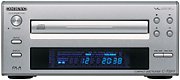 Imatge: Frontal view of the ONKYO INTEC205 C-705FX CD Player, showing the disc tray, display, and control buttons. This image illustrates the general appearance of the unit.
3. Connexió d'alimentació
After all audio connections are made, plug the power cord into the AC INlet on the rear of the CD player, then plug the other end into a suitable wall outlet.
Instruccions de funcionament
1. Càrrega d'un CD
- Premeu el botó PODER per engegar la unitat.
- Premeu el botó OBRIR/TANCAR botó per obrir la safata del disc.
- Place a CD with the label side facing up into the disc tray.
- Premeu el botó OBRIR/TANCAR button again to close the disc tray. The unit will read the disc.
2. Reproducció bàsica
- REPRODUIR (►): Premeu per iniciar la reproducció.
- PAUSE (‖): Press to temporarily stop playback. Press again to resume.
- ATURAR (■): Premeu per aturar la reproducció.
- SKIP (►►| / |◄◄): Press to skip to the next track or return to the beginning of the current track. Press twice to go to the previous track.
- Avançar/rebobinar ràpid: Hold down the SKIP buttons during playback to fast forward or rewind through the track.
3. Controls del tauler frontal
The front panel includes buttons for Power, Open/Close, Play, Pause, Stop, and Skip. The display shows track number, elapsed time, and other playback information.
4. Remote Control (if applicable)
If your unit came with a remote control, refer to its specific instructions for advanced functions such as programming, repeat play, and random play.
Manteniment
1. Neteja de la unitat
Wipe the exterior of the unit with a soft, dry cloth. Do not use abrasive cleaners, waxes, or solvents as they may damage the finish. Never spray cleaning liquids directly onto the unit.
2. Manipulació de discs
- Manipuleu els discs per les vores per evitar que deixeu empremtes dactilars a la superfície de reproducció.
- Keep discs clean. Wipe them with a soft, lint-free cloth from the center outwards.
- Guardeu els discs en les seves fundes per protegir-los de la pols i les ratllades.
- Do not expose discs to direct sunlight or high temperatures.
Resolució de problemes
If you experience problems with your CD player, consult the following table before seeking professional service.
| Problema | Causa possible | Solució |
|---|---|---|
| Sense poder | Cable d'alimentació no connectat correctament. | Comproveu la connexió del cable d'alimentació a la unitat i a la presa de corrent. |
| Sense so | Audio cables not connected correctly; Amplifier input not selected. | Verify audio cable connections. Select the correct input on your ampmés viu. |
| Disc does not play / Skipping | Disc is dirty or scratched; Disc inserted incorrectly; Unit needs warm-up time. | Clean the disc. Insert the disc with the label side up. Allow the unit to warm up for a few minutes before playing. |
| Disc tray opens/closes too quickly | Sensitive tray mechanism. | This can be a characteristic of the unit. Ensure the disc is placed quickly and correctly. |
| LCD display not lighting up | Internal connection issue or display malfunction. | If the unit otherwise functions, this may indicate a display panel issue. Contact customer support. |
Especificacions
| Característica | Detall |
|---|---|
| Marca | Onkyo |
| Número de model | C-705FX |
| Color | Plata |
| Pes de l'article | Aproximadament 2821 grams |
| Dispositius compatibles | altaveus, Ampaixecadors |
| Conector d'auriculars | Jack de 3.5 mm |
| Tecnologies clau | VLSC (Vector Linear Shaping Circuitry), 192kHz/24bit Advanced Multi-bit DAC (Cirrus Logic CS4398), Direct Digital Pass |
| Playback Type | Només reproducció |
Garantia i Suport
For warranty information and customer support, please refer to the official Onkyo website or contact your local Onkyo dealer. Keep your purchase receipt as proof of purchase for warranty claims.