
1. Introducció
The Antec HCG750 Gold is a 750-watt, 80 PLUS Gold certified, fully modular power supply designed for personal computer systems. It features 100% Japanese capacitors for stability, a 120mm Fluid Dynamic Bearing (FDB) fan for quiet and efficient cooling, and a comprehensive suite of industrial-grade protections to ensure reliable power delivery.
This manual provides detailed instructions for the installation, operation, and maintenance of your Antec HCG750 Gold power supply. Please read this manual thoroughly before installation and retain it for future reference.
2. Informació de seguretat
ADVERTIMENT: Vol. Alttage is present inside the power supply unit. Do not open the PSU casing. No hi ha peces que l'usuari pugui reparar a l'interior. Obrint la casing anul·larà la garantia.
- Assegureu-vos que l'alimentació estigui desconnectada de la presa de corrent altern abans de la instal·lació o la manipulació.
- Instal·leu la font d'alimentació en una zona ben ventilada.
- This product is designed for use in personal computer systems only. Using it for other applications may cause damage and will void the warranty.
- Do not expose the power supply to moisture or extreme temperatures.
- Professional installation is recommended if you are unfamiliar with computer hardware installation.
3. Contingut del paquet
Verifiqueu que tots els components siguin presents al vostre paquet:
- Antec HCG750 Gold Power Supply Unit
- Modular Cable Set (including MB 24-pin, EPS 8-pin, PCI-E 6+2 pin, SATA, Molex, FDD)
- Cable d'alimentació CA
- Cargols de muntatge
- Manual d'usuari (aquest document)

This image displays the Antec HCG750 Gold power supply unit alongside all the modular cables provided in the package. The cables are neatly bundled, ready for connection to your system components.
4. Configuració i instal·lació
4.1 Llista de comprovació prèvia a la instal·lació
- Ensure your computer case supports ATX12V power supplies.
- Reuneix les eines necessàries: tornavís Phillips.
- Desendolleu l'ordinador de la presa de corrent i descarregueu la bateria restant prement el botó d'engegada durant uns segons.
4.2 Instal·lació física
- Locate the power supply mounting area in your computer case, typically at the bottom or top rear.
- Carefully slide the Antec HCG750 Gold power supply into the designated bay.
- Secure the power supply to the case using the provided mounting screws. Ensure the fan faces the correct direction for optimal airflow (usually downwards if there's a vent, or upwards if the case has no bottom vent).

Aquesta imatge proporciona una clara view of the Antec HCG750 Gold power supply from the front and side, highlighting its modular cable connections and overall form factor, which is important for case compatibility.
4.3 Connexions de cable
The HCG750 Gold is a fully modular power supply, allowing you to connect only the cables your system requires. This helps improve airflow and reduce cable clutter.

This image shows a close-up of the modular cable ports on the power supply. Each port is clearly labeled for its intended connection type (M/B, PCI-E/CPU, SATA/Molex), simplifying the cable management process.
- 24-pin Motherboard Cable: Connect the 24-pin cable to the corresponding port on your motherboard and the PSU.
- EPS/CPU 8-pin Cable(s): Connect the 8-pin (4+4 pin) EPS/CPU cable(s) to your motherboard's CPU power connector(s) and the PSU. Modern motherboards may require one or two 8-pin connectors.
- PCI-E 6+2 pin Cable(s): Connect the 6+2 pin PCI-E cable(s) to your graphics card(s) and the PSU. Ensure all required power connectors on your graphics card are utilized.
- Cables SATA: Connecteu els cables d'alimentació SATA a les unitats d'emmagatzematge (SSD, HDD) i a les unitats òptiques.
- Cables Molex: Connect Molex cables to any peripherals that require them (e.g., older fans, fan controllers).
- FDD Cable (Optional): If your system requires a floppy disk drive power connector, use the FDD adapter.
Route cables neatly within your case to optimize airflow and aesthetics.
4.4 Encès inicial
- After all connections are secure, connect the AC power cord to the power supply and then to a wall outlet.
- Flip the main power switch on the back of the power supply to the "ON" (I) position.
- Power on your computer system.
5. Instruccions de funcionament
5.1 Hybrid Mode Operation
This image displays the rear of the power supply, featuring the AC power input, the main ON/OFF switch, and a small toggle switch labeled "HYBRID MODE".
The Antec HCG750 Gold features a Mode híbrid, controlled by a switch on the rear panel. This mode allows the 120mm FDB fan to remain off at low loads, providing absolute silence during light computing tasks. The fan will automatically activate when the power supply load increases to maintain optimal cooling.
- Hybrid Mode ON: The fan will not spin until a certain load or temperature threshold is reached, ensuring silent operation at low power consumption.
- Hybrid Mode OFF: The fan will spin continuously, adjusting its speed based on load and temperature. This provides consistent airflow through the PSU.
Choose the mode that best suits your preference for noise levels and cooling performance.
6. Manteniment
6.1 Neteja
- Regularly clean the exterior of the power supply and the fan intake/exhaust vents to prevent dust buildup.
- Use compressed air to gently remove dust from the fan blades and heatsinks. Ensure the system is powered off and unplugged before cleaning.
- Do not use liquid cleaners directly on the power supply.
6.2 Fan Inspection
- Periodically check the fan for any obstructions or unusual noises.
- If the fan is making excessive noise or not spinning when it should (outside of Hybrid Mode's silent operation), consult the troubleshooting section or contact support.
7. Solució De Problemes
If you encounter issues with your Antec HCG750 Gold power supply, refer to the following common problems and solutions:
| Problema | Causa possible | Solució |
|---|---|---|
| El sistema no s'encén. |
|
|
| El sistema s'encén però s'apaga immediatament. |
|
|
| Fan is not spinning (in Hybrid Mode OFF). |
|
|
Per obtenir més ajuda, consulteu la secció Garantia i assistència.
8. Especificacions
Detailed technical specifications for the Antec HCG750 Gold Power Supply:
| Nom del model | HCG Gold 750 |
| Marca | Antec |
| Potència de sortidatage | 750 watts |
| Certificació 80 PLUS | Or |
| Factor de forma | ATX12V |
| Disseny de fonts d'alimentació | Completament Modular |
| Mètode de refrigeració | Aire (ventilador FDB de 120 mm) |
| Entrada Voltage Rang | 100-240 VAC |
| PFC | Active PFC (>0.9 typical) |
| Condensadors | Condensadors 100% japonesos |
| Proteccions | OCP/OVP/UVP/SCP/OPP/OTP/SIP/NLO (CircuitShield) |
| Dimensions (L x A x A) | 5.91 x 5.51 x 3.39 polzades (150 x 140 x 86 mm) |
| Pes | 4.7 lliures (2.11 kg) |
| Connectors | 1x MB 24(20+4) pin, 2x 8(4+4) pin EPS 12V, 4x 8(6+2) pin PCI-E, 8x SATA, 3x Molex, 1x FDD |

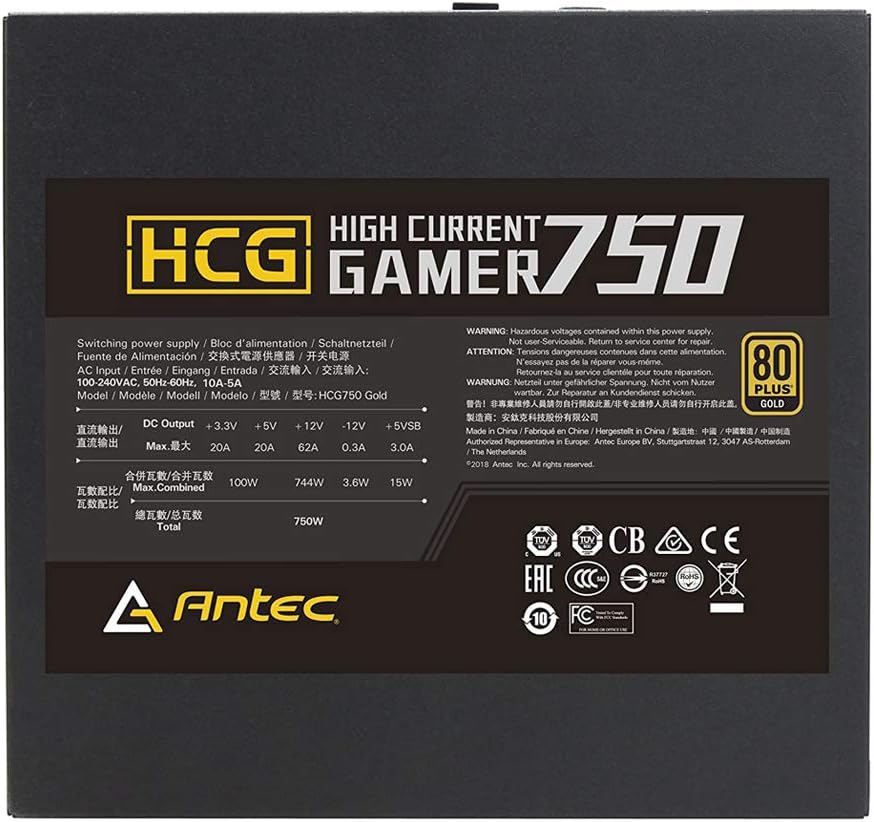
This image shows the product label affixed to the power supply, which lists critical electrical specifications such as DC output voltages, maximum current for each rail, total combined wattage, and various safety certifications.
9. Garantia i Suport
9.1 Garantia limitada
The Antec HCG750 Gold Power Supply is backed by a Garantia limitada de 10 anys des de la data de compra. Aquesta garantia cobreix els defectes de materials i de fabricació en condicions d'ús normal. Conserveu el comprovant de compra per a reclamacions de garantia.
For full warranty terms and conditions, please visit the official Antec weblloc.
9.2 Suport tècnic
If you require technical assistance or have questions regarding your Antec HCG750 Gold power supply, please contact Antec Customer Support through their official weblloc:
When contacting support, please have your product model (HCG750 Gold) and proof of purchase readily available.


