
1. Introducció
This manual provides instructions for the installation, operation, and maintenance of the Allied Telesis AT-GS950/24-10 Gigabit Ethernet Smart Switch. The GS950 Series web Smart switch combines the simplicity of unmanaged switches with the performance and reliability of managed switches, offering a cost-effective solution for network edge management. It supports key features such as port-based VLANs, 802.1P QoS, port trunking/link aggregation, port mirroring, priority queues, Spanning Tree, and 802.1X security. With an 8K MAC address table and a 512K packet buffer, this switch is designed for integrating management into your network infrastructure.
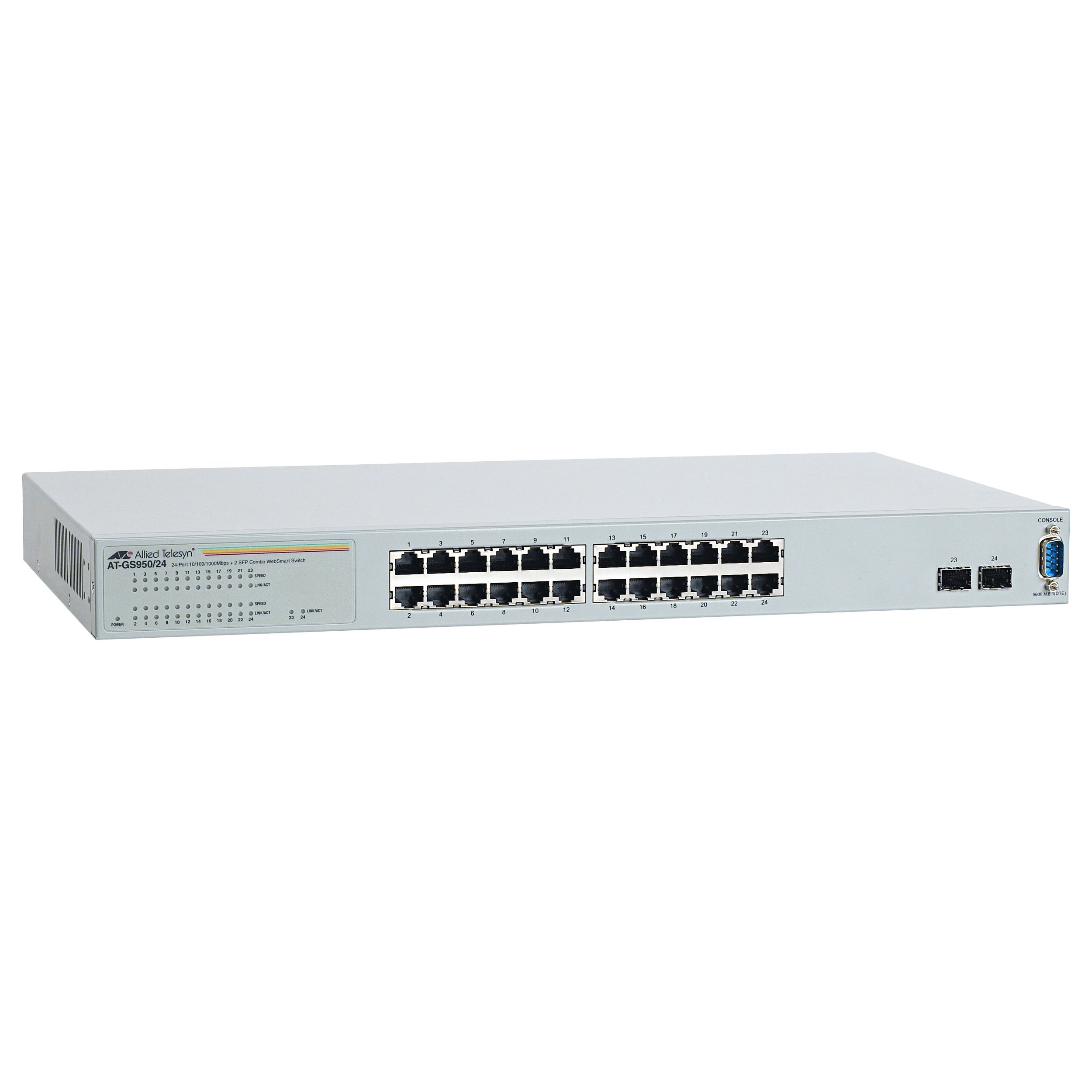
Figura 1: Frontal view of the Allied Telesis AT-GS950/24-10 Gigabit Ethernet Smart Switch, showing 24 Ethernet ports and two SFP ports.
2. Informació de seguretat
Please read all safety instructions carefully before installing or operating this device. Failure to follow these instructions may result in electric shock, fire, or damage to the product.
- Font d'alimentació: Connect the device only to the type of power source indicated on the marking label.
- Ventilació: Assegureu-vos que hi hagi una ventilació adequada. No bloquegeu cap obertura de ventilació.
- Humitat: No exposeu el dispositiu a l'aigua ni a la humitat.
- Temperatura: Operate the device within the specified temperature range (up to 40°C).
- Manteniment: No intenteu atendre aquest producte vosaltres mateixos. Consulteu tots els serveis a personal de servei qualificat.
- cables: Use only approved and appropriate cables for network connections.
3. Contingut del paquet
Comproveu que el vostre paquet contingui els elements següents:
- Allied Telesis AT-GS950/24-10 Gigabit Ethernet Smart Switch (24 x 10/100/1000 + 2 x SFP ports)
- Cable d'alimentació
- Rack-mount kit (if applicable, for desktop enclosure)
- Guia d'inici ràpid o CD de documentació
Si falta algun article o està malmès, poseu-vos en contacte amb el vostre proveïdor immediatament.
4. Configuració
4.1 Instal·lació física
The AT-GS950/24-10 is designed for desktop deployment. Ensure the installation location meets the following criteria:
- A stable, flat surface.
- Adequate ventilation space around the device.
- Away from direct sunlight, heat sources, and excessive moisture.
- Within reach of a grounded power outlet.
4.2 Connexió de potència
- Connect one end of the power cord to the power inlet on the rear panel of the switch.
- Connecteu l'altre extrem del cable d'alimentació a una presa de corrent amb connexió a terra.
- The power LED on the front panel should illuminate, indicating the device is receiving power.
4.3 Connexió de dispositius de xarxa
- Connect Ethernet cables from your network devices (computers, servers, other switches) to the 24 10/100/1000BASE-T ports on the front panel.
- For fiber optic connections, insert compatible SFP transceivers into the two SFP ports and connect fiber optic cables.
- Observe the link/activity LEDs for each port. A solid green LED indicates a valid link, and a blinking LED indicates data activity.
4.4 Configuració inicial (Webgestió basada en
The AT-GS950/24-10 is a web-smart switch, meaning it can be configured via a web browser. Refer to the Quick Start Guide for the default IP address and login credentials to access the web management interface. Through this interface, you can configure advanced features such as VLANs, QoS, and port security.
5. Funcionament de l'interruptor
Once powered on and connected, the AT-GS950/24-10 switch operates automatically to forward network traffic. As a managed switch, it offers a range of configurable features to optimize network performance and security.
5.1 Funcionament bàsic
- Data Forwarding: The switch intelligently forwards data frames between connected devices at Gigabit speeds.
- Negociació automàtica: Each Ethernet port automatically detects the speed and duplex mode of the connected device.
- MDI/MDIX automàtic: Elimina la necessitat de cables creuats.
5.2 Advanced Features (via Web Gestió)
Accedeix al web management interface using a standard web browser to configure the following features:
- VLAN (xarxes d'àrea local virtuals): Segmenta la teva xarxa per millorar la seguretat i el rendiment.
- QoS (Qualitat de servei): Prioritize critical network traffic (e.g., voice or video) to ensure consistent performance.
- Port Trunking/Link Aggregation: Combineu diversos enllaços físics en un únic enllaç lògic per augmentar l'amplada de banda i la redundància.
- Mirall de ports: Supervisar el trànsit de xarxa enviant una còpia dels paquets d'un port a un altre.
- Protocol d'arbre d'expansió (STP): Evitar els bucles de xarxa i garantir l'estabilitat de la xarxa.
- 802.1X Security: Implement port-based network access control.
6. Manteniment
Un manteniment regular ajuda a garantir la longevitat i el rendiment òptim del vostre interruptor.
- Neteja: Netegeu periòdicament l'exterior de l'interruptor amb un drap suau i sec. No utilitzeu netejadors líquids ni en aerosol. Assegureu-vos que les obertures de ventilació estiguin lliures de pols i obstruccions.
- Actualitzacions de firmware: Check the Allied Telesis website for available firmware updates. Keeping the firmware up-to-date can provide new features, performance improvements, and security patches. Follow the instructions provided with the firmware update carefully.
- Condicions ambientals: Ensure the operating environment remains within the specified temperature and humidity ranges to prevent hardware damage.
7. Solució De Problemes
This section provides solutions to common issues you might encounter with your AT-GS950/24-10 switch.
| Problema | Causa possible | Solució |
|---|---|---|
| No power LED indication | Power cord disconnected or faulty power outlet. | Check power cord connections. Try a different power outlet. |
| No link LED for a connected device | Faulty Ethernet cable, incorrect port, or device not powered on. | Verify cable integrity. Ensure the connected device is powered on. Try a different port or cable. |
| Rendiment lent de la xarxa | Cable issues, network congestion, or duplex mismatch. | Check cable quality. Investigate network traffic patterns. Ensure devices are set to auto-negotiate speed and duplex. |
| No es pot accedir web interfície de gestió | Adreça IP incorrecta, problema de configuració de xarxa o tallafocs. | Verify the switch's IP address. Ensure your computer is on the same subnet. Temporarily disable firewalls. |
8. Especificacions
Key technical specifications for the Allied Telesis AT-GS950/24-10 Gigabit Ethernet Smart Switch:
| Característica | Descripció |
|---|---|
| Número de model | AT-GS950/24-10 |
| Marca | Telesis aliada |
| Tipus de tancament | Escriptori |
| Subtipus | Gigabit Ethernet |
| Ports | 24 x 10/100/1000BASE-T + 2 x SFP |
| Velocitat de transferència de dades | 1000 megabits per segon (gigabit) |
| Tipus d'interfície | SFP |
| Pes de l'article | 7.2 lliures (3.27 kg) |
| Dimensions del producte | 19.7 x 15.2 x 4.9 polzades (50.04 x 38.61 x 12.45 cm) |
| Classificació de temperatura superior | 40 graus centígrads |
| Gestió | Web-based Smart Management |
| Mida de la taula d’adreces MAC | Fins a 8 entrades |
| Mida de la memòria intermèdia de paquets | 512K |
9. Informació de la garantia
Allied Telesis products are designed for reliability and performance. For specific warranty terms and conditions applicable to your AT-GS950/24-10 switch, please refer to the warranty statement included with your product or visit the official Allied Telesis weblloc. La cobertura de la garantia normalment inclou defectes de materials i de fabricació en condicions d'ús normal.
10. Suport tècnic
If you require technical assistance or have questions not covered in this manual, please contact Allied Telesis technical support. Before contacting support, please have your product model number (AT-GS950/24-10) and serial number ready.
- Recursos en línia: Visit the Allied Telesis website for FAQs, documentation, and software downloads.
- Informació de contacte: Consulteu l'Allied Telesis website for regional support contact details (phone numbers, email).


