
1. Introducció
The SABRENT SBT-TVFM is a versatile PCI card designed to transform your desktop PC into a multimedia entertainment and recording station. This card enables you to watch and record NTSC analog TV, listen to and record FM radio, and capture video and audio signals from external sources such as VCRs, DVD players, game consoles, and camcorders. It features S-Video and composite inputs for broad compatibility and includes a remote control for convenient operation.
2. Informació de seguretat
Please read and follow these safety guidelines carefully before installing or operating the device:
- Desconnecteu sempre l'ordinador de la presa de corrent abans d'obrir la carcassa o instal·lar qualsevol component intern.
- Wear an anti-static wrist strap to prevent electrostatic discharge (ESD) damage to your computer components.
- Handle the PCI card by its edges to avoid touching sensitive components.
- Ensure proper ventilation for your computer to prevent overheating.
- No exposeu el dispositiu a la humitat ni a temperatures extremes.
- Mantingueu el dispositiu lluny dels nens.
3. Contingut del paquet
Verifiqueu que tots els elements siguin presents al vostre paquet:
- SABRENT SBT-TVFM TV Tuner/Video Capture/FM Radio PCI Card
- Control remot
- Remote I/R Receiving Cable
- Cable d'àudio
- Antena FM
- Manual d'usuari (aquest document)
- Programari CD

Image: Contents of the SABRENT SBT-TVFM package, including the PCI card, remote control, cables, FM antenna, and software CD.
4. Producte acabatview
The SBT-TVFM PCI card integrates multiple functions into a single expansion card for your computer. Below are key components and their descriptions.

Imatge: Superior view of the SABRENT SBT-TVFM PCI card, showing the main chipset and tuner module.
4.1. PCI Cardbus Connector
This connector interfaces with your computer's PCI slot, providing power and data transfer for the card's operations.

Image: Close-up of the SABRENT SBT-TVFM PCI card, highlighting the PCI Cardbus Connector at the bottom edge.
4.2. Ports d'entrada/sortida
The rear bracket of the card features various ports for connecting external devices:
- Connectors d'antena: For connecting TV and FM antennas.
- Composite Video Jack: For connecting composite video sources (yellow RCA).
- Jack d'entrada de línia: For audio input from external devices.
- S-Video Connector: For connecting S-Video sources.
- Jack remot: For connecting the IR receiver cable for the remote control.
- Line-Out Jack: For audio output to external speakers or your sound card.
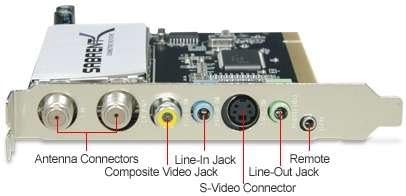
Imatge: Detallada view of the SABRENT SBT-TVFM PCI card's rear bracket, clearly labeling the Antenna Connectors, Composite Video Jack, Line-In Jack, S-Video Connector, Remote Jack, and Line-Out Jack.
5. Configuració
5.1. Requisits del sistema
Abans de la instal·lació, assegureu-vos que l'ordinador compleixi els requisits mínims següents:
- Sistema operatiu: Windows 98SE, Windows ME, Windows 2000, Windows XP, Windows Vista, or Windows 7 (32-bit recommended for older drivers).
- CPU: 366 MHz o superior
- RAM: 32 MB o més
- Targeta gràfica: VGA card with 8 MB memory
- Ranura d'expansió: Ranura PCI disponible
- Font del senyal: Analog TV signal source (NTSC) and/or FM radio antenna.
5.2. Instal·lació de maquinari
- Apagar: Apagueu l'ordinador completament i desconnecteu el cable d'alimentació de la presa de corrent.
- Cas obert: Traieu el panell lateral de la caixa de l'ordinador per accedir a la placa base.
- Localitza la ranura PCI: Identifica una ranura d'expansió PCI disponible a la placa base.
- Treure la coberta de la ranura: Traieu amb cura la tapa metàl·lica de la ranura corresponent a la ranura PCI escollida de la part posterior de la carcassa de l'ordinador.
- Insereix la targeta: Align the SBT-TVFM PCI card with the PCI slot and press down firmly and evenly until it is securely seated.
- Targeta segura: Fasten the card's metal bracket to the computer case with a screw.
- Tanca el cas: Replace the computer case side panel and reconnect the power cable.
5.3. Instal·lació de programari
- Encès: Start your computer. Windows may detect new hardware and prompt for drivers.
- Insereix CD: Insert the included Software CD into your computer's optical drive.
- Executa l'instal·lador: Follow the on-screen instructions to install the drivers and the TV/FM application software. If the installer does not launch automatically, navigate to the CD drive in 'My Computer' and run 'Setup.exe' or a similar installer file.
- Reinicia: Restart your computer after the installation is complete, if prompted.
- Verificació del conductor: After restarting, verify that the drivers are correctly installed by checking Device Manager (Right-click 'My Computer' or 'This PC' > 'Manage' > 'Device Manager'). Look for the SBT-TVFM device under 'Sound, video and game controllers' or similar categories.
5.4. Connexió de dispositius externs
Connect your signal sources and audio output to the appropriate ports on the card's rear bracket:
- TV Antenna/Cable: Connect your analog TV antenna or cable TV coaxial cable to the designated TV antenna connector.
- Antena FM: Connect the included FM antenna to the FM antenna connector.
- Receptor IR de control remot: Plug the remote I/R receiving cable into the 'Remote' jack. Position the IR receiver in a location where it has a clear line of sight to your remote control.
- Sortida d'àudio: Connect the included audio cable from the card's 'Line-Out' jack to your computer's sound card 'Line-In' jack or directly to external speakers.
- Video Input (Optional): For video capture, connect your external video source (VCR, DVD player, camcorder) using either an S-Video cable to the 'S-Video Connector' or an RCA composite video cable (yellow) to the 'Composite Video Jack'.
- Entrada d'àudio (opcional): For video capture, connect the audio output from your external video source to the card's 'Line-In' jack using an audio cable.
6. Instruccions de funcionament
After successful installation, launch the TV/FM application software installed from the CD.
6.1. Watching TV
- Programari de llançament: Open the TV application software.
- Escaneig de canals: Access the settings or options menu within the software and initiate an 'Auto Scan' for TV channels. This will detect available analog NTSC channels.
- Seleccioneu el canal: Once the scan is complete, you can select channels using the software interface or the remote control.
- Ajustar el volum: Use the software controls or remote to adjust the volume.
6.2. Escoltar la ràdio FM
- Mode de canvi: Within the application software, switch to FM Radio mode.
- Escaneig de l'estació: Perform an 'Auto Scan' for FM radio stations.
- Select Station: Choose your desired FM station from the list.
6.3. Video Capture
- Font de connexió: Ensure your external video source (VCR, DVD player, camcorder) is connected to the card's video and audio input ports.
- Seleccioneu l'entrada: In the software, select the appropriate video input source (S-Video or Composite).
- Preview: You should see the video feed from your external source in the software's preview finestra.
- Registre: Use the software's recording function to capture the video. You can typically specify the save location and file format (e.g., AVI).
6.4. Ús del comandament a distància
The included remote control allows for convenient operation from a distance. Ensure the IR receiver cable is properly connected and positioned. Functions typically include:
- Encès/Apagat
- Canal amunt/avall
- Pujar/Bajar el volum
- Silenciar
- Selecció de la font d'entrada
- Gravar/Aturar
- Controls de reproducció
6.5. Programes d'enregistrament
The software allows you to record TV programs or FM radio broadcasts. Consult the software's help documentation for detailed instructions on scheduling recordings, setting recording quality, and managing recorded files.
7. Manteniment
The SBT-TVFM PCI card requires minimal maintenance. Keep your computer's interior clean and dust-free to ensure optimal performance and longevity of all components, including the TV tuner card. Periodically check for updated drivers on the SABRENT weblloc.
8. Solució De Problemes
Si teniu problemes, consulteu els següents problemes i solucions habituals:
- Sense imatge/senyal:
- Ensure the TV antenna or cable is securely connected to the card.
- Verify that the correct input source is selected in the software.
- Perform an auto-scan for channels within the software.
- Check if your TV signal source is analog NTSC. Digital ATSC signals are not supported by this model.
- Sense so:
- Confirm the audio cable is correctly connected from the card's 'Line-Out' to your sound card's 'Line-In' or external speakers.
- Check the volume levels in the software, your computer's operating system, and any external speakers.
- Ensure the correct audio input is selected in your computer's sound settings if routing through the sound card.
- El control remot no funciona:
- Check that the remote I/R receiving cable is firmly plugged into the 'Remote' jack on the card.
- Ensure the IR receiver has a clear line of sight to the remote control.
- Substituïu les piles del comandament a distància.
- Verify that the remote control drivers are correctly installed and configured with the application software.
- Problemes de programari/controlador:
- Reinstall the drivers and software from the provided CD.
- For Windows Vista/7, older drivers might cause compatibility issues. Try installing only the drivers from the CD first, then the application software.
- Check the SABRENT support website for updated drivers or compatibility information for newer operating systems.
- Poca qualitat de vídeo:
- Assegureu-vos que tots els cables estiguin connectats correctament i que no estiguin danyats.
- Adjust video settings (brightness, contrast, saturation) within the application software.
- Verify the quality of your analog TV signal source.
9. Especificacions
| Marca | SABRENT |
| Número de model | SBT-TVFM |
| Interfície del maquinari | PCI |
| Tipus de sintonitzador | NTSC, FM |
| Resolució de captura de vídeo | 480p |
| Sortida AV | AVI |
| Compatibilitat de sistemes operatius | Windows 98SE, ME, 2000, XP, Vista, 7 |
| Dispositius compatibles | Ordinador personal, Televisió |
| Dimensions de l'article | 8.1 x 6.3 x 1.8 polzades |
| Pes de l'article | 13.6 unces |
| Mitjans integrats | Control remot |
| UPC | 188218000729 |
10. Informació de la garantia
The SABRENT SBT-TVFM PCI Card comes with a limited warranty covering parts and labor for 12 months from the date of purchase. Please retain your proof of purchase for warranty claims. For detailed warranty terms and conditions, refer to the information provided with your product or visit the official SABRENT weblloc.
11. Suport
For technical support, driver updates, or further assistance, please visit the official SABRENT website or contact their customer service department. You can often find FAQs and troubleshooting guides online.
SABRENT Official Weblloc: www.sabrent.com