
Escali P115
Escali Primo Digital Food Scale (Model P115) Instruction Manual
Your guide to precise weight measurement and portion control.
1. Introducció
Thank you for choosing the Escali Primo Digital Food Scale. This manual provides essential information for the proper setup, operation, and maintenance of your new scale. Designed for accuracy and ease of use, the Escali Primo is ideal for various kitchen tasks, including food preparation, baking, and portion control.
The Escali Primo Digital Food Scale features a simple two-button operation, a sealed control panel for easy cleaning, and an automatic shut-off function to conserve battery life. It measures weights up to 11 lb (5,000 g) with precision.

Image: Escali Primo Digital Food Scale, Metallic.
2. Components del producte
The Escali Primo Digital Food Scale consists of the following main components:
- Plataforma de pesatge: The surface where items are placed for measurement.
- Pantalla digital: Shows weight readings and unit indicators.
- On/Tare/Off Button: Used to power the scale on/off and activate the tare function.
- Unit (g/oz) Button: Used to switch between measurement units (grams, ounces, pounds:ounces).
- Compartiment de la bateria: Located on the underside, holds two AA batteries.
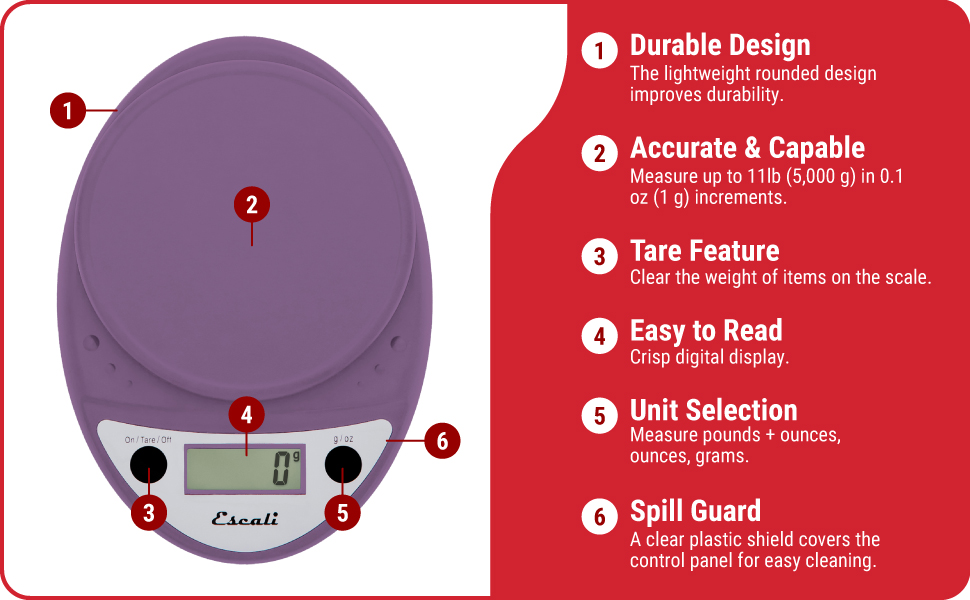
Image: Key features of the Escali Primo Digital Food Scale.
3. Configuració
3.1 Instal·lació de la bateria
- Localitzeu el compartiment de la bateria a la part inferior de la bàscula.
- Obriu la tapa del compartiment de la bateria.
- Introduïu dues piles AA, assegurant-vos de la polaritat correcta (+/-) tal com s'indica a l'interior del compartiment.
- Tanqueu bé la tapa del compartiment de la bateria.
3.2 Col·locació inicial
Place the scale on a flat, stable, and level surface. Avoid placing it on soft or uneven surfaces, which can affect accuracy.
4. Instruccions de funcionament
4.1 Encès/Apagat
- Per encendre: Premeu el botó On/Tare/Off button. The display will show "0" when ready.
- Per apagar: Manteniu premut el botó On/Tare/Off button for approximately 3 seconds. The scale will also automatically shut off after four minutes of inactivity to conserve battery life.
4.2 Selecció d'unitats
To change the unit of measurement (grams, ounces, pounds:ounces), press the g/oz button while the scale is on. The display will cycle through the available units.

Image: Display and unit selection button.
4.3 Funció de tara
The tare function allows you to subtract the weight of a container or to measure multiple ingredients consecutively.
- Col·loqueu un recipient buit a la plataforma de pesatge. La pantalla mostrarà el seu pes.
- Premeu el botó On/Tare/Off botó. La pantalla es reiniciarà a "0".
- Afegiu el vostre ingredient al recipient. La pantalla mostrarà només el pes de l'ingredient.
- Repeat the tare process for additional ingredients if needed.

Image: Using the scale for portion control with meal prep.
4.4 Pesatge d'articles
Once the scale is on and set to your desired unit, simply place the item(s) to be weighed directly onto the weighing platform or into a tared container. The weight will be displayed instantly.

Image: Weighing ingredients for baking.
5. Manteniment
5.1 Neteja
The sealed control panel and rounded design make the Escali Primo scale easy to clean. Wipe the scale with a damp tela. No submergiu la bàscula en aigua ni utilitzeu netejadors abrasius.
5.2 Emmagatzematge
Store the scale in a dry place at room temperature. Avoid placing heavy objects on the scale when not in use, as this may affect its calibration over time.
6. Solució De Problemes
| Problema | Causa possible | Solució |
|---|---|---|
| L'escala no s'encén | Piles gastades o instal·lades incorrectament. | Substituïu les piles per piles AA noves, assegurant-vos de la polaritat correcta. |
| Lectures inexactes | Scale not on a flat, stable surface; scale overloaded; debris under platform. | Place scale on a firm, level surface. Ensure weight does not exceed 11 lb (5000 g). Clean any debris from under the platform. |
| La pantalla mostra "Err" | L'escala està sobrecarregada. | Remove items from the scale. Ensure total weight is within the 11 lb (5000 g) capacity. |
| Automatic shut-off too soon | Normal operation (4 minutes of inactivity). | This is a battery-saving feature. Press the On/Tare/Off button to restart. |
7. Especificacions
- Model: P115
- Capacitat: 11 lliures (5,000 g)
- Increments: 0.05 oz (1 g)
- Unitats de mesura: oz, lb:oz, g
- Potència: 2 piles AA (incloses)
- Dimensions del producte: 8.5 x 6 x 1.5 polzades (aproximadament)
- Tipus de visualització: LED digital
- Característiques especials: Auto Shut Off, Tare Function, Sealed Control Panel
8. Informació de la garantia
The Escali Primo Digital Food Scale comes with a Garantia de per vida. For detailed warranty terms and conditions, please refer to the official Escali weblloc o contacteu amb el servei d'atenció al client.
9. Atenció al client
For further assistance, product information, or support, please visit the official Escali weblloc web o poseu-vos en contacte amb el seu departament d'atenció al client. Normalment, les dades de contacte es troben a l'embalatge del producte o a la fitxa del fabricant. weblloc.
Podeu trobar més informació i suport a Escali Store on Amazon.
Ask a question about this manual
Ask about setup, troubleshooting, compatibility, parts, safety, or missing instructions. Manuals+ will review the question and use this page’s manual context to help answer it.