
1. Introducció
Gràcies per la compraasing the Pentax Optio W10 Digital Camera. This manual provides essential information for the safe and effective use of your camera. The Optio W10 is a compact 6.0-megapixel digital camera featuring a 3x optical zoom lens, designed for capturing high-quality still images and video. Its robust design makes it suitable for various environments.
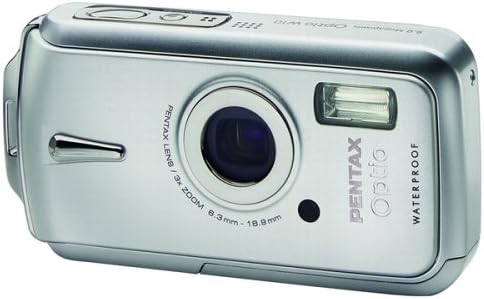
Figura 1.1: Frontal view of the Pentax Optio W10 Digital Camera, showcasinl'objectiu, el flaix i la marca.
2. Informació de seguretat
Please read and understand all safety precautions before using the camera. Failure to do so may result in injury or damage to the product.
- No intenteu desmuntar ni modificar la càmera.
- Keep the camera away from extreme temperatures, direct sunlight, and high humidity.
- Ensure all compartment covers (battery, memory card) are securely closed and locked before exposing the camera to water or dust.
- Use only the specified battery type (Lithium-ion DL-I8) and charger.
- Mantenir fora de l'abast dels nens.
3. Contingut del paquet
Verifiqueu que tots els elements estiguin presents a l'embalatge de la càmera:
- Pentax Optio W10 Digital Camera
- Lithium-ion Battery DL-I8
- Carregador de bateria
- Cable d'alimentació CA
- USB Cable (for computer connection)
- Corretja
- CD-ROM de programari
- Manual d'instruccions (aquest document)
4. Configuració
4.1. Instal·lació de la bateria
- Localitzeu la tapa del compartiment de la bateria/targeta de memòria a la part inferior de la càmera.
- Slide the lock switch to the 'OPEN' position and open the cover.
- Insert the Lithium-ion battery DL-I8 into the compartment, ensuring the correct orientation as indicated inside the compartment.
- Close the cover and slide the lock switch to the 'LOCK' position until it clicks securely.

Figura 4.1: A baix view of the camera, illustrating the battery and SD card compartment with the lock switch.
4.2. Instal·lació de la targeta de memòria
The Pentax Optio W10 uses SD memory cards.
- Open the battery/memory card compartment cover as described in Section 4.1.
- Insert the SD memory card into the designated slot with the label facing the correct direction, pushing gently until it clicks into place.
- Close the cover and slide the lock switch to the 'LOCK' position.
4.3. Engegada inicial i configuració de la data i l'hora
- Premeu el botó ON/OFF botó situat a la part superior de la càmera.
- Upon first power-on, the camera will prompt you to set the date and time. Use the directional buttons on the back of the camera to navigate and the OK botó per confirmar.
- Seguiu les instruccions a la pantalla per completar la configuració inicial.

Figura 4.2: superior view of the camera, highlighting the ON/OFF button and 6.0 Megapixels branding.
5. Funcionament de la càmera
5.1. Fotografia bàsica
To take a still picture:
- Enceneu la càmera prement el botó ON/OFF botó.
- Enquadra la teva foto amb el monitor LCD de 2.5 polzades.
- Premeu el botó de l'obturador fins a la meitat per enfocar. El marc d'enfocament es tornarà verd quan s'hagi aconseguit enfocar.
- Premeu el botó de l'obturador fins al fons per capturar la imatge.

Figura 5.1: posterior view of the camera, displaying the LCD screen and various control buttons for navigation and settings.
5.2. Modes de tir
The Optio W10 offers various shooting modes accessible via the MODE button. Refer to the on-screen menu for specific options such as Program Auto, Scene Modes, and Movie Mode.
5.3. Gravació de vídeo
Per gravar un vídeo:
- Switch to Movie Mode using the MODE botó.
- Press the shutter button to start recording. The camera can capture QuickTime motion JPEG videos at 640 x 480 resolution at 30 frames per second.
- Torneu a prémer el botó de l'obturador per aturar la gravació.
5.4. Reproducció
A view imatges i vídeos capturats:
- Premeu el botó Reproducció botó (normalment indicat per una icona triangular).
- Use the directional buttons to scroll through your photos and videos.
- Premeu el botó OK botó per view a video or zoom into a photo.
5.5. Connexió a un ordinador
Per transferir imatges i vídeos a un ordinador:
- Assegureu-vos que la càmera estigui apagada.
- Connecteu la càmera a l'ordinador mitjançant el cable USB proporcionat.
- Turn on the camera. It should be recognized as a removable disk or a PTP device.
- Follow your computer's operating system instructions to access and transfer files.
6. Manteniment
6.1. Neteja
- Cos de la càmera: Netegeu amb un drap suau i sec. Per a la brutícia resistent, utilitzeu un drap lleugerament sec.amp un drap i després assecar-lo bé.
- Lent: Use a lens brush or a soft, clean lens cloth. Avoid touching the lens surface with your fingers.
- Monitor LCD: Netegeu suaument amb un drap suau i sec. Eviteu pressionar fort la pantalla.
- Segells impermeables: Regularly inspect the rubber seals around the battery/memory card compartment for dirt, sand, or damage. Clean gently with a soft cloth. Do not use sharp objects.
6.2. Emmagatzematge
When not in use for extended periods, store the camera in a cool, dry, and well-ventilated place. Remove the battery to prevent leakage. Avoid storing in areas with high humidity or extreme temperature fluctuations.
7. Solució De Problemes
If you encounter issues with your Pentax Optio W10, refer to the following common solutions:
| Problema | Possible causa/solució |
|---|---|
| La càmera no s'encén | Battery is depleted or incorrectly inserted. Recharge the battery or reinsert it correctly. |
| No es poden fer fotos | Memory card is full, locked, or not inserted. Delete unnecessary files, unlock the card, or insert it correctly. |
| Les imatges són borroses | Lens is dirty, camera shake, or incorrect focus. Clean the lens, hold the camera steady, or ensure proper focus. |
| Water inside compartment | Compartment cover not securely closed or seal is damaged. Ensure cover is locked. If seal is damaged, contact service. |
For further assistance, please refer to the official Pentax support weblloc o contacteu amb el servei d'atenció al client.
8. Especificacions
Key technical specifications for the Pentax Optio W10 Digital Camera:
- Resolució fixa efectiva: 6.0 megapíxels
- Tecnologia del sensor fotogràfic: CCD (1/2.5 polzades)
- Zoom òptic: 3x
- Zoom digital: 4x
- Distància focal màxima: 114 mm
- Distància focal mínima: 38 mm
- Mida de la pantalla LCD: 2.5 polzades
- Estabilització d'imatge: Digital, Òptic
- Resolució de vídeo: 640 x 480, 30/15 fps (QuickTime Motion JPEG)
- Admet File Format: JPEG (Still Images), MJPEG (Video)
- Mitjans d'emmagatzematge: SD/MMC card, Internal Memory
- Tipus de bateria: Lithium-ion (DL-I8)
- Característica especial: Waterproof (Note: Ensure all seals are properly closed before water exposure)
- Velocitat mínima d'obturació: 4 segons
- Velocitat màxima de l'obturador: 1/2000 segons
- Rang ISO: Automàtic, 64, 100, 200, 400, 800
- Pes de l'article: 5.6 unces
- Número de model: 19033
9. Garantia i Suport
For information regarding warranty coverage, service, or technical support for your Pentax Optio W10 camera, please refer to the warranty card included with your product or visit the official Pentax weblloc web. Conserveu el comprovant de compra per a reclamacions de garantia.
Assistència en línia: Ricoh Imaging Global Support (Pentax is a brand of Ricoh Imaging)