1. Introducció
This manual provides essential instructions for the safe and efficient operation of your Sharp LC-37XD1E Full HD LCD Television. Please read this manual thoroughly before using the television and retain it for future reference. It covers setup, operation, maintenance, and troubleshooting.
2. Informació de seguretat
- Font d'alimentació: Connect the television only to an AC 220V-240V, 50Hz power supply.
- Ventilació: Ensure adequate ventilation around the television. Do not block ventilation openings.
- Aigua i humitat: Do not expose the television to rain or moisture. Do not place objects filled with liquids on the television.
- Neteja: Unplug the television from the power outlet before cleaning. Use a soft, dry cloth.
- Manteniment: No intenteu atendre aquest producte vosaltres mateixos. Consulteu tots els serveis a personal de servei qualificat.
3. Contingut del paquet
Verifiqueu que tots els elements siguin presents al paquet:
- Sharp LC-37XD1E LCD Television
- Unitat de control remot
- Cable d'alimentació
- Table Stand (if included)
- Manual d'usuari (aquest document)
4. Configuració
4.1. Col·locació física
Place the television on a stable, level surface using the provided table stand, or mount it on a wall using a compatible VESA wall mount (sold separately). Ensure proper ventilation by leaving space around the unit.
4.2. Connexió de perifèrics
Connect your external devices to the television's input ports. Ensure the television is powered off before making any connections.
- HDMI: For high-definition video and audio from devices like Blu-ray players, game consoles, or set-top boxes. The TV has 2 HDMI ports.
- SCART: For standard-definition video and audio from devices like DVD players or VCRs. The TV has 2 SCART ports.
- AV/S-Video In: For composite video and S-Video connections.
- PC In: Per connectar un ordinador.
- RS232C: Per a finalitats de servei o control.
- Sortida d'àudio: Per connectar sistemes d'àudio externs.
4.3. Connexió d'alimentació
After all connections are made, plug the power cord into the television's power input, then into a wall outlet (AC 220V-240V, 50Hz).
4.4. Assistent de configuració inicial
Upon first power-on, the television may guide you through an initial setup wizard to configure language, country, and channel scanning. Follow the on-screen instructions.
5. Instruccions de funcionament
5.1. Funcionament bàsic
- Encès/apagat: Premeu el botó Poder botó del comandament a distància o del televisor.
- Selecció de canals: Utilitza el CH +/- buttons or the number buttons on the remote.
- Ajust de volum: Utilitza el VOL +/- botons del comandament a distància.
5.2. Control remot
The remote control allows full functionality of your Sharp LC-37XD1E television. Familiarize yourself with its buttons.
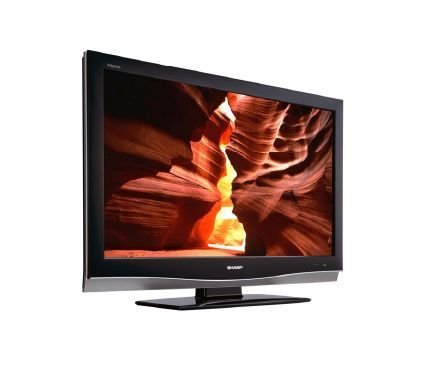
Image: Sharp LC-37XD1E Remote Control. This image displays the black remote control unit for the Sharp LC-37XD1E television, featuring various buttons for power, channel, volume, input selection, menu navigation, and numeric input.
- Botó d'encesa: Encén o apaga el televisor.
- Botons numèrics (0-9): Selecciona directament els canals.
- DTV/EPG/ESD/RADIO: Buttons for digital TV functions, Electronic Program Guide, and radio.
- Pujar/baixar el volum (+/-): Ajusta el nivell de so.
- Channel Up/Down (P ^/v): Canvia de canal seqüencialment.
- MODE AV: Cycles through available AV modes.
- ENTORN: Activates or deactivates surround sound.
- MENÚ: Obre el menú principal per ajustar la configuració.
- Botons de navegació (amunt/avall/esquerra/dreta): Used to navigate through menus.
- Botó D'acord: Confirma les seleccions als menús.
- EXIT/RETURN: Surt dels menús o torna a la pantalla anterior.
- Botons de color (vermell, verd, groc, blau): Used for specific functions in certain menus or interactive services.
5.3. Selecció d'entrada
Premeu el botó Entrada or Font button on the remote control to cycle through connected input sources (HDMI1, HDMI2, SCART1, SCART2, AV, S-Video, PC).
5.4. Navegació i configuració del menú
Premeu el botó MENÚ button to access the main settings menu. Use the navigation buttons to move between options and OK to select. Common settings include:
- Configuració de la imatge: Adjust brightness, contrast, color, sharpness, and aspect ratio (16:9).
- Configuració d'àudio: Adjust bass, treble, balance, and select audio modes (Nicam A2 / Surround).
- Configuració del canal: Cerca canals, edita llistes de canals.
- Configuració de l'hora: Set current time and sleep timer.
6. Manteniment
- Neteja de pantalla: Netegeu suaument la pantalla amb un drap suau i sense borrissol. Per a marques difícils, netegeu lleugerament.ampNetegeu el drap amb aigua o un netejador de pantalles especialitzat. No ruixeu líquid directament sobre la pantalla.
- Neteja d'armaris: Wipe the television cabinet with a soft, dry cloth.
- Ventilació: Periodically check that the ventilation openings on the back of the television are not obstructed by dust or debris.
- Cable d'alimentació: Inspect the power cord regularly for any damage. If damaged, replace it with an approved cord.
7. Solució De Problemes
Abans de contactar amb l'atenció al client, prova les solucions següents per a problemes comuns:
| Problema | Possible solució |
|---|---|
| Sense poder | Ensure the power cord is securely plugged into both the TV and the wall outlet. Check if the wall outlet is functioning. |
| No hi ha imatge, però hi ha so | Check the input source selection. Ensure the connected device is powered on and sending a signal. |
| No hi ha so, però hi ha imatge | Comproveu el nivell de volum i assegureu-vos que el televisor no estigui silenciat. Verifiqueu les connexions del cable d'àudio per a dispositius externs. |
| El comandament a distància no funciona | Substituïu les piles del comandament a distància. Assegureu-vos que no hi hagi cap obstacle entre el comandament a distància i el sensor d'infrarojos del televisor. |
| Poca qualitat d'imatge | Adjust picture settings (brightness, contrast, sharpness). Check antenna or cable connections. For external devices, ensure high-quality cables are used. |
8. Especificacions
Technical specifications for the Sharp LC-37XD1E LCD Television:
| Característica | Detall |
|---|---|
| Nom del model | LC-37XD1E |
| Mida de la pantalla | 37 polzades (93.98 cm) |
| Tecnologia de visualització | LCD |
| Resolució | 1920 x 1080 píxels (Full HD) |
| Relació d'aspecte | 16:9 (1.78:1) |
| Brillantor | 450 cd/m² |
| Relació de contrast | 1200:1 |
| Temps de resposta | 6 ms |
| ViewAngle d'acció (H/V) | 176° / 176° |
| Sistema d'àudio | Nicam A2 / Surround |
| Potència de sortida dels altaveus | 20 watts |
| Ports HDMI | 2 |
| Ports SCART | 2 |
| Altres entrades | AV/S-Video In, PC In, RS232C |
| Sortida d'àudio | Sí |
| Requisits d'alimentació | 220 V-240 V CA, 50 Hz |
| Consum d'energia | 20 watts (típic) |
| Dimensions (A x A x P) | 92 cm x 60 cm x 11.5 cm (without stand) |
| Pes | 21 kg |
9. Garantia i Suport
Per obtenir informació sobre la garantia, consulteu la targeta de garantia inclosa amb el producte o visiteu el lloc web oficial de Sharp. weblloc web. Per a consultes sobre assistència tècnica o servei, poseu-vos en contacte amb el servei d'atenció al client de Sharp a través dels seus canals oficials.