
1. Introducció
The ZYXEL G-4100 v2 is an advanced all-in-one hotspot gateway designed to provide secure and managed Internet access. This device integrates authentication and accounting functions for both wireless and wired clients, supporting up to 100 concurrent users. It is ideal for various environments such as coffee shops, bookstores, hotels, and resorts looking to offer reliable Internet services.
Key features include an easy-configuration authentication server, support for RADIUS servers for large-scale deployments, and rich networking functions such as IP PnP, DHCP server, NAT, MAC address, and IP address filtering. The G-4100 v2 ensures user privacy and provides a seamless 'zero configuration' user experience.
2. Contingut del paquet
Si us plau, verifiqueu que el vostre paquet contingui els elements següents:
- ZYXEL G-4100 v2 Hotspot Gateway Unit
- Adaptador d'alimentació
- Cable Ethernet
- Guia d'inici ràpid (si escau)
- Targeta de garantia (si escau)
If any items are missing or damaged, please contact your vendor or ZYXEL support immediately.
3. Configuració
3.1. Instal·lació física
- Posicionament: Place the G-4100 v2 in a central location to maximize wireless coverage. Avoid placing it near large metal objects, concrete walls, or sources of interference such as microwave ovens or cordless phones.
- Connectar l'alimentació: Connect the provided power adapter to the DC-in port on the back of the G-4100 v2 and then plug it into a standard electrical outlet. The power LED indicator should illuminate.
- Connecta't a la font d'Internet: Connect an Ethernet cable from your broadband modem or router's LAN port to the WAN port on the G-4100 v2.
- Connect to Local Network (Optional): If you have wired devices or a local network switch, connect an Ethernet cable from one of the LAN ports on the G-4100 v2 to your device or switch.
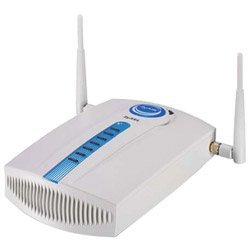
Figura 3.1: posterior view of the ZYXEL G-4100 v2 showing power, WAN, and LAN ports. Ensure all cables are securely connected as illustrated.
3.2. Configuració Inicial
- Connect a Computer: Connect a computer directly to one of the G-4100 v2's LAN ports using an Ethernet cable, or connect wirelessly to the default Wi-Fi network (SSID and password usually found on a label on the device).
- Accés Web Interfície: Obre a web browser and enter the default IP address of the G-4100 v2 (commonly
192.168.1.1or192.168.0.1). Refer to the Quick Start Guide or device label for the exact IP address. - Inici de sessió: Introduïu el nom d'usuari i la contrasenya predeterminats (per exemple,
admin/1234oradmin/password). It is highly recommended to change these default credentials immediately after the first login for security purposes. - Executa l'assistent de configuració: Follow the on-screen setup wizard to configure basic Internet settings, Wi-Fi network name (SSID), and security settings.
4. Instruccions de funcionament
4.1. Basic Operation and Status Indicators
Once configured, the G-4100 v2 operates automatically. Monitor the LED indicators on the front panel to understand the device's status:
- LED d'alimentació: El verd fix indica que el dispositiu està encès.
- LED WAN: Solid green indicates a successful connection to the Internet. Blinking indicates data activity.
- LED WLAN: Solid green indicates the wireless network is active. Blinking indicates wireless data activity.
- LED LAN: Solid green indicates a wired device is connected to that port. Blinking indicates data activity.
4.2. Configuring Hotspot Services
The G-4100 v2's primary function is to provide managed hotspot services. Access the web interface to configure these settings:
- Mètodes d'autenticació: Choose between free access, ticket-based access, or external RADIUS server authentication.
- User Policies: Set bandwidth limits, session durations, and access schedules for different user groups.
- Login Page Customization: Customize the captive portal login page with your branding, messages, or redirect users to advertisement links.
- Ticket Generation: If using ticket-based access, the G-4100 v2 can work with a ZYXEL SP-200E statement printer to generate and print tickets with account details and pre-configured access times.
4.3. Gestió d'usuaris
El web interface provides tools to monitor and manage connected users:
- View active sessions and their usage.
- Disconnect specific users.
- Generate new user accounts or tickets.
- Review access logs for auditing purposes.
5. Manteniment
5.1. Actualitzacions de firmware
Regularly updating the device firmware ensures optimal performance, security, and access to new features.
- Visit the official ZYXEL support weblloc (www.zyxel.com/us/en/support) to download the latest firmware for the G-4100 v2.
- Access the G-4100 v2 web interfície.
- Navigate to the 'Maintenance' or 'System' section and locate the 'Firmware Upgrade' option.
- Carregueu el firmware descarregat file i seguiu les instruccions que apareixen a la pantalla. No apagueu el dispositiu durant el procés d'actualització.
5.2. Restabliment dels valors predeterminats de fàbrica
If you encounter persistent issues or forget your login credentials, you may need to reset the device to its factory default settings. This will erase all custom configurations.
- With the device powered on, locate the 'Reset' button (often a small pinhole button) on the back or bottom of the unit.
- Use a paperclip or a similar pointed object to press and hold the 'Reset' button for approximately 10-15 seconds until the LEDs flash.
- Deixeu anar el botó. El dispositiu es reiniciarà amb la configuració predeterminada de fàbrica.
5.3. Neteja
To maintain optimal performance and longevity, keep the device clean.
- Assegureu-vos que el dispositiu estigui apagat i desconnectat abans de netejar-lo.
- Feu servir un drap suau i sec per netejar les superfícies exteriors.
- No utilitzeu netejadors líquids, aerosols ni dissolvents.
- Mantingueu les obertures de ventilació netes de pols i deixalles.
6. Solució De Problemes
6.1. Problemes comuns i solucions
- Sense energia:
- Assegureu-vos que l'adaptador de corrent estigui connectat correctament tant al dispositiu com a una presa de corrent que funcioni.
- Comproveu si la presa de corrent funciona connectant-hi un altre dispositiu.
- Sense accés a Internet:
- Verify that the WAN cable is securely connected to your modem/router and the G-4100 v2's WAN port.
- Check the WAN LED on the G-4100 v2. If it's off, there might be an issue with the upstream connection.
- Ensure your modem/router is working correctly and has an active Internet connection.
- Restart both your modem/router and the G-4100 v2.
- Check the Internet settings in the G-4100 v2's web interface (e.g., DHCP, Static IP, PPPoE).
- No es pot connectar a Wi-Fi:
- Ensure the WLAN LED on the G-4100 v2 is solid green.
- Verify that you are selecting the correct Wi-Fi network (SSID) and entering the correct password.
- Move closer to the G-4100 v2 to rule out range issues.
- Try restarting the G-4100 v2.
- Velocitat d'Internet lenta:
- Check for excessive concurrent users or high bandwidth usage.
- Review bandwidth management settings in the G-4100 v2's web interfície.
- Ensure the G-4100 v2 is placed optimally to avoid interference.
- Test your Internet speed directly from your modem/router to rule out issues with the G-4100 v2.
7. Especificacions
| Característica | Descripció |
|---|---|
| Marca | CYXEL |
| Número de model | G-4100 v2 (G4100V2WOPRINTER) |
| Comunicació sense fils estàndard | 802.11 g |
| Tecnologia de connectivitat | Sense fil, Ethernet |
| Pes de l'article | 0.01 unces |
| UPC | 760559114244 |
| ASIN | B000N5UXZO |
| Fabricant | CYXEL |
8. Garantia i Suport
ZYXEL products are designed for reliability and performance. This device comes with a standard manufacturer's warranty. Please refer to the warranty card included in your package or visit the official ZYXEL weblloc web per obtenir informació detallada sobre els termes i condicions de la garantia.
For technical assistance, troubleshooting, or further inquiries, please contact ZYXEL Customer Support:
- Weblloc: www.zyxel.com/us/en/support
- Telèfon: Refer to the ZYXEL website for regional support contact numbers.
When contacting support, please have your product model (G-4100 v2) and serial number ready.