
1. Introducció
Thank you for choosing the Casio PQ-31-1EF Digital Wake Up Timer. This manual provides detailed instructions for the proper setup, operation, and maintenance of your new digital alarm clock. Please read this manual thoroughly before using the product to ensure correct usage and to prevent damage.
2. Precaucions de seguretat
- No exposeu la unitat a temperatures extremes, llum solar directa o humitat elevada.
- Eviteu deixar caure la unitat o sotmetre-la a impactes forts.
- No intenteu desmuntar ni modificar la unitat. Això anul·larà la garantia.
- Mantingueu les piles fora de l'abast dels nens. En cas d'ingestió, busqueu atenció mèdica immediatament.
- Eliminar les bateries usades d'acord amb la normativa local.
3. Contingut del paquet
Si us plau, comproveu que tots els articles estiguin presents al vostre paquet:
- 1 x Casio PQ-31-1EF Digital Wake Up Timer
- 2 x Lithium Metal batteries (pre-installed or included separately)
- 1 x Manual d'usuari (aquest document)
4. Producte acabatview
The Casio PQ-31-1EF is a compact digital alarm clock designed for reliability and ease of use. It features a clear digital display, an integrated alarm function, and a light for visibility in low-light conditions. The sturdy case provides impact resistance for daily use.
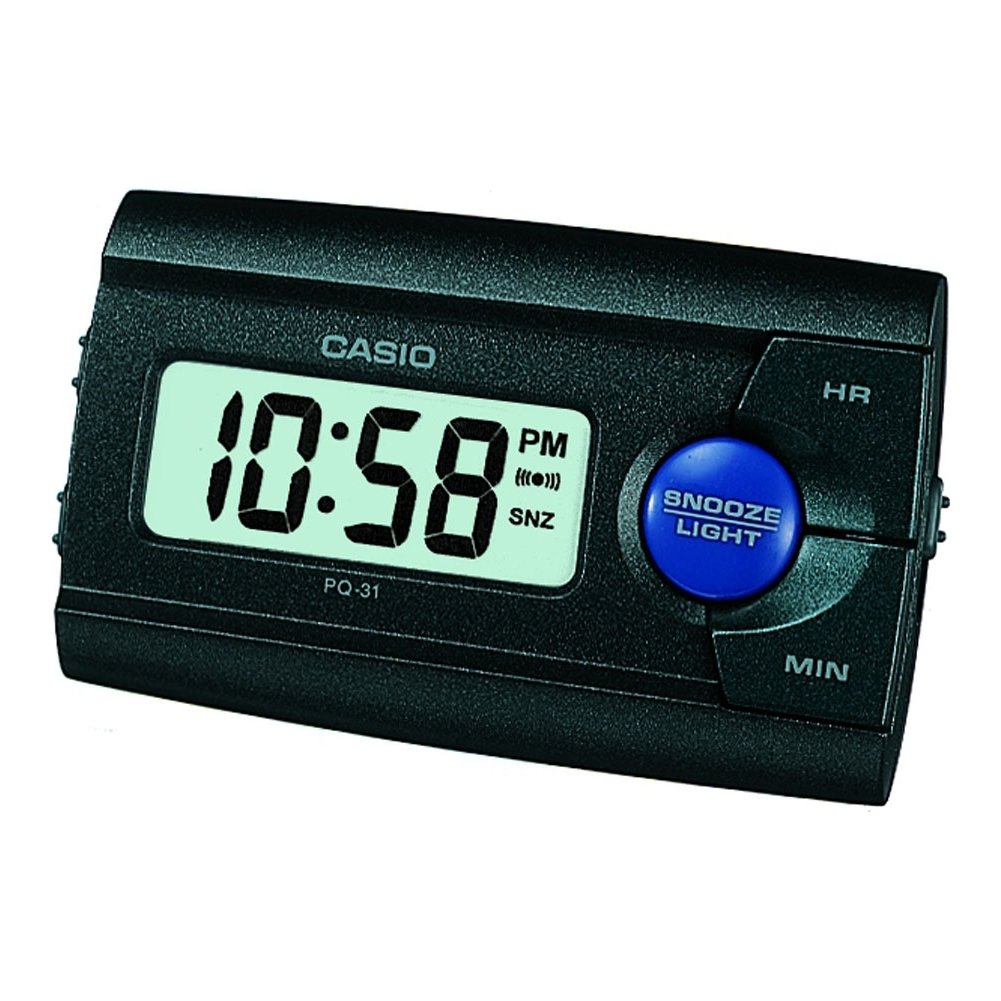
Figura 1: Frontal view of the Casio PQ-31-1EF Digital Wake Up Timer. Shows the digital display and general shape of the device.
Button Functions (Typical Layout - Refer to actual device for exact labels):
- MODE/SET Button: Used to switch between time, alarm, and timer modes, and to confirm settings.
- ADJUST/+/H Button: Used to increase values (hours) or move forward in settings.
- ADJUST/-/M Button: Used to decrease values (minutes) or move backward in settings.
- Botó LLUM: Activates the backlight for a few seconds.
- Interruptor d'activació/desactivació de l'alarma: Toggles the alarm function.
- Botó SNOOZE: Temporarily silences the alarm and activates snooze function.
5. Configuració
5.1 Instal·lació de la bateria
Your Casio PQ-31-1EF requires 2 Lithium Metal batteries. These are typically included with the product.
- Locate the battery compartment cover on the back or bottom of the unit.
- Open the cover by sliding it or unscrewing it (if applicable).
- Insert the 2 Lithium Metal batteries, ensuring the positive (+) and negative (-) terminals are aligned correctly according to the diagram inside the compartment.
- Col·loqueu la coberta del compartiment de la bateria amb seguretat.
The clock display should now activate. If not, check battery orientation or replace with fresh batteries.
5.2 Configuració inicial de l'hora
- En el mode de visualització de l'hora normal, premeu i manteniu premut MODE/SET button for a few seconds until the hour digits begin to flash.
- Utilitza el ADJUST/+ or ADJUST/- buttons to set the correct hour. Pay attention to AM/PM indicators if your clock uses a 12-hour format.
- Premeu el botó MODE/SET Premeu el botó de nou per anar a la configuració dels minuts. Els dígits dels minuts parpellejaran.
- Utilitza el ADJUST/+ or ADJUST/- buttons to set the correct minutes.
- Premeu el botó MODE/SET button one more time to exit the time setting mode. The time will now be set.
6. Instruccions de funcionament
6.1 Configuració de l'alarma
The daily alarm reminds you of events that recur every day.
- Des de la pantalla de l'hora normal, premeu la tecla MODE/SET button once to enter alarm setting mode. The alarm time will be displayed, and the hour digits may flash.
- Utilitza el ADJUST/+ or ADJUST/- botons per configurar l'hora d'alarma desitjada.
- Premeu el botó MODE/SET button again to move to the minute setting.
- Utilitza el ADJUST/+ or ADJUST/- botons per configurar els minuts d'alarma desitjats.
- Premeu el botó MODE/SET button one more time to confirm the alarm setting and return to normal time display.
6.2 Activació/desactivació de l'alarma
To turn the alarm ON or OFF, locate the ALARMA ON / OFF switch (usually on the side or back of the unit) and slide it to the desired position. An alarm icon will typically appear on the display when the alarm is active.
6.3 Ús de la funció Snooze
Quan soni l'alarma, premeu el botó DORMITAR button (often a large button on top of the unit). The alarm will temporarily stop and sound again after a few minutes (typically 5-10 minutes, depending on the model).
6.4 Ús de la retroiluminació
To illuminate the clock face in dark environments, press the LLUM button. The light-emitting diode (LED) will illuminate the display for a short period, then automatically turn off.
7. Manteniment
7.1 Neteja de la unitat
To clean the Casio PQ-31-1EF, wipe it gently with a soft, dry cloth. Do not use abrasive cleaners, solvents, or chemical sprays, as these can damage the casing i pantalla.
7.2 Substitució de la bateria
When the display becomes dim or the clock functions erratically, it is time to replace the batteries. Follow the steps in Section 5.1 Battery Installation to replace the 2 Lithium Metal batteries. Ensure proper disposal of old batteries.
8. Solució De Problemes
| Problema | Causa possible | Solució |
|---|---|---|
| La pantalla està en blanc o tènue. | Les bateries estan esgotades o instal·lades incorrectament. | Substituïu les piles per unes de noves, assegurant la polaritat correcta. |
| L'alarma no sona. | L'alarma no està activada o el volum és massa baix (si és ajustable). | Ensure the ALARM ON/OFF switch is in the ON position. Check alarm settings. |
| L'hora és incorrecta. | Time was not set correctly or batteries were removed. | Reset the time following instructions in Section 5.2. |
| Els botons no responen. | Error temporal de programari o bateria baixa. | Traieu i torneu a inserir les piles per reiniciar la unitat. Canvieu les piles si cal. |
9. Especificacions
| Característica | Detall |
|---|---|
| Número de model | PQ-31-1EF |
| Marca | Casio |
| Tipus de visualització | Digital |
| Color | Black (Unit color, display is typically grey/LCD) |
| Font d'alimentació | Funciona amb bateria |
| Tipus de bateria | 2 x Lithium Metal batteries |
| Dimensions del producte (amplada x alçada) | 8.6W x 5H centimetres |
| Pes de l'article | 45.4 grams |
| Característiques especials | Alarm, Backlight (LED), Impact Resistance |
| Tipus de muntatge | Muntatge de sobretaula |
| Ús interior/exterior | Interior |
10. Garantia i Suport
Casio products are manufactured to high-quality standards and are backed by a manufacturer's warranty. For specific warranty terms and conditions, please refer to the warranty card included with your purchase or visit the official Casio weblloc per a la vostra regió.
If you encounter any issues or require technical assistance, please contact Casio customer support through their official website or the contact information provided in your product packaging. Please have your model number (PQ-31-1EF) and proof of purchase ready when contacting support.
Nota: Els termes de la garantia poden variar segons la regió.