
Introducció
Thank you for choosing the Gaiam Pedometer Plus Audio CD. This device is designed to help you track your daily steps, distance, and calories burned, supporting your fitness journey. The included audio CD provides guided intermediate-level exercises to complement your walking routine. Please read this manual carefully to ensure proper use and maintenance of your pedometer.
Producte acabatview
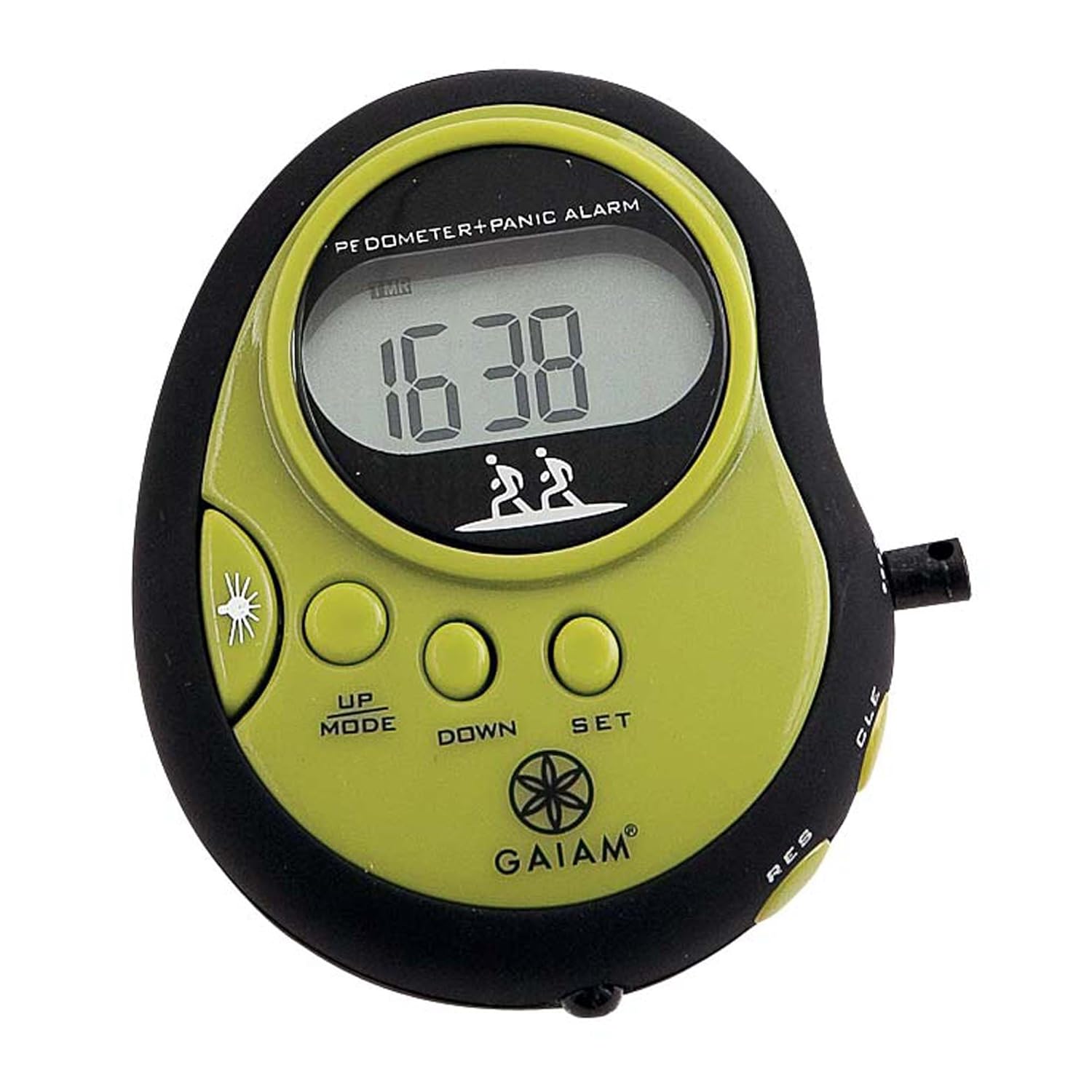
Figura 1: Gaiam Pedometer front view. The device is black and lime green, featuring a digital display, control buttons, and a panic alarm function.
The Gaiam Pedometer is a compact, clip-on device featuring a digital display, control buttons for mode selection and settings, and a built-in panic alarm. It is designed for easy portability and accurate tracking of your physical activity.
Configuració
1. Instal·lació de la bateria
The pedometer requires a Lithium-Ion battery (included). To install or replace the battery:
- Locate the battery compartment cover on the back of the pedometer.
- Feu servir un tornavís petit o una moneda per obrir la tapa.
- Insert the battery, ensuring the correct polarity (+/-).
- Replace the cover and secure it.
2. Configuració inicial
After battery installation, the display may flash. Follow these steps to set up your personal data:
- Hora: Premeu el botó SET button to enter time setting mode. Use UP/MODE i ABAIX buttons to adjust hours and minutes. Press SET per confirmar cada selecció.
- Longitud del pas: Accurate stride length is crucial for distance calculation. Measure your average stride (distance covered in one step). Enter this value in centimeters or inches.
- Pes: Enter your body weight in kilograms or pounds for calorie calculation.
- Target Steps: Optionally, set a daily step target.
3. Attaching the Pedometer
For accurate readings, attach the pedometer securely to your waistband or belt, close to your hip. Ensure it is positioned vertically and does not swing freely.
Instruccions de funcionament
1. Funcions bàsiques
- Encès/apagat: The pedometer typically powers on automatically when motion is detected or a button is pressed. It may enter a low-power sleep mode after a period of inactivity.
- ViewDades d'ing: Premeu el botó UP/MODE button to cycle through different display modes: Steps, Distance, Calories, Time.
- Restabliment de dades: To clear daily data (steps, distance, calories), press and hold the CLE (Clear) button for a few seconds until the display resets to zero. This typically resets daily data, not personal settings.
2. Panic Alarm
The pedometer includes a panic alarm feature. To activate the alarm, press and hold the designated alarm button (often marked with a speaker or siren icon, or integrated with another button like RES or a dedicated side button). Release the button to deactivate the alarm.
3. Using the Audio CD
The included Audio CD provides guided walking or exercise routines at an intermediate level. Insert the CD into a compatible CD player and follow the audio instructions. It is designed to enhance your fitness experience by providing structured workouts.
Manteniment
- Neteja: Netegeu el podòmetre amb un drap suau i sec. No utilitzeu productes de neteja abrasius ni submergiu el dispositiu en aigua.
- Emmagatzematge: Store the pedometer in a cool, dry place away from direct sunlight and extreme temperatures. If storing for an extended period, consider removing the battery to prevent leakage.
- Resistència a l'aigua: This device is not waterproof. Avoid exposure to rain, sweat, or other liquids.
Resolució de problemes
| Problema | Solució |
|---|---|
| Sense pantalla o pantalla tènue. | Comproveu la instal·lació de la bateria. Substituïu la bateria si cal. |
| Recompte de passos inexacte. | Ensure pedometer is securely attached and positioned vertically. Verify stride length setting is accurate. Avoid excessive shaking or non-walking movements. |
| Els botons no responen. | Remove and reinsert the battery to perform a soft reset. If the issue persists, the device may require service. |
| Panic alarm not working. | Ensure the battery has sufficient charge. Check if the alarm button is being pressed correctly and held for the required duration. |
Especificacions
- Número de model: 05-51976
- Marca: Gaiam
- Tipus de sensor: Podòmetre
- Tipus de bateria: Ió de liti
- Pes de l'article: 113 g (3.99 unces)
- Dimensions del producte: 20.32 x 15.88 x 0.64 cm
- UPC: 018713519764
Garantia i Suport
For warranty information or technical support, please refer to the contact details provided with your product packaging or visit the official Gaiam weblloc web. Conserveu el rebut de compra com a comprovant de compra.