
Introducció
The Oregon Scientific WR601 Portable Weather Radio is designed to provide essential emergency alerts and weather information. This device monitors U.S. Emergency All Hazards and Emergency Alert System (EAS) weather bulletins, warnings, and forecasts. It receives all National Oceanic & Atmospheric Association (NOAA) reports, offering comprehensive emergency advisories on events such as tornadoes, severe thunderstorms, floods, evacuations, and civil dangers.
Les característiques clau inclouen:
- Monitoring of U.S. Emergency All Hazards and EAS weather bulletins.
- Reception of all NOAA reports for emergency advisories.
- Flexible programming for Specific Area Message Encoding (SAME) broadcasts in up to 6 different counties.
- A 100-decibel audio alarm with a visual alert signal.
- Three levels of NOAA messages: Statement, Watch, and Warning.
- Non-volatile memory backup to retain settings.
- Dual alarm with snooze function.
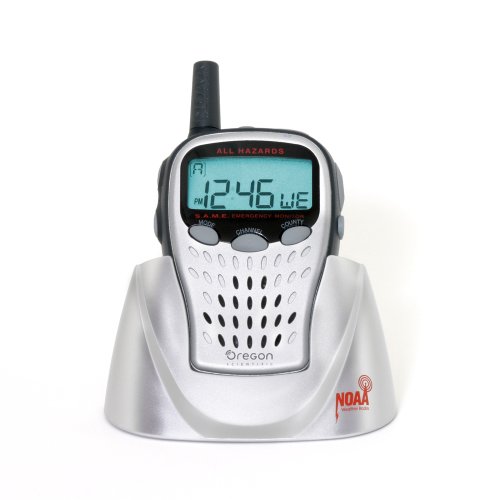
Figure 1: Oregon Scientific WR601 Portable Weather Radio with charging dock and belt clip.
Configuració
1. Desembalatge i inspecció inicial
Carefully remove all components from the packaging. Verify that the radio, AC adapter, and belt clip are present. Inspect the unit for any visible damage.
2. Instal·lació de la bateria
The WR601 requires 3 AA batteries for portable operation and as a backup power source. Locate the battery compartment on the back of the unit. Open the compartment and insert the batteries, ensuring correct polarity (+/-). Close the compartment securely. It is recommended to use fresh batteries and regularly check for any signs of corrosion, especially if the unit has been stored for extended periods.
3. Connexió de l'adaptador de CA
For continuous power and to prevent battery drain, connect the included AC adapter to the radio and a standard electrical outlet. Place the radio in its convenient stand for charging and stable placement. Ensure the AC adapter is firmly seated to maintain power.
4. Configuració de l'hora i la data
Upon initial power-on or after battery replacement, you may need to set the current time and date. Refer to the on-screen prompts and the radio's buttons for navigation. This process can be intricate; follow the instructions carefully.
5. Programming SAME Codes
The Specific Area Message Encoding (SAME) feature allows you to receive localized warnings for up to 6 different counties. To program SAME codes:
- Access the programming menu on the radio.
- Enter the 6-digit SAME code for your desired county. These codes can typically be found on your local NOAA weather radio website or by contacting your local emergency management agency.
- Repeat for additional counties, up to a maximum of six.
Note: Programming the SAME codes can be complex. Patience and careful adherence to the on-screen instructions are advised.
Funcionament de la ràdio
1. Monitoring Weather Channels
The radio automatically monitors NOAA weather channels for alerts. Ensure the radio is powered on and has adequate reception. The display will show the current time and monitoring status.
2. Recepció d'alertes
When an emergency alert or weather warning is broadcast for your programmed SAME areas, the radio will activate a 100-decibel audio alarm and a visual alert signal. This ensures you are promptly notified of critical information.
3. NOAA Message Levels
The radio distinguishes between three levels of NOAA messages:
- Declaració: General information or updates.
- Mira: Conditions are favorable for a hazardous weather event to occur.
- Avís: A hazardous weather event is imminent or occurring.
4. Accessing Weather Forecasts
The radio can provide access to current weather forecasts. Consult the radio's interface for options to manually check the latest forecast information.
5. Dual Alarm with Snooze
The WR601 includes a dual alarm function with snooze. This can be set for daily use, separate from emergency alerts. Refer to the radio's menu for setting and managing these alarms.
Manteniment
1. Cura i substitució de la bateria
Regularly inspect the battery compartment for signs of corrosion, especially if the radio is not frequently used or if old batteries are left inside. Corroded batteries can damage the unit and prevent proper operation. Replace batteries promptly when the low battery indicator appears or if the unit is not functioning correctly on battery power. Always use fresh, high-quality AA batteries.
2. Instruccions de neteja
To clean the radio, use a soft, dry cloth. For stubborn dirt, a slightly damp cloth can be used, followed by a dry cloth. Do not use abrasive cleaners, solvents, or strong chemicals, as these can damage the radio's finish and internal components. Ensure no moisture enters the device openings.
Resolució de problemes
1. La ràdio no s'encén
- Check if the AC adapter is securely connected to both the radio and the power outlet.
- If using batteries, ensure they are correctly installed and not depleted. Replace with fresh batteries if necessary.
- Inspect the battery compartment for corrosion and clean contacts if present.
2. No Emergency Alerts Received
- Verify that the SAME codes for your area are correctly programmed. Incorrect codes will prevent localized alerts.
- Ensure the radio is placed in an area with good reception for NOAA channels. Obstructions or interference can affect signal quality.
- Confirm that the alert volume is not set to minimum or muted.
3. Difficulty with Programming or Settings
- The programming interface can be challenging. Refer to the detailed instructions in this manual and attempt the steps carefully.
- If persistent issues occur, try resetting the device to factory defaults (if available) and re-enter all settings.
4. Poor Audio Quality or Reception
- Ajusteu l'antena per a una recepció òptima del senyal.
- Relocate the radio to a different position, away from potential sources of interference (e.g., other electronic devices, large metal objects).
Especificacions
| Dimensions del producte | 2.91 x 1.38 x 5.39 polzades |
| Pes de l'article | 4.6 unces |
| Número de model | WR601N |
| Fabricant | Oregon Scientific |
| Bateries | Es necessiten 3 piles AA |
Garantia i Suport
For warranty information, technical support, or service inquiries, please refer to the documentation included with your purchase or visit the official Oregon Scientific weblloc web. Conserveu el comprovant de compra per a reclamacions de garantia.