
Producte acabatview
The Western Digital My Book Essential external hard drive provides 1 terabyte (1TB) of storage capacity. Designed for data backup and archiving, this device features a high-speed USB 2.0 interface for broad compatibility and efficient data transfer. Its design allows it to power on and off in conjunction with your computer, contributing to energy efficiency.
Característiques principals:
- Instal·lació senzilla: Plug-and-play functionality for immediate use.
- Disseny compacte: Occupies minimal desk space, similar to a paperback book.
- Eficient energètic: Automatically enters standby mode after 10 minutes of inactivity to conserve power.
- Interfície USB 2.0: Offers convenient and compatible connectivity with various computers.
- PC and Mac Compatible: Supports Windows 2000/XP/Vista and Mac OS X 10.4.8 or later.
Què hi ha a la caixa
Verifiqueu que tots els elements següents s'inclouen al paquet del producte:
- Western Digital My Book Essential WDBAAF0010HBK Hard Drive
- Cable USB
- Adaptador de CA
- Guia d'instal·lació ràpida
Instruccions de configuració
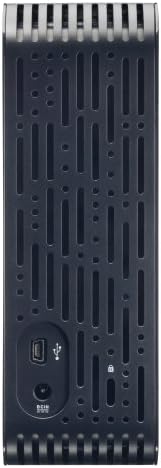
- Connecteu l'adaptador de CA: Plug the AC adapter into the power port on the back of the My Book Essential drive. Connect the other end of the AC adapter to a power outlet.
- Connecteu el cable USB: Connect one end of the supplied USB cable to the USB 2.0 port on the back of the My Book Essential drive. Connect the other end of the USB cable to an available USB port on your computer.
- Encès: The drive is designed to power on automatically with your computer. Ensure your computer is powered on. The drive's indicator light will illuminate.
- Reconeixement inicial: Your operating system (Windows or Mac OS) should automatically detect and install the necessary drivers for the drive. This process may take a few moments.
- Accés a la unitat: Once installed, the drive will appear as a new storage device in 'My Computer' (Windows) or 'Finder' (Mac OS). You can now begin transferring files.
Note: For detailed operating system-specific instructions or if the drive is not recognized, refer to the included Quick Install Guide or the Western Digital support weblloc.
Instruccions de funcionament
The Western Digital My Book Essential drive functions as an external storage device for your computer. It is ideal for backing up important files, storing large media libraries, and freeing up space on your computer's internal hard drive.
Transferència de dades:
- Per transferir files, simply drag and drop them to and from the My Book Essential drive icon in your computer's file explorador.
- For optimal performance, ensure the USB cable is securely connected to a USB 2.0 port on your computer.
Gestió d'energia:
- The drive is designed to turn on and off with your computer. When your computer is shut down or put to sleep, the drive will also enter a low-power state.
- After 10 minutes of inactivity, the drive will automatically enter standby mode to save energy. It will resume normal operation when accessed.
Eliminació segura:
Always use the "Safely Remove Hardware" option (Windows) or drag the drive icon to the Trash/Eject (Mac OS) before disconnecting the USB cable to prevent data corruption.
Manteniment
Proper maintenance ensures the longevity and reliable performance of your external hard drive.
- Cura física: Keep the drive in a stable, well-ventilated area. Avoid exposing it to extreme temperatures, direct sunlight, or moisture. Do not block the ventilation slots.
- Neteja: Use a soft, dry cloth to clean the exterior of the drive. Do not use liquid cleaners or aerosols.
- Còpia de seguretat de dades: Regularly back up critical data stored on the external drive to another location (e.g., cloud storage, another hard drive) to prevent data loss in case of unforeseen issues.
- Actualitzacions de firmware: Periodically check the Western Digital support weblloc web per obtenir actualitzacions de firmware disponibles per al vostre model.
Resolució de problemes
If you encounter issues with your My Book Essential drive, try the following steps:
- Unitat no detectada:
- Ensure the AC adapter is securely connected to both the drive and a working power outlet.
- Verify the USB cable is firmly connected to both the drive and your computer's USB port. Try a different USB port or cable if available.
- Reinicieu l'ordinador.
- Check your computer's Disk Management (Windows) or Disk Utility (Mac OS) to see if the drive is recognized but unformatted or unallocated.
- Transferència lenta de dades:
- Ensure you are using a USB 2.0 port. While compatible with USB 1.1, performance will be significantly slower.
- Eviteu executar diverses aplicacions exigents durant grans períodes file transferències.
- Check for background processes that might be using system resources or disk I/O.
- Drive Light Not On:
- Confirm the AC adapter is connected and the power outlet is active.
- If connected to a computer, ensure the computer is powered on and not in sleep mode.
For further assistance, consult the Quick Install Guide or visit the Western Digital support weblloc.
Especificacions
| Característica | Detall |
|---|---|
| Nom del model | My Book Essential Edition 2.0 |
| Número de model | WDH1U10000N |
| Capacitat d'emmagatzematge digital | 1024 GB (1 TB) |
| Interfície de disc dur | USB 2.0 |
| Tecnologia de connectivitat | USB |
| Factor de forma del disc dur | 3.5 polzades |
| Descripció del disc dur | Escriptori |
| Dispositius compatibles | Escriptori |
| Tipus d'instal·lació | Connectar-se |
| Color | Negre |
| Velocitat de rotació del disc dur | 7200 RPM |
| Velocitat de lectura | 60 megabytes per segon |
| Velocitat dels mitjans | 30 MB/s |
| Material de tancament | Hard Plastic or Metal |
| Pes de l'article | 3.3 lliures |
| Requisits del sistema | Available USB port, Windows 2000/XP/Vista, Mac OS X 10.4.8 or later |
Garantia i Suport
The Western Digital My Book Essential drive comes with a Garantia limitada d'1 any. For warranty claims, technical support, or to access additional resources such as drivers and software, please visit the official Western Digital support weblloc.
Assistència en línia: support.wdc.com
Imatges del producte




Vídeos de productes
WD Hard Drives: Essential vs. Home Edition Comparison
This video provides a comparison between the Western Digital My Book Essential and Home Edition hard drives, highlighting their physical differences and connectivity options. It helps users understand the specific features of the Essential model in context.