
Charter C4000 & S4000
Charter Ocap–4 (C4000 & S4000) 4-Device Universal Remote Control User Manual
Model: C4000 & S4000
1. Introducció
This manual provides instructions for the setup, operation, and maintenance of your Charter Ocap–4 (C4000 & S4000) 4-device universal remote control. This remote is designed to simplify your home entertainment experience by controlling up to four different audio/video devices, including your television, DVR, cable box, and other compatible equipment.

Imatge 1.1: En angle view of the Charter Ocap-4 universal remote control. This image displays the silver-colored remote with various gray, blue, red, and green buttons for different functions, including power, channel, volume, and device selection. The Charter logo is visible at the bottom right.
2. Característiques clau
The Charter Ocap–4 remote control offers several features for enhanced usability:
- Control universal: Preprogrammed to operate cable converters provided by your cable service provider.
- DVR/PVR Functionality: Dedicated keys for controlling popular functions on your Digital Video Recorder (DVR) or Personal Video Recorder (PVR).
- Programmable Master Power: A single key to turn on/off multiple home entertainment devices simultaneously.
- Color-Coded Keys: Buttons are color-coded to help quickly locate frequently used functions.
- Biblioteca de codi extensa: Includes a comprehensive code library for various video and audio devices.
- Bloqueig de volum: Allows you to lock the volume controls to a specific device mode or to individual modes.
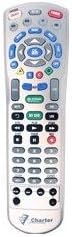
Imatge 2.1: Davant view of the Charter Ocap-4 universal remote control. This image provides a clear, straight-on view of all buttons and their labels, including the device selection buttons (TV, VCR, DVD, CBL), number pad, navigation, and function keys.
3. Configuració
3.1. Instal·lació de la bateria
- Traieu la tapa de la bateria a la part posterior del comandament a distància.
- Insert two (2) AA batteries, ensuring correct polarity (+ and -) as indicated inside the battery compartment.
- Substituïu la tapa de la bateria.
3.2. Programació de dispositius
To control your devices, the remote must be programmed with the correct codes. The following steps outline the general programming procedure. For specific device codes, refer to the code library provided with your remote or consult your cable service provider's weblloc.
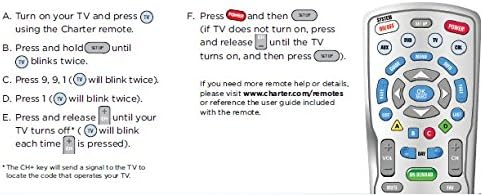
Imatge 3.1: Diagram illustrating the steps for programming the Charter Ocap-4 remote control to a television. The image shows a simplified remote layout and six steps (A-F) for code entry and verification.
General Programming Steps (Example for TV):
- Turn on your TV and press the TV button on the Charter remote.
- Manteniu premut el botó CONFIGURACIÓ botó fins que el TV el botó parpelleja dues vegades.
- Introduïu el codi de 3 dígits 991. El TV button will blink twice.
- Premeu el botó PODER botó.
- Premeu i deixeu anar CH+ (Channel Up) button repeatedly until your TV turns off. The TV button will blink each time CH+ està pressionat.
- Un cop apagat el televisor, premeu el botó CONFIGURACIÓ botó per desar el codi. El TV button will blink twice to confirm.
Nota: If your TV does not turn on after programming, press and release the PODER button until the TV turns on, then press CONFIGURACIÓ. Repeat this process for other devices (VCR, DVD, CBL) using their respective device buttons.
4. Funcionament del comandament a distància
After programming, you can use your Charter Ocap–4 remote to control your devices.
- Selecció del dispositiu: Press the desired device button (TV, VCR, DVD, CBL) to select the device you wish to control. The selected device button will illuminate.
- Encès/apagat: Premeu el botó PODER botó per encendre o apagar el dispositiu seleccionat.
- Poder Mestre: To use the programmable Master Power feature, program it according to the instructions in your full user guide (if available) or your cable provider's website. This allows a single press to control multiple devices.
- Control de volum: Utilitza el VOL+ i VOL- buttons to adjust the volume. The MUT El botó silencia l'àudio.
- Navegació de canals: Utilitza el CH+ i CH- buttons to change channels. The number pad can be used for direct channel entry.
- DVR/PVR Functions: Utilitzeu el dedicat REC, JUGAR, PAUSA, STOP, FF (Avançament ràpid) i REW (Rewind) buttons for controlling your DVR or PVR.
- Menu and Guide: Access your device's menu or program guide using the MENÚ i GUIA botons.
- Bloqueig de volum: This feature allows you to control the volume of one specific device (e.g., your TV) regardless of which device mode the remote is currently in. Consult your cable provider's instructions for setting up Volume Lock.
5. Manteniment
- Neteja: Netegeu el comandament a distància amb un drap suau i sec. Eviteu utilitzar productes de neteja o dissolvents abrasius.
- Substitució de la bateria: Replace batteries when the remote's indicator light becomes dim or the remote stops responding consistently. Always replace both batteries at the same time with new AA alkaline batteries.
- Emmagatzematge: Guardeu el comandament a distància en un lloc fresc i sec, allunyat de la llum solar directa i de temperatures extremes.
6. Solució De Problemes
If you encounter issues with your remote control, try the following solutions:
- El comandament a distància no respon:
- Ensure there are fresh batteries installed correctly.
- Check for any obstructions between the remote and the device.
- Verify that the correct device button (TV, VCR, DVD, CBL) is selected.
- El dispositiu no respon després de la programació:
- The entered code may be incorrect. Repeat the programming steps (Section 3.2) and try other codes listed for your device brand in the remote's code library.
- Assegureu-vos que el dispositiu estigui encès abans d'intentar programar-lo.
- Algunes funcions no funcionen:
- És possible que no tots els dispositius siguin compatibles amb totes les funcions.
- Assegureu-vos que el comandament a distància estigui en el mode de dispositiu correcte per a la funció que esteu intentant utilitzar.
7. Especificacions
| Marca | Carta |
| Números de model | C4000, S4000 |
| Dimensions del producte | 8 x 2.2 x 1.4 polzades |
| Pes de l'article | 1 unces |
| Piles necessàries | 2 piles AA |
| Màxim de dispositius compatibles | 4 |
| Dispositius compatibles | Television, DVR, Cable Box, VCR, DVD (after programming) |
| Color | Plata |
8. Suport
For additional assistance, device codes, or advanced programming instructions, please refer to the official user guide provided by your cable service provider or visit their support weblloc.
Example Link: www.charter.com/remotes (This is a placeholder link based on the image content, actual link may vary).
9. Informació de la garantia
Specific warranty details for the Charter Ocap–4 remote control are typically provided at the time of purchase or can be found on the manufacturer's or your cable service provider's official weblloc web. Si us plau, conserveu el comprovant de compra per a reclamacions de garantia.
Ask a question about this manual
Ask about setup, troubleshooting, compatibility, parts, safety, or missing instructions. Manuals+ will review the question and use this page’s manual context to help answer it.