
1. Introducció
This manual provides detailed instructions for the safe and efficient use of your Vivitar VIVICAM-7340RED 7.0MP Digital Camera. Please read this manual thoroughly before operating the camera and keep it for future reference. Your camera is designed for capturing high-quality still images and video recordings with ease.
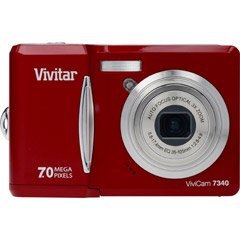
Figura 1: Frontal view of the Vivitar VIVICAM-7340RED Digital Camera. This image shows the lens, flash, and the overall compact design of the camera.
2. Configuració
2.1. Introducció de piles
- Localitzeu la tapa del compartiment de la bateria a la part inferior o lateral de la càmera.
- Feu lliscar el pestell per obrir la coberta.
- Insert the required batteries (typically AA or AAA, refer to packaging) according to the polarity indicators (+ and -) inside the compartment.
- Tanqueu la tapa del compartiment de la bateria de manera segura fins que encaixi al seu lloc.
Note: Ensure batteries are inserted with correct polarity as indicated inside the compartment.
2.2. Inserció d'una targeta de memòria
Your camera requires a compatible memory card (e.g., SD card) to store photos and videos. The memory card slot is usually located near the battery compartment or on the side of the camera.
- Obriu la tapa de la ranura de la targeta de memòria.
- Insert the memory card with the metal contacts facing the correct direction (refer to the diagram near the slot). Push gently until it clicks into place.
- Tanqueu la tapa de la ranura de la targeta de memòria.
Note: Do not force the memory card. If it does not insert easily, check its orientation.
2.3. Encès / apagat
- Per encendre la càmera, premeu el botó PODER button. The LCD screen will illuminate.
- To turn off the camera, press and hold the PODER button again until the LCD screen turns off.
2.4. Initial Settings (Date & Time)
Upon first use or after battery replacement, you may need to set the date and time. Follow the on-screen prompts or navigate to the MENÚ > CONFIGURACIÓ > DATA/HORA option to adjust these settings.
3. Funcionament de la càmera
3.1. Fer fotos
- Turn on the camera. Ensure it is in photo capture mode (usually indicated by a camera icon on the LCD).
- Enquadra la teva foto amb la pantalla LCD de 2.4 polzades.
- Press the shutter button halfway down to allow the camera to focus. A green frame or beep typically indicates focus lock.
- Premeu el botó de l'obturador completament cap avall per capturar la imatge.
3.2. Ús del zoom òptic
Your camera features a 3x optical zoom. Use the zoom lever (often located around the shutter button) to zoom in or out. Optical zoom adjusts the lens elements to magnify the subject without losing image quality.
- Empenyeu la palanca del zoom cap a T (Teleobjectiu) per ampliar la imatge.
- Empenyeu la palanca del zoom cap a W (Amplia) per allunyar la imatge.
The camera also has a 5x digital zoom, which can be accessed after reaching the maximum optical zoom. Digital zoom digitally enlarges the image, which may result in reduced image quality.
3.3. Gravació de vídeos
- Switch the camera to video recording mode (usually via a mode dial or menu option).
- Press the shutter button to start recording. A red dot or timer on the LCD indicates recording is in progress.
- Torneu a prémer el botó de l'obturador per aturar la gravació.
3.4. Viewfotos i vídeos
- Premeu el botó REPRODUCCIÓ button (often indicated by a play icon).
- Feu servir els botons de direcció per navegar per les imatges i els vídeos capturats.
- Per reproduir un vídeo, seleccioneu-lo i premeu el botó OK or JUGAR botó.
3.5. Transferència Files to a Computer (PictBridge)
Your camera is PictBridge compatible, allowing direct printing to compatible printers. For transferring files a un ordinador:
- Connecteu la càmera a l'ordinador mitjançant el cable USB proporcionat.
- Turn on the camera. It should appear as a removable disk or device on your computer.
- Open the camera's folder and copy the desired photos and videos to your computer.
- Safely eject the camera from your computer before disconnecting the USB cable.
4. Manteniment
4.1. Neteja de la càmera
- Lent: Feu servir un drap suau i sense borrissol dissenyat específicament per a objectius de càmera. Netegeu suaument amb moviments circulars. Eviteu utilitzar productes químics agressius.
- Pantalla LCD: Netegeu amb un drap suau i sec. Per a taques difícils, apliqueu una mica deamp cloth (water only) can be used, followed by a dry wipe.
- Cos de la càmera: Feu servir un drap suau i sec per netejar la pols i les empremtes dactilars.
Do not use solvents, alcohol, or abrasive cleaners on any part of the camera.
4.2. Cura de la bateria
- Traieu les piles si no heu d'utilitzar la càmera durant un període prolongat per evitar fuites.
- Utilitzeu només els tipus de bateries recomanats.
- Eliminar les piles velles de manera responsable d'acord amb la normativa local.
4.3. Emmagatzematge
Store the camera in a cool, dry place away from direct sunlight, extreme temperatures, and high humidity. Use the included case for protection during transport.
5. Solució De Problemes
| Problema | Causa possible | Solució |
|---|---|---|
| La càmera no s'encén. | Piles gastades o incorrectament inserides. | Canvieu les piles o assegureu-vos que estiguin inserides amb la polaritat correcta. |
| Les fotos són borroses. | Tremolor de la càmera, objectiu desenfocat o brut. | Hold camera steady, ensure focus is achieved before shooting, clean the lens. |
| Missatge "Error de la targeta de memòria". | Card not inserted correctly, damaged, or full. | Reinsert card, try a different card, or delete files per alliberar espai. |
| El flaix no s'encén. | Flash mode set to OFF, or batteries low. | Check flash settings in menu, replace batteries. |
6. Especificacions
| Característica | Detall |
|---|---|
| Marca | Vivitar |
| Número de model | VIVICAM-7340RED |
| Resolució de fixes efectius | 7 MP |
| Zoom òptic | 3x |
| Zoom digital | 5x |
| Mida de pantalla LCD | 2.4 polzades |
| Gravació de vídeo | Up to 640 x 480 at 30fps |
| Resolució d'imatge | Fins a 3072 x 2304 |
| Enfocament automàtic | Sí |
| PictBridge Compatible | Sí |
| Font d'alimentació | Bateries (incloses) |
| Color | Vermell |