
KLH KL-300i
KLH AUDIO KL-300i Nostalgia 5-n-1 System
Model: KL-300i
Introducció
Gràcies per la compraasing the KLH AUDIO KL-300i Nostalgia 5-n-1 System. This integrated audio system combines classic and modern audio playback capabilities, including a turntable, CD player, cassette player, AM/FM radio, and an iPod dock. This manual provides essential information for setting up, operating, and maintaining your system to ensure optimal performance and longevity.
Informació de seguretat
Please read all safety instructions carefully before operating this product. Keep this manual for future reference.
- Font d'alimentació: Connecteu la unitat només a una presa de corrent de CA del volum especificat.tage.
- Ventilació: Assegureu-vos que hi hagi una ventilació adequada. No bloquegeu les obertures de ventilació.
- Aigua i humitat: No exposeu la unitat a la pluja ni a la humitat. No col·loqueu objectes plens de líquids, com ara gerros, a sobre de la unitat.
- Calor: No col·loqueu la unitat a prop de fonts de calor com ara radiadors, registres de calor, estufes o altres aparells (inclosos amplificadors) que produeixen calor.
- Neteja: Desendolleu la unitat de la presa de corrent abans de netejar-la. Feu servir només un drap sec.
- Manteniment: No intenteu atendre aquest producte vosaltres mateixos. Consulteu tots els serveis a personal de servei qualificat.
Contingut del paquet
Verifiqueu que tots els elements que s'enumeren a continuació s'inclouen al paquet:
- KLH AUDIO KL-300i Main Unit
- Control remot
- Cable d'entrada auxiliar
- AM/FM Antenna Wire
- Manual d'instruccions (aquest document)
Producte acabatview
Familiarize yourself with the various components and controls of your KLH AUDIO KL-300i system.
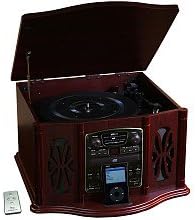
This image displays the KLH AUDIO KL-300i Nostalgia 5-n-1 System. The unit features a dark wood finish. The top lid is open, revealing a turntable. Below the turntable, the front panel includes controls for the CD player, AM/FM radio tuner, and an iPod dock. A small remote control is visible to the left of the main unit.
Controls del panell frontal:
- Botó d'encesa: Encén o apaga la unitat.
- Selector de funcions: Switches between Phono, CD, Radio, iPod, and Aux modes.
- Pom de volum: Ajusta el nivell de volum principal.
- CD Player Controls: Reproduir/Pausa, Aturar, Saltar endavant/enrere.
- Sintonitzador de ràdio: AM/FM band selector, Tuning knob.
- Base per a iPod: Connector for iPod devices.
- Aux-In Jack: Entrada de 3.5 mm per a dispositius d'àudio externs.
- Auriculars Jack: Sortida de 3.5 mm per a escolta privada.
Tauler superior:
- Plataforma giratòria: For playing vinyl records.
- Tapa: Protects the turntable when not in use.
Tauler lateral:
- Plata de cassets: For playing audio cassette tapes.
Configuració
Follow these steps for initial setup of your audio system.
- Col·locació: Place the unit on a stable, flat surface away from direct sunlight, heat sources, and excessive dust or moisture. Ensure there is adequate space around the unit for ventilation.
- Connectar l'antena: For optimal AM/FM radio reception, connect the supplied antenna wire to the antenna terminal on the rear of the unit. Extend the wire fully for better reception.
- Connexió d'alimentació: Connecteu el cable d'alimentació de CA a una presa de corrent estàndard.
- Encesa inicial: Press the Power button on the front panel to turn on the unit.
Instruccions de funcionament
Funcionament general:
- Encès/apagat: Premeu el botó d'engegada per encendre o apagar la unitat.
- Selecció de la funció: Use the Function Selector knob or buttons to choose your desired audio source (Phono, CD, Radio, iPod, Aux).
- Ajust de volum: Rotate the Volume knob to increase or decrease the sound level.
Funcionament de la placa giratòria:
- Lift the lid of the unit.
- Col·loqueu un disc de vinil al plat del tocadiscos.
- Select the appropriate speed (33 1/3, 45, or 78 RPM) using the speed selector switch. For 45 RPM records, place the included adapter on the spindle if needed.
- Gently lift the tonearm and position the stylus over the desired starting groove of the record.
- Baixeu el braç lentament sobre el disc. La reproducció començarà automàticament.
- To stop playback, gently lift the tonearm and return it to its rest.
Funcionament del reproductor de CD:
- Press the Function Selector to CD mode.
- Press the Eject button to open the CD tray.
- Col·loqueu un CD amb l'etiqueta cap amunt a la safata.
- Press the Eject button again to close the tray. The CD will begin playing automatically or display the track count.
- Use the Play/Pause, Stop, and Skip buttons to control playback.
Cassette Player Operation:
- Introduïu una cinta de casset a la ranura de casset que hi ha al lateral de la unitat.
- Premeu el botó Reproduir per començar la reproducció.
- Use the Fast Forward (FF) button to advance the tape quickly.
- To stop playback, press the Stop/Eject button. Pressing it halfway will eject the tape.
Funcionament de la ràdio AM/FM:
- Press the Function Selector to Radio mode.
- Select either AM or FM band using the band selector switch.
- Rotate the Tuning knob to search for radio stations.
- Adjust the antenna wire for best reception.
iPod Dock Operation:
- Press the Function Selector to iPod mode.
- Carefully place your compatible iPod device onto the iPod dock connector.
- Use your iPod's controls to select and play music. Audio will be routed through the KLH AUDIO system's speakers.
Aux-In Operation:
- Press the Function Selector to Aux mode.
- Connect an external audio device (e.g., MP3 player, smartphone) to the Aux-In jack on the front panel using the supplied 3.5mm auxiliary cable.
- Play audio from your external device. The sound will be played through the KLH AUDIO system's speakers.
Ús del control remot:
The remote control primarily operates the CD player functions (Play, Pause, Stop, Skip). Note that the remote cannot turn the unit on or off.
Manteniment
Una cura adequada garantirà la longevitat del vostre sistema.
- Neteja de la unitat: Netegeu l'exterior de la unitat amb un drap suau i sec. No utilitzeu productes de neteja abrasius, ceres ni dissolvents.
- Cura del stylus: Handle the turntable stylus with extreme care. Clean the stylus periodically with a soft brush, brushing from back to front.
- Cura de CD/casset: Keep CDs and cassette tapes clean and free of dust. Store them in their cases when not in use.
Resolució de problemes
If you experience issues with your system, refer to the following common problems and solutions.
| Problema | Causa possible | Solució |
|---|---|---|
| Sense poder | El cable d'alimentació no està ben connectat. | Check power cord connection to unit and wall outlet. |
| Sense so | Volum massa baix; Funció incorrecta seleccionada; Auriculars connectats. | Increase volume; Select correct function; Disconnect headphones. |
| La plataforma giratòria no gira | Unit not powered on; Belt dislodged. | Ensure unit is on; Contact service if belt issue suspected. |
| Mala recepció de ràdio | Antena no estesa o no posicionada correctament. | Extend and adjust the antenna wire for better signal. |
| El CD no es reprodueix | CD inserted incorrectly; CD is scratched or dirty. | Ensure CD is label-side up; Clean or replace CD. |
Especificacions
| Característica | Especificació |
|---|---|
| Font d'alimentació | CA 120V ~ 60Hz |
| Dimensions (L x P x A) | Approx. 17" x 17" x 10.5" (43.2 cm x 43.2 cm x 26.7 cm) |
| Velocitats de la placa giratòria | 33 1/3, 45 i 78 RPM |
| Rang de freqüència de ràdio | AM: 530-1710 kHz, FM: 88-108 MHz |
| Compatibilitat amb CD | CD, CD-R / RW |
| Dock per a iPod | Compatible with older generation iPods (30-pin connector) |
Garantia i Suport
This product is covered by a limited manufacturer's warranty. For specific warranty terms and conditions, please refer to the warranty card included with your purchase or contact KLH customer support. If you require technical assistance or have questions not covered in this manual, please contact KLH customer service through their official weblloc web o la informació de contacte proporcionada amb el vostre producte.
Ask a question about this manual
Ask about setup, troubleshooting, compatibility, parts, safety, or missing instructions. Manuals+ will review the question and use this page’s manual context to help answer it.