
1. Introducció
The Carnation CR2 Money Counter is designed for efficient and accurate counting of banknotes, featuring advanced counterfeit detection capabilities. This manual provides instructions for the proper setup, operation, and maintenance of your device to ensure optimal performance and longevity.
Les característiques clau inclouen:
- Counts up to 1500 bills per minute with adjustable speed settings.
- Integrated Ultraviolet (UV), Magnetic (MG), and Infrared (IR) counterfeit detection.
- Interactive touchscreen display for easy operation.
- Batch and Add functions for streamlined counting tasks.
- Compatibility with multiple currencies including USD, Canadian Dollar, and Euro.

Figura 1: Frontal view of the Carnation CR2 Money Counter, illustrating the bill feeder and output stacker.
2. Configuració
Follow these steps to set up your Carnation CR2 Money Counter:
- Desembalatge: Carefully remove the money counter from its packaging. Retain all packaging materials for future transport or storage.
- Col·locació: Place the machine on a stable, flat surface, ensuring adequate ventilation around the unit.
- Connexió d'alimentació: Connect the power cord to the machine's power input port located at the rear. Plug the other end into a standard AC 110V/60HZ (or 220V/50HZ, depending on model) electrical outlet.
- Encès: Locate the power switch, typically on the rear or side of the unit. Flip the switch to the "ON" position. The machine will perform a self-test upon startup.
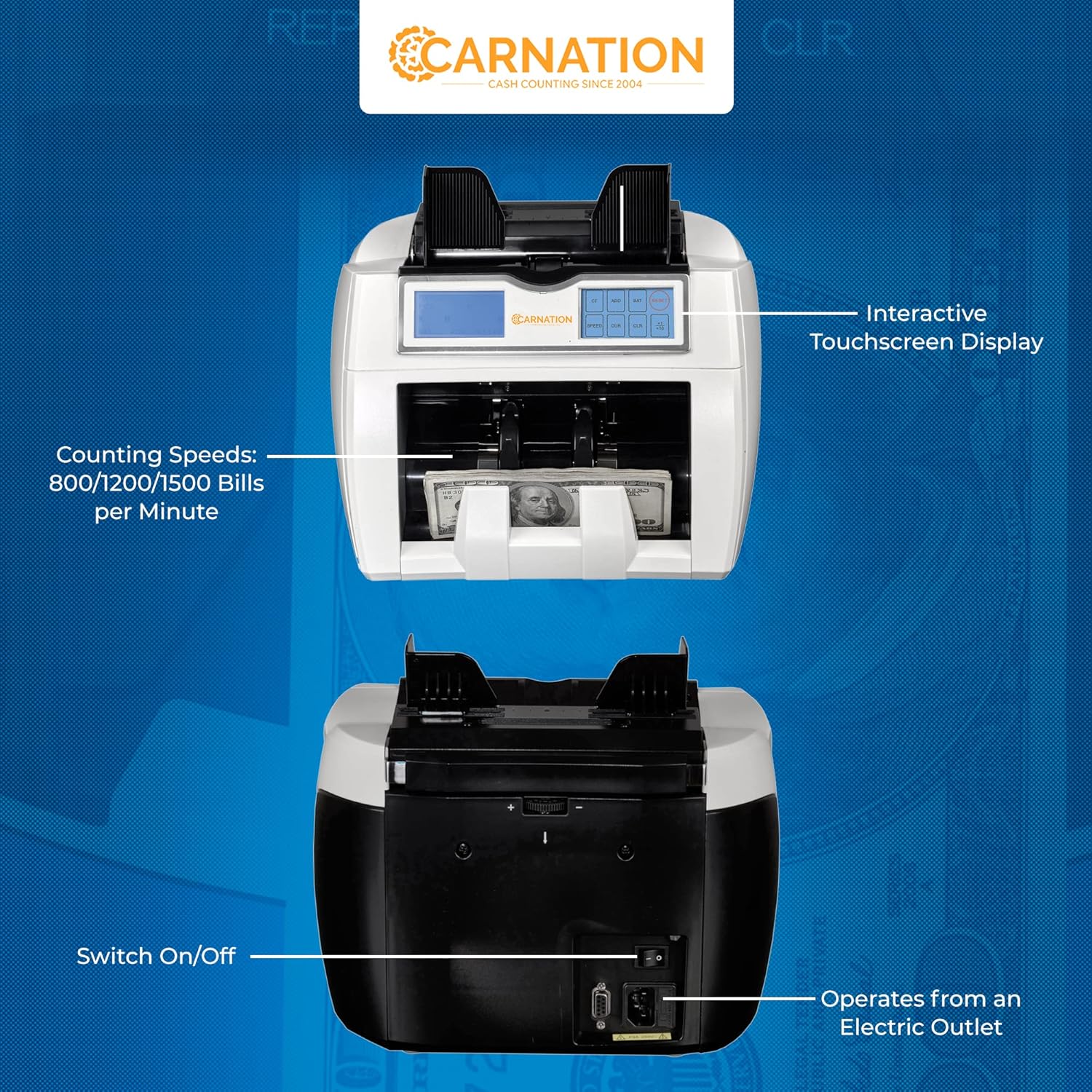
Figura 2: posterior view of the Carnation CR2, highlighting the power switch and electrical outlet connection.
3. Instruccions de funcionament
3.1 Basic Counting
- Prepare Bills: Ensure bills are neatly stacked, free from folds, tears, or foreign objects like paper clips.
- Càrrega de factures: Place the stack of bills into the feeder hopper. The machine will automatically start counting.
- Visualització de lectura: The display will show the total number of bills counted.
Selecció de 3.2 velocitats
The CR2 offers three counting speeds: 800, 1200, and 1500 bills per minute. Use the speed selection buttons on the control panel to adjust the counting speed according to the condition of the banknotes or your preference.
3.3 Funció per lots
The Batch function allows you to count bills into preset quantities.
- Press the "BATCH" button on the touchscreen.
- Enter the desired batch quantity using the numeric keypad.
- Load bills into the hopper. The machine will count until the preset batch quantity is reached, then pause. Remove the batch and the machine will resume counting for the next batch.
3.4 Afegir una funció
The Add function accumulates the total count of multiple stacks of bills.
- Press the "ADD" button on the touchscreen.
- Load the first stack of bills. The machine will count them.
- Load subsequent stacks. The machine will add each new count to the running total.
- Press "ADD" again to exit the function and clear the total.
4. Detecció de falsificacions
The Carnation CR2 is equipped with multiple detection methods to identify counterfeit banknotes:
- Ultraviolet (UV) Detection: Checks for UV security features embedded in genuine banknotes that are not visible to the naked eye.
- Magnetic (MG) Detection: Scans for magnetic ink patterns present in specific areas of authentic currency.
- Infrared (IR) Detection: Verifies the presence of infrared security marks, which are often used for denomination recognition and counterfeit prevention.
If a suspicious bill is detected, the machine will typically stop counting and display an error code. Remove the suspect bill and press a designated button (refer to the touchscreen interface) to resume counting.

Figura 3: Mésview of the Carnation CR2's features, including its interactive touchscreen and various counterfeit detection technologies.
5. Manteniment
Regular maintenance ensures the accuracy and longevity of your money counter.
5.1 Neteja
- Apagar: Always turn off and unplug the machine before cleaning.
- Eliminació de pols: Use a soft brush or compressed air to remove dust and paper residue from the bill path, sensors, and rollers.
- Neteja exterior: Netegeu l'exterior amb un suau, damp drap. Eviteu productes de neteja o dissolvents abrasius.
- Neteja del sensor: Gently clean the sensors (located along the bill path) with a cotton swab lightly dampenriquit amb alcohol isopropílic. Deixeu assecar completament abans d'usar.
5.2 Actualitzacions de programari
The CR2 can connect to a computer for software updates. This allows the machine to identify new denominations and adapt to evolving anti-counterfeit technologies. Refer to the manufacturer's website or contact customer support for instructions on how to perform software updates.
6. Solució De Problemes
This section addresses common issues you might encounter with your Carnation CR2 Money Counter.
| Problema | Causa possible | Solució |
|---|---|---|
| La màquina no s'encén. | Cable d'alimentació no connectat, interruptor apagat o problema amb la presa de corrent. | Ensure power cord is securely connected. Check power switch. Test outlet with another device. |
| Bills are jamming frequently. | Bills are not neatly stacked, worn/damaged bills, or dirty rollers/sensors. | Straighten bills before loading. Remove damaged bills. Clean rollers and sensors as per Maintenance section. Adjust bill guides if available. |
| Recompte inexacte. | Dirty sensors, worn rollers, or incorrect bill loading. | Clean sensors. Ensure bills are loaded correctly. If problem persists, contact support. |
| Counterfeit detection errors. | Dirty sensors, heavily worn bills, or outdated software. | Clean UV, MG, and IR sensors. Try counting the bill manually to verify. Consider a software update. |
| Es mostren els codis d'error. | Problema intern específic. | Refer to the full user manual (if provided separately) for a list of error codes and their solutions. If not available, contact customer support. |
7. Especificacions
| Característica | Detall |
|---|---|
| Model | CR2 |
| Velocitat de recompte | 800, 1200, 1500 bills/minute (adjustable) |
| Capacitat de l'alimentació | 400 Bills |
| Capacitat del transportista | 300 Bills |
| Detecció de falsificacions | UV (Ultraviolet), MG (Magnetic), IR (Infrared) |
| Mostra | Touchscreen, 4-digit LED for Counting/Preset |
| Consum d'energia | 75W |
| Font d'alimentació | AC 110V/60HZ (or 220V/50HZ) |
| Dimensions (N.W./PC) | 10.5"x8.1"x9.8" (16.5 lb) |
| Monedes admeses | USD, Canadian Dollar, Euro, and others |
8. Garantia i Suport
8.1 Informació de la garantia
The Carnation CR2 Money Counter comes with a complimentary 1-year warranty from the date of purchase. This warranty covers defects in materials and workmanship under normal use. For specific terms and conditions, please refer to your purchase documentation or contact Carnation customer support.
Additionally, a 30-day return policy is offered for complete satisfaction. If you are not satisfied with the product, a free replacement or refund may be available within 30 days of purchase.
8.2 Atenció al client
For technical assistance, troubleshooting beyond this manual, or warranty claims, please contact Carnation customer support. Contact information can typically be found on the manufacturer's weblloc web o l'embalatge del producte.