
1. Introducció
This manual provides essential instructions for the safe and effective use of your Health o meter 2595KL Digital Chair Scale. This scale is designed for weighing individuals who cannot stand on a conventional scale or who do not use a wheelchair, offering a capacity of up to 600 lb (280 kg). Please read this manual thoroughly before operating the device.
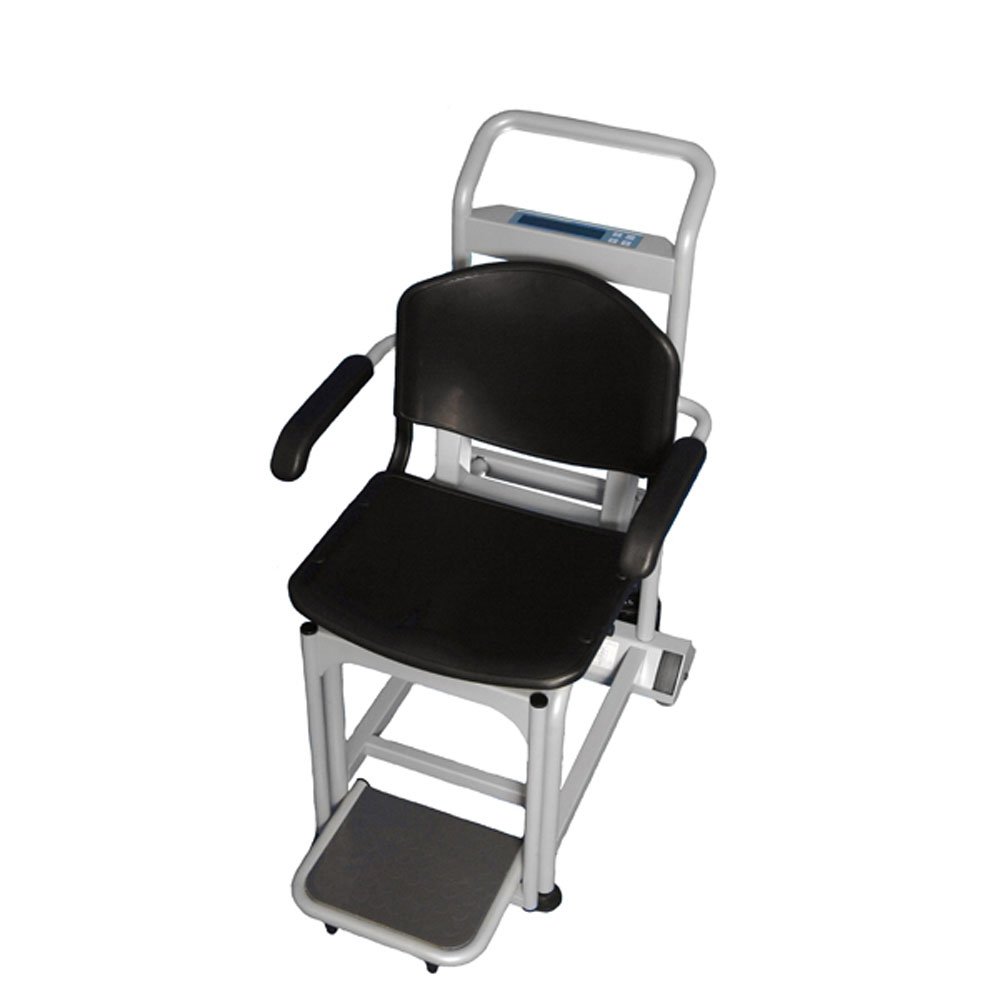
Figura 1: Health o meter 2595KL Digital Chair Scale. This image displays the chair scale from an elevated front-right perspective, showing the black padded seat and backrest, grey metal frame, armrests, and a footrest. The digital display unit is visible at the top of the backrest.
2. Informació de seguretat
Always adhere to the following safety precautions to prevent injury or damage to the scale:
- Ensure the scale is placed on a firm, level surface before use.
- No supereu la capacitat màxima de pes de 600 kg (280 lliures).
- Always assist patients when transferring them onto and off the scale.
- Keep hands and clothing clear of moving parts, especially the footrest and armrests.
- Do not attempt to disassemble or repair the scale yourself. Refer to qualified service personnel.
- Keep the scale clean and dry. Avoid exposure to excessive moisture.
3. Configuració
3.1 Desembalatge
Carefully remove all components from the packaging. Inspect the scale for any signs of damage during transit. Retain packaging materials for future transport or storage.
3.2 Col·locació
Position the chair scale on a stable, flat, and non-slip surface. Ensure there is adequate space around the scale for safe patient transfer and operation.
3.3 Connexió d'alimentació
Connect the power adapter to the scale and then to a suitable electrical outlet. Ensure the connection is secure. The scale may also operate on internal batteries (if equipped), but for continuous use, AC power is recommended.
4. Funcionament
4.1 Powering On and Zeroing
- Premeu el botó ON/OFF botó per encendre la bàscula.
- Wait for the display to show '0.0' or '0.00'. If it does not, press the ZERO/TARA button to reset the scale to zero before weighing.
4.2 Patient Weighing Procedure
- Ensure the scale is zeroed.
- Assist the patient to sit comfortably on the scale's seat. The moveable armrests and footrest can be adjusted for patient comfort and safety during transfer.
- Ensure the patient is centered and still on the seat.
- Read the weight displayed on the digital indicator.
- Assist the patient off the scale once the reading is recorded.
4.3 Funcions
- lb/kg Conversion: Premeu el botó lliures/kg button to switch between pounds and kilograms.
- lb/kg Lock Out: This feature allows the user to lock the scale to display readings in either pounds or kilograms only. Refer to the full product manual for specific instructions on activating this lock-out feature.
- Zero Out/Tare: Utilitza el ZERO/TARA button to zero the scale before a patient sits, or to subtract the weight of an item (e.g., a cushion) placed on the scale before the patient.
- Apagat automàtic: The scale is equipped with an auto-off function to conserve power. It will automatically turn off after a period of inactivity.
4.4 EMR Connectivity
The 2595KL scale supports EMR (Electronic Medical Records) connectivity via USB. For detailed instructions on connecting the scale to an EMR system and data transfer, please consult the specific EMR integration guide or contact Health o meter technical support.
5. Manteniment
5.1 Neteja
Clean the scale regularly with a soft cloth dampened with a mild, non-abrasive cleaner. Do not use harsh chemicals or immerse the scale in water. Ensure the scale is dry before next use.
5.2 Emmagatzematge
When not in use for extended periods, store the scale in a clean, dry environment, away from extreme temperatures and direct sunlight.
6. Solució De Problemes
This section addresses common issues you may encounter with your chair scale.
| Problema | Causa possible | Solució |
|---|---|---|
| La bàscula no s'encén | Sense font d'alimentació; connexió fluixa | Check power adapter connection; ensure outlet is functional. |
| Lectures inexactes | Scale not zeroed; unstable surface; patient movement | Premeu ZERO/TARA; place scale on a level surface; ensure patient remains still. |
| La pantalla mostra "Err" o similar | Overload; internal error | Ensure weight is within capacity; power cycle the scale. If error persists, contact support. |
7. Especificacions
| Característica | Detall |
|---|---|
| Número de model | 2595 KL |
| Capacitat | 600 lliures (280 kg) |
| Dimensions del seient | 15-1/2" x 18-1/4" x 16-1/2" (Width x Depth x Backrest Height) |
| Dimensions generals del producte | 37 x 23 x 38 polzades (Llarg x Amplada x Altura) |
| Pes | 101 lliures |
| Connectivitat | EMR via USB |
| Funcions | lb/kg conversion, lb/kg lock out, zero out/tare, auto off |
8. Informació de la garantia
Health o meter products are manufactured to high-quality standards. For specific warranty terms and conditions applicable to your 2595KL Digital Chair Scale, please refer to the warranty card included with your product or visit the official Health o meter weblloc web. Conserveu el rebut de compra com a comprovant de compra per a reclamacions de garantia.
9. Atenció al client
If you have any questions, require technical assistance, or need to report an issue with your Health o meter 2595KL Digital Chair Scale, please contact Health o meter customer support. Contact information can typically be found on the manufacturer's weblloc web o a l'embalatge del producte.