
Introducció
Gràcies per la compraasing the Snakebyte Wireless Bluetooth Premium PS3 Controller. This manual provides detailed instructions for setting up, operating, maintaining, and troubleshooting your new controller. Please read this manual thoroughly before use to ensure optimal performance and longevity of your device.
Contingut del paquet
Si us plau, comproveu que tots els elements siguin presents al paquet:
- Snakebyte Wireless Bluetooth Premium PS3 Controller
- USB Charging Cable (approximately 3 meters)
- Manual d'instruccions (aquest document)

Image: The Snakebyte Wireless Bluetooth Premium PS3 Controller shown in its retail blister packaging, indicating the product and included cable.
Configuració
1. Càrrega del controlador
Before initial use, fully charge the controller. Connect the supplied USB charging cable to the controller's charging port and the other end to a USB port on your PlayStation 3 console or a compatible USB power adapter. The indicator lights on the controller will show charging status and turn off or change color when fully charged.
2. Connexió a la PlayStation 3
To connect the controller wirelessly to your PlayStation 3 console:
- Assegura't que la teva consola PlayStation 3 estigui engegada.
- Connect the controller to the PS3 console using the supplied USB charging cable. This will register the controller with the console.
- Premeu el botó Botó PS (located in the center of the controller) once. The controller will power on and attempt to establish a connection.
- Once the controller is registered and connected, the indicator lights will illuminate, typically assigning a player number.
- You can now disconnect the USB cable for wireless gameplay. If the connection is lost, reconnect the USB cable and press the PS button again.

Imatge: Frontal view of the Snakebyte Wireless Bluetooth Premium PS3 Controller, showing the button layout including the central PS button.
Instruccions de funcionament
Disseny i funcions del controlador
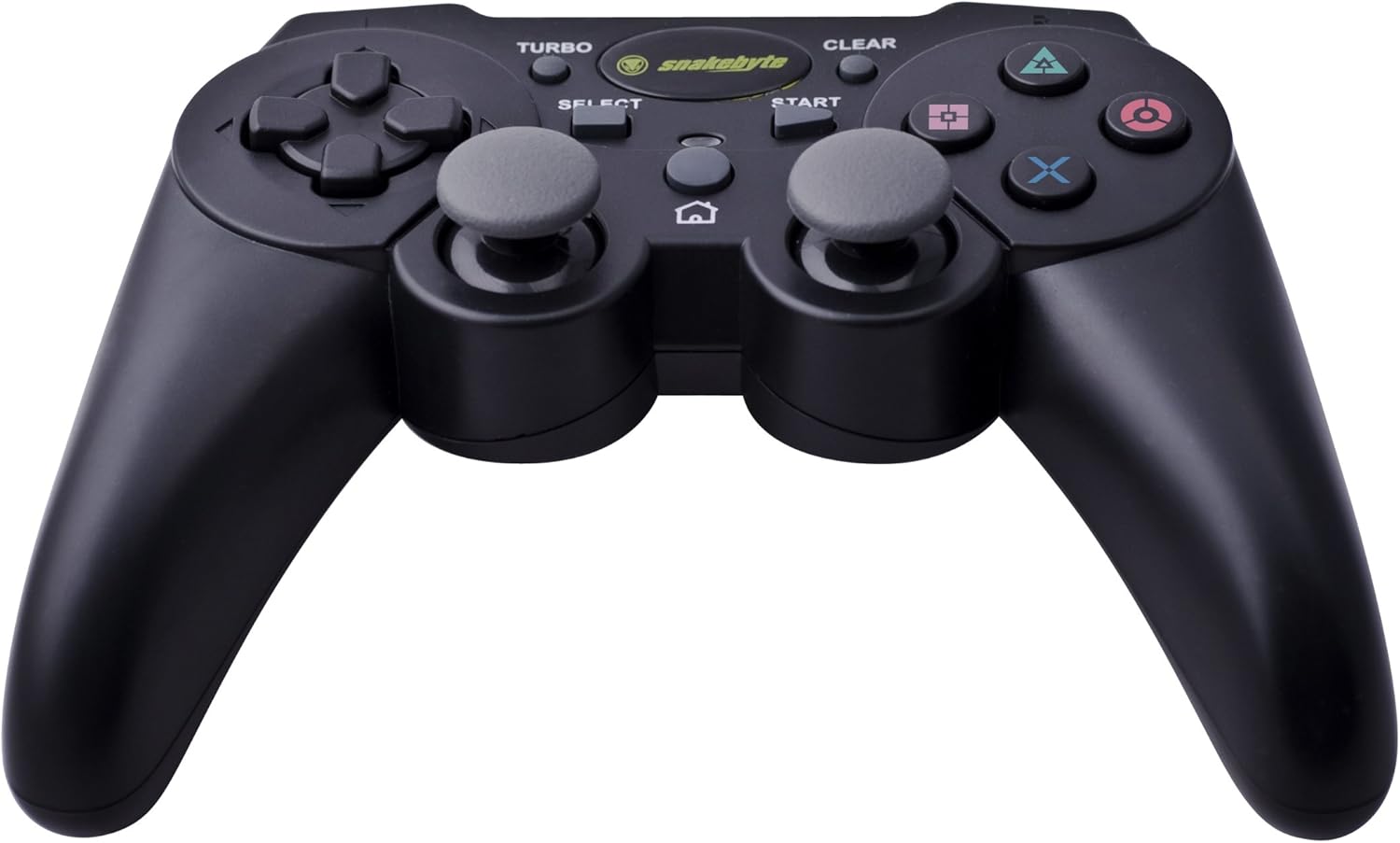
Image: The Snakebyte Wireless Bluetooth Premium PS3 Controller, highlighting the dual analog sticks and various buttons.
- Coixinet direccional (D-Pad): For precise directional input in games.
- Stick analògic esquerre: Control primari del moviment.
- Stick analògic dret: Control de càmera o moviment secundari.
- Botons d'acció (Triangle, Cercle, Creu, Quadrat): Game-specific actions.
- Botons L1/R1: Shoulder buttons for various in-game functions.
- Disparadors L2/R2: Analog triggers for pressure-sensitive input, often used for acceleration/braking or aiming/firing.
- Botó INICI: Pauses games or opens menus.
- Botó SELECCIÓ: Opens in-game maps, inventories, or other menus.
- Botó PS: Powers on the controller, accesses the PS3 XMB (Cross Media Bar) menu, or turns off the controller/console.
- Botó TURBO: Activates the turbo function for other buttons.
- Botó ESBORRA: Deactivates the turbo function.
Funció Turbo
The controller features a TURBO function, allowing a selected button to register multiple presses rapidly with a single hold. This can be useful for certain game mechanics.
- To activate TURBO: Press and hold the Botó TURBO, then press the desired action button (e.g., Cross, Square, Circle, Triangle, L1, R1, L2, R2). Release both buttons. The selected button will now have the TURBO function enabled.
- To deactivate TURBO for a specific button: Press and hold the Botó ESBORRA, then press the button for which TURBO is currently active. Release both buttons.
- To deactivate all TURBO functions: Press the Botó ESBORRA once without holding it down.
Motion Sensing and Vibration Feedback
This controller supports motion sensing capabilities, allowing for intuitive control in compatible games. It also provides vibration feedback to enhance immersion during gameplay, reacting to in-game events such as impacts or explosions.
Encès i apagat
- Per encendre: premeu el botó Botó PS.
- To power off: The controller will automatically enter sleep mode after a period of inactivity to conserve battery. Alternatively, you can hold the Botó PS for several seconds to bring up the PS3 menu, where you can choose to turn off the controller.
Manteniment
- Neteja: Feu servir un drap suau i sec per netejar el controlador. No utilitzeu productes de neteja abrasius ni dissolvents.
- Emmagatzematge: Guardeu el controlador en un lloc fresc i sec, allunyat de la llum solar directa i de temperatures extremes.
- Cura de la bateria: Per allargar la durada de la bateria, eviteu descarregar completament el controlador amb freqüència. Carregueu-lo regularment, fins i tot si no l'utilitzeu constantment.
- Evita danys: Do not drop the controller or expose it to excessive force or moisture.
Resolució de problemes
| Problema | Possible solució |
|---|---|
| El controlador no es connecta sense fil. |
|
| Els botons o els joysticks analògics no responen. |
|
| Controller does not charge. |
|
Reinicialització del controlador
If the controller behaves erratically or becomes unresponsive, you can perform a reset. Locate the small reset button on the back of the controller (often in a small hole). Use a thin, pointed object (like a straightened paperclip) to press and hold the reset button for a few seconds. This will restart the controller's internal electronics.
Especificacions
- Marca: Snakebyte
- Número de model: SB904714
- Plataforma compatible: Sony PlayStation 3
- Connectivitat: Sense fil (Bluetooth)
- Nombre de botons: 16
- Dimensions (L x A x A): Aproximadament 23.01 x 16.31 x 8.51 cm (9.06 x 6.42 x 3.35 polzades)
- Pes: Aproximadament 419.99 g (0.93 lliures)
- Color: Negre
Garantia i Suport
For warranty information and technical support, please refer to the documentation provided with your purchase or contact your retailer. You may also visit the official Snakebyte weblloc web per obtenir més ajuda i informació sobre el producte.