
1. Acabatview
The Microsoft LifeCam Cinema is a high-definition webcam designed for clear and smooth video communication. It features 720p HD video chat capabilities, a high-precision glass element lens for sharp image quality, and is certified for Skype. The webcam offers 360° rotation and incorporates TrueColor Technology with face tracking for bright and colorful video output.
Característiques principals:
- 720p HD video chat
- High precision glass element lens for sharp image quality
- Certified for Skype
- Rotació de 360°
- TrueColor Technology with face tracking for bright and colorful video
2. Què hi ha a la caixa
En obrir el paquet, assegureu-vos que hi hagi tots els components següents:
- Microsoft LifeCam Cinema Weblleva
- Cable USB (integrat)
- Manual d'usuari (aquest document)
- Muntatge adhesiu corbat
- Mounting Buckle
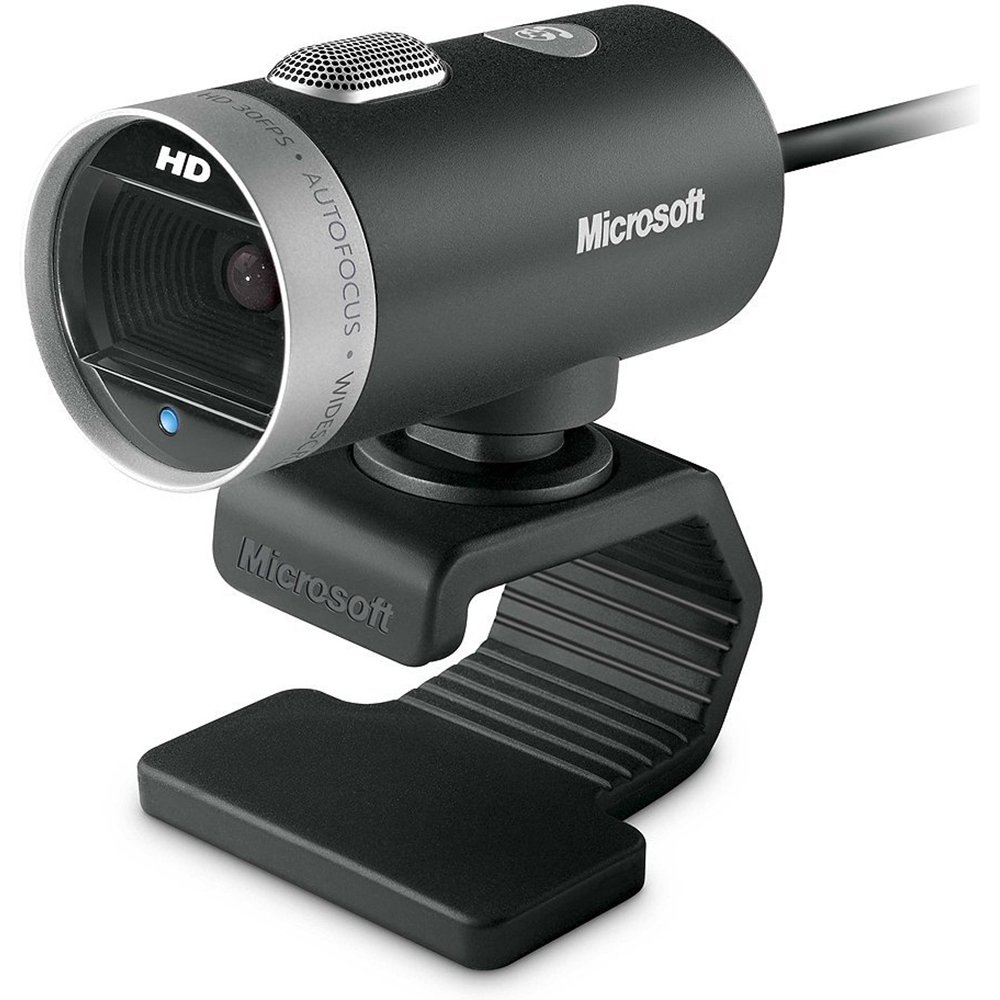
Imatge: El cinema Microsoft LifeCam webcam, showing its main body, lens, microphone, and flexible stand with integrated USB cable.
3. Configuració
- Posicionament del Weblleva: Place the LifeCam Cinema on top of your monitor or a flat surface. The flexible stand allows for stable placement.
- Connexió a l'ordinador: Plug the integrated USB cable into an available USB port on your computer.
- Instal·lació del controlador: Your operating system (Windows is supported) should automatically detect the device and install the necessary drivers. If prompted, follow the on-screen instructions. You may need to download the latest drivers from the official Microsoft support weblloc per a un rendiment òptim.
- Instal·lació de programari: Install any accompanying LifeCam software if desired, which may offer additional features or settings.

Imatge: El cinema Microsoft LifeCam webcam securely positioned on top of a computer monitor, demonstrating its stable mounting design.
Video: An official product video demonstrating the features and usage of the Microsoft LifeCam Cinema webcam, including its 720p HD widescreen video, auto focus, high-precision glass element lens, ClearFrame Technology, and digital microphone.
4. Instruccions de funcionament
- Starting a Video Call: Open your preferred video conferencing application (e.g., Skype, Zoom, Microsoft Teams). The LifeCam Cinema should be automatically recognized as your primary camera and microphone.
- Posició d'ajust: El webcam features 360° rotation, allowing you to easily adjust the camera angle without moving the base.
- Enfocament automàtic: The camera automatically adjusts focus to keep you sharp and clear during video calls.
- TrueColor Technology: This feature automatically adjusts exposure for bright and colorful video, even in varying lighting conditions.
- Digital Microphone: The built-in digital microphone provides clear audio capture. Ensure it is selected as the input device in your application settings if you experience audio issues.
5. Manteniment
- Neteja de la lent: Use a soft, lint-free cloth specifically designed for optics to gently wipe the camera lens. Avoid abrasive materials or harsh chemicals.
- Neteja del cos: Netegeu el webel cos de la càmera amb un suau, damp drap. No submergiu el dispositiu en aigua ni utilitzeu una humitat excessiva.
- Emmagatzematge: Quan no s’utilitzi, emmagatzemeu el fitxer webguardeu-ho en un lloc net i sec, allunyat de temperatures extremes i de la llum solar directa.
- Cura del cable: Eviteu doblegar o girar excessivament el cable USB per evitar danys interns.
6. Solució De Problemes
- No s'ha detectat cap vídeo/càmera:
- Assegureu-vos que el cable USB estigui ben connectat a tots dos webcàmera i l'ordinador.
- Proveu de connectar el webcam a un port USB diferent.
- Reinicieu l'ordinador.
- Consulteu el Gestor de dispositius de l'ordinador (Windows) per veure si el webcàmera apareix a la llista i si hi ha algun problema amb el controlador. Torneu a instal·lar els controladors si cal.
- Verify that your video conferencing software is configured to use the LifeCam Cinema as the video input device.
- Sense àudio/Micròfon no funciona:
- Check your computer's sound settings to ensure the LifeCam Cinema microphone is selected as the default recording device.
- Verify that your video conferencing software is configured to use the LifeCam Cinema as the audio input device.
- Ensure the microphone is not muted in your system settings or within the application.
- Poca qualitat de vídeo:
- Assegureu-vos que la lent de la càmera estigui neta.
- Check your internet connection speed; a slow connection can affect video quality.
- Ensure adequate lighting in your environment. TrueColor Technology helps, but sufficient ambient light is always best.
- Tanqueu altres aplicacions que puguin estar consumint recursos del sistema.
7. Especificacions
| Característica | Detall |
|---|---|
| Marca | Microsoft |
| Número de model | H5D-00001 |
| Resolució de captura de vídeo | 720p |
| Tecnologia del sensor fotogràfic | CMOS |
| Tecnologia de connectivitat | USB |
| Color | Negre |
| Característiques | Low Light, Auto Focus, TrueColor Technology, Digital Microphone |
| Dimensions de l'article (D x W x H) | 0.71 "P x 2.19" W x 1.81" H |
| Pes de l'article | 0.87 lliures |
| Sistema operatiu | Windows |
| Viewangle ing | 360 Degrees (rotation) |
| Velocitat de captura d'imatges | 30 fps |
| Dispositius compatibles | PCs with specified system requirements; Skype |
8. Garantia i Suport
The Microsoft LifeCam Cinema (Model H5D-00001) comes with a 3 anys de garantia limitada from the manufacturer, Microsoft.
For technical support, driver downloads, or further assistance, please visit the official Microsoft support weblloc web o consulteu la informació de contacte que es proporciona a l'embalatge del producte.
You can also find additional resources and FAQs on the Microsoft support pages for LifeCam products.