
Introducció
The Brecknell SBI 140 is a versatile and cost-effective weight indicator designed for a wide range of non-trade weighing applications. Housed in a durable stainless steel and ABS case, this compact indicator features an easy-to-read five-digit LCD display. It is compatible with various Brecknell platform scales and can connect to up to four 350 ohm load cells. Key features include full duplex RS-232 output, NCI protocol for shipping software compatibility, and user-friendly push-button controls for essential functions.
Configuració
1. Desembalatge i inspecció
Carefully remove the SBI 140 indicator and all accessories from the packaging. Inspect the unit for any signs of damage. Retain the packaging for future transport or storage.
2. Mounting the Indicator
The SBI 140 is supplied with a mounting bracket, allowing for flexible installation on a wall or bench. Secure the bracket to your desired location using appropriate fasteners (not included). Then, attach the indicator to the bracket.
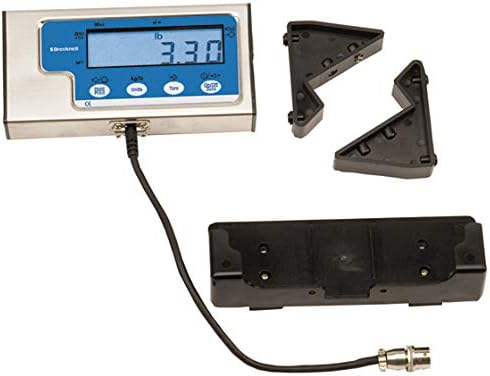
Image: The Brecknell SBI 140 Weight Indicator shown with its included mounting brackets and connection cable, ready for installation.
3. Connexió d'alimentació
The SBI 140 can be powered by either the included AC adapter or four 'AAA' batteries. Connect the AC adapter to the indicator and a suitable power outlet, or install the batteries into the battery compartment located on the underside of the unit. Ensure correct battery polarity.
4. Connecting to a Platform Scale
Connect the SBI 140 indicator to a compatible platform scale using the provided cable. The indicator supports connection to a maximum of four 350 ohm load cells. Ensure the connection is secure.
5. Calibració inicial
The SBI 140 features front panel calibration for easy setup. Refer to the detailed calibration procedure in the separate calibration guide (if provided) or follow the on-screen prompts after initial power-on to ensure accurate weight readings.
Instruccions de funcionament
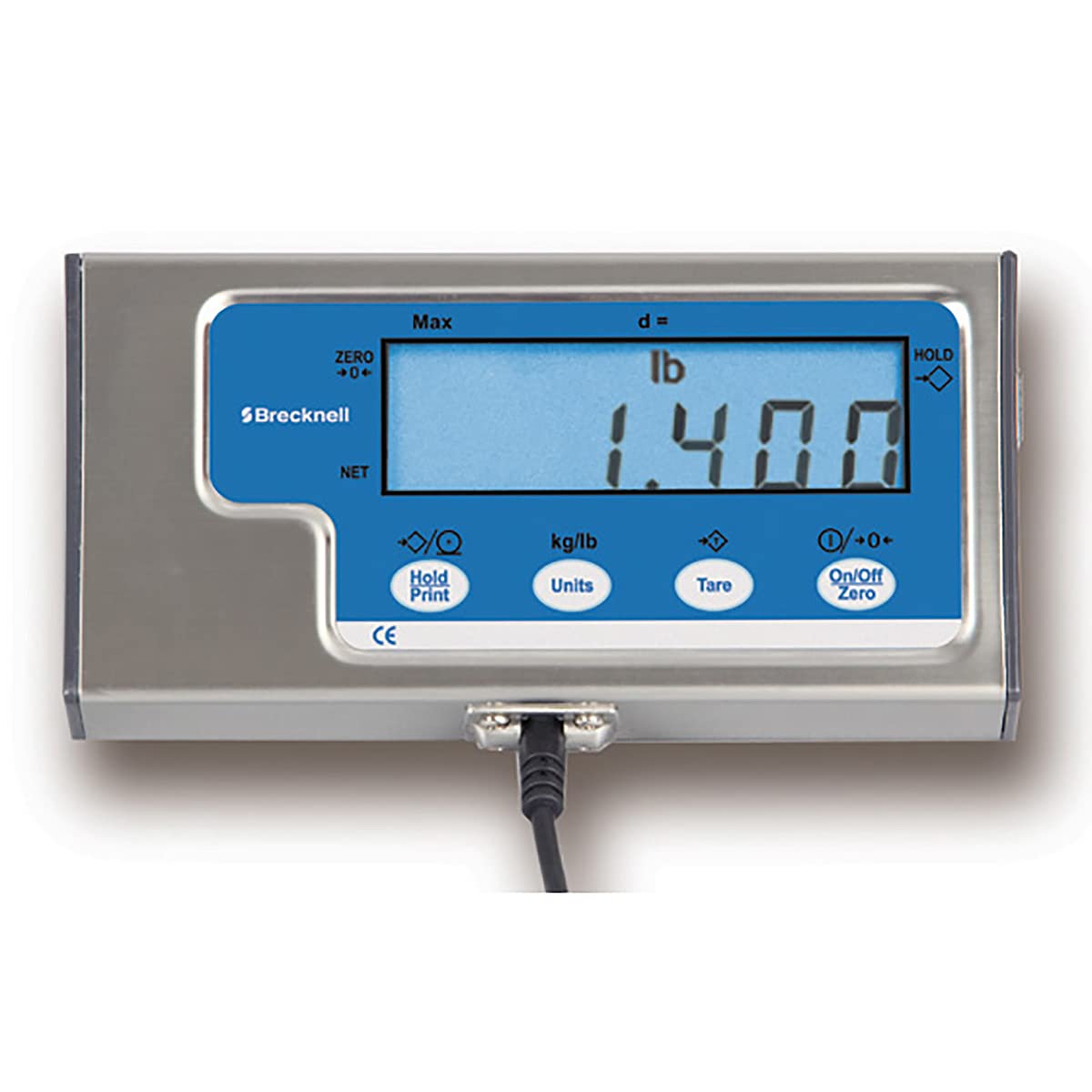
Imatge: Frontal view of the Brecknell SBI 140 Weight Indicator, showing the display and control buttons.
1. Power On/Off and Zero
- Premeu el botó Encès/Apagat/Zero botó per encendre o apagar la unitat.
- When the indicator is on, press the Encès/Apagat/Zero button briefly to zero the display. This sets the current weight to zero, useful before placing an item on the scale.
2. Funció de tara
- Place an empty container or packaging material on the scale platform.
- Premeu el botó Tara button. The display will show zero, and the tare weight will be subtracted from subsequent measurements. This allows for net weight measurement.
- Per esborrar la tara, traieu tots els elements de la bàscula i premeu el botó Tara botó de nou.
3. Unit Switching (kg/lb)
- Premeu el botó Unitats button to toggle between kilograms (kg) and pounds (lb). The display will indicate the currently selected unit.
4. Funció Hold
- Premeu el botó Hold/Print button to activate the hold function. This will freeze the current weight reading on the display, even if the item is removed from the platform.
- Premeu el botó Hold/Print button again to release the hold function.
5. Auto Zero Tracking
The SBI 140 features automatic zero tracking, which maintains the zero display within a specified range, compensating for minor fluctuations or debris on the scale platform.
6. Funció d'apagada automàtica
To conserve battery life, the indicator will automatically switch off after 2 minutes of inactivity. This feature helps extend the operational time when using battery power.
7. Sortida RS-232
The full duplex RS-232 output allows the SBI 140 to connect to external devices such as printers or computers. It supports standard NCI protocol, enabling interface with common shipping software like UPS Worldship Online and FedEx.
Manteniment
1. Neteja
To clean the SBI 140, use a soft, damp cloth with a mild detergent. Avoid abrasive cleaners, solvents, or excessive moisture, as these can damage the display or internal components. Ensure the unit is powered off and disconnected from any power source before cleaning.
2. Substitució de la bateria
If the indicator is powered by batteries and the display becomes dim or the unit fails to power on, it may be time to replace the batteries. Open the battery compartment, remove the old 'AAA' batteries, and insert new ones, ensuring correct polarity. Dispose of used batteries responsibly.
Resolució de problemes
If you encounter issues with your Brecknell SBI 140 Weight Indicator, please review els passos habituals següents per a la resolució de problemes:
- Sense pantalla/la unitat no s'encén: Check the power source. If using the AC adapter, ensure it is securely plugged into both the indicator and a working outlet. If using batteries, ensure they are correctly installed and not depleted.
- Lectures inexactes: Verify that the scale platform is stable and level. Ensure no objects are touching the platform or indicator. Perform a recalibration if necessary, following the calibration instructions.
- Display Shows 'OVERLOAD' or 'UNDERLOAD': This indicates the weight on the platform is outside the scale's capacity. Remove or add weight as appropriate.
- Communication Issues (RS-232): Check the RS-232 cable connection between the indicator and the external device. Ensure the correct communication settings are configured on both devices.
If these steps do not resolve the issue, please contact Brecknell customer support for further assistance.
Especificacions
| Model | SBI 140 |
| Número de model de l'article | 52751-0556 |
| Load Cells Supported | 4, 350Ω load cells |
| Protocol | Standard NCI (compatible with UPS Worldship Online, FedEx) |
| Interfície | RS-232 with 10' Cable (9 pin to 9 pin type connector) |
| Poder | 4 "AAA" Batteries (Included) or AC Adaptor (Included) |
| Operator Keys | On/Off/Zero, Tare, Units, Hold/Print |
| Mostra | Five digit 17 mm / 0.625" high LCD |
| Dimensions del producte | 9.25 x 7.25 x 3 polzades; 3 lliures |
| Fabricant | SalterBrecknell |
Garantia i Suport
For information regarding product warranty, please refer to the documentation provided at the time of purchase or visit the official Brecknell website. For technical support, service, or replacement parts, please contact Brecknell customer service directly. When contacting support, please have your product model number (SBI 140) and item model number (52751-0556) available.