
Canon SD1300IS Silver
Canon PowerShot SD1300 IS Digital Camera User Manual
Model: SD1300IS Silver
Introducció
This manual provides detailed instructions for the safe and effective use of your Canon PowerShot SD1300 IS Digital ELPH camera. Please read this manual thoroughly before using the camera and keep it in a safe place for future reference. The PowerShot SD1300 IS is designed to capture high-quality images with its 12.1-megapixel resolution, 4x optical zoom, and Optical Image Stabilizer.
Configuració i primer ús
Before you begin capturing memories, follow these steps to set up your camera.
1. Carregant la bateria
Insert the Lithium-ion Battery Pack NB-6L into the Battery Charger CB-2LY. Plug the charger into a power outlet. The charging indicator light will show the charging status. Once fully charged, remove the battery.
2. Inserció de la bateria i la targeta de memòria
Open the battery/card compartment cover on the bottom of the camera. Insert the charged battery with the correct orientation. Insert a compatible SD/SDHC/SDXC memory card into the card slot until it clicks into place. Close the compartment cover securely.

Figura 1: Frontal view of the Canon PowerShot SD1300 IS camera, showing the lens, flash, and power button.
Funcionament de la càmera
This section details the primary functions and modes of your PowerShot SD1300 IS.
Encès/Apagat
Premeu el botó ON/OFF button located on the top of the camera to power it on or off. The lens will extend when powered on.
Modes de tir
The camera offers various shooting modes to optimize your photos for different scenes.
- Mode automàtic intel·ligent: This intelligent mode automatically selects the best settings from 18 predefined scenes based on the shooting conditions. Ideal for point-and-shoot simplicity.
- Other Shooting Modes: The camera includes 15 additional shooting modes for specific conditions, accessible via the mode dial or menu. Refer to the on-screen display for options like Portrait, Landscape, Night Snapshot, etc.
Funció de zoom
Use the zoom lever around the shutter button to adjust the focal length. The camera features a Zoom òptic de 4x i a 28mm wide-angle lens, allowing you to capture both expansive scenes and distant subjects.
Estabilitzador òptic d'imatge (IS)
The built-in Optical Image Stabilizer automatically detects and corrects camera shake, helping to prevent blurry photos, especially when zoomed in or in low light conditions.
Low Light Photography
For dimly lit situations, activate the Mode de poca llum. This mode utilizes higher ISO sensitivities (ISO 400-6400) to capture clearer images with reduced noise in challenging lighting environments without the need for flash.
Ús de la pantalla LCD
El 2.7-inch PureColor System LCD ofereix una claredat view for framing shots, reviewing images, and navigating menus. It features a scratch-resistant, anti-reflective coating and a Night Display function for improved visibility in low light.
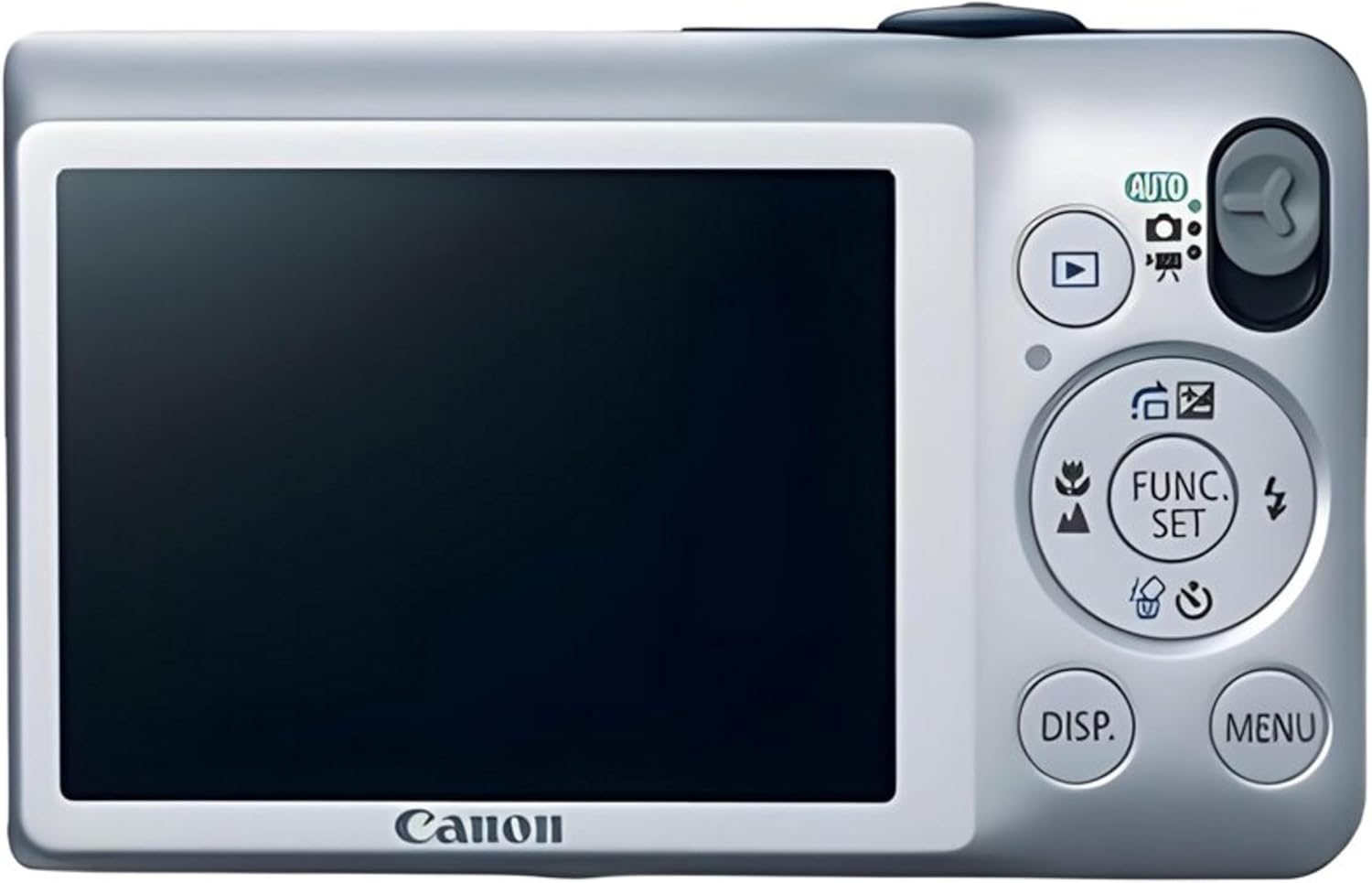
Figura 2: posterior view of the Canon PowerShot SD1300 IS, highlighting the LCD and control layout.
Gravació de vídeo
To record videos, switch the camera to movie mode. The PowerShot SD1300 IS can record video at Resolució 480p. Press the shutter button to start and stop recording.
Manteniment
Un manteniment adequat garanteix la longevitat i el rendiment òptim de la càmera.
- Cleaning the Camera Body and LCD: Use a soft, dry cloth to wipe the camera body. For the LCD screen, use a specialized screen cleaning cloth. Avoid abrasive materials or chemical cleaners.
- Neteja de la lent: Use a lens brush or a blower to remove dust. For smudges, use a lens cleaning solution and a microfiber cloth designed for optical surfaces. Do not touch the lens with your fingers.
- Cura de la bateria: Store batteries in a cool, dry place when not in use. Avoid fully discharging the battery frequently.
- Emmagatzematge: When storing the camera for extended periods, remove the battery and memory card. Store in a dry, dust-free environment, ideally with a desiccant packet to prevent moisture buildup.
Resolució de problemes
Aquesta secció tracta problemes comuns que podeu trobar amb la vostra càmera.
| Problema | Possible causa/solució |
|---|---|
| La càmera no s'encén. | Battery may be depleted or incorrectly inserted. Ensure battery is charged and inserted correctly. |
| Les fotos són borroses. | Camera shake (use Optical Image Stabilizer, hold steady). Subject movement. Insufficient light (use flash or Low Light mode). Lens may be dirty. |
| Images appear grainy or noisy. | Shooting in low light conditions with high ISO. This is normal for high ISO settings. Ensure adequate lighting or use flash when possible. |
| Error de la targeta de memòria. | Card may be full, corrupted, or incompatible. Try reinserting the card, using a different card, or formatting the card (this will erase all data). |
| El flaix no es dispara. | Flash mode may be set to 'Off' or 'Auto' in bright conditions. Ensure flash is enabled in settings if desired. |
Especificacions
Key technical specifications for the Canon PowerShot SD1300 IS Digital ELPH camera.
| Característica | Detall |
|---|---|
| Resolució de fixes efectius | 12.1 megapíxels |
| Zoom òptic | 4x |
| Lent | 28mm Wide-Angle |
| Estabilització d'imatge | Òptic |
| Pantalla LCD | 2.7-inch PureColor System LCD |
| Sensibilitat ISO | Expanded ISO Minimum 80, Expanded ISO Maximum 1600 (Low Light mode: 400-6400) |
| Resolució de vídeo | 480p |
| Tipus de targeta de memòria | SD/SDHC/SDXC/MMC/MMCplus/MMCplus HC |
| Tipus de bateria | Ió de liti (NB-6L) |
| Connectivitat | USB |
| Dimensions (aprox.) | Item Height: 2.2 inches (other dimensions not specified in input) |
| Pes (aprox.) | 4.96 unces |
Què hi ha a la caixa
The standard package for the PowerShot SD1300 IS includes:
- PowerShot SD1300 IS Digital ELPH Body
- Paquet de bateries de liti-ió NB-6L
- Carregador de bateries CB-2LY
- Corretja de canell WS-DC7
- CD-ROM de solució de càmera digital
- Cable d'interfície USB IFC-400PCU
- Cable AV AVC-DC400
Garantia i Suport
Per obtenir informació detallada sobre la garantia, consulteu la targeta de garantia inclosa amb el producte o visiteu el lloc web oficial de Canon. weblloc. Els termes i condicions de la garantia poden variar segons la regió.
For technical support, product registration, or to download the latest drivers and software, please visit the official Canon support weblloc web. També hi podeu trobar recursos addicionals i preguntes freqüents.
Visita el Botiga Canon for more information on Canon products.