
1. Introducció
Thank you for choosing the Voltcraft VC-11 Digital Multimeter. This portable, Category III, 250V multimeter with a 2000-count display is designed for accurate electrical measurements in various applications. This manual provides essential information for safe operation, proper use, and maintenance of your device. Please read it thoroughly before use and keep it for future reference.
2. Informació de seguretat
WARNING: Electrical shock hazard. Improper use of this meter can cause damage, shock, injury, or death. Read and understand this manual before operating the meter.
- Always ensure the meter is in good working condition and the test leads are not damaged.
- No apliqueu més del volum nominaltage, as marked on the meter, between terminals or between any terminal and ground.
- Tingueu molta precaució quan treballeu amb voltages above 25V AC RMS or 35V DC. These voltagsuposen un risc de xoc.
- Desconnecteu sempre els cables de prova del circuit abans de canviar les funcions o els rangs.
- Do not operate the meter with the battery cover removed or loosened.
- Adhere to local and national safety codes. Use personal protective equipment (PPE) such as approved safety glasses and electrically insulated gloves.
3. Producte acabatview
The Voltcraft VC-11 is a compact digital multimeter featuring a clear LCD display, a rotary function switch, and input jacks for test leads. It is designed for measuring DC/AC voltage, DC current, resistance, and includes diode and continuity test functions.
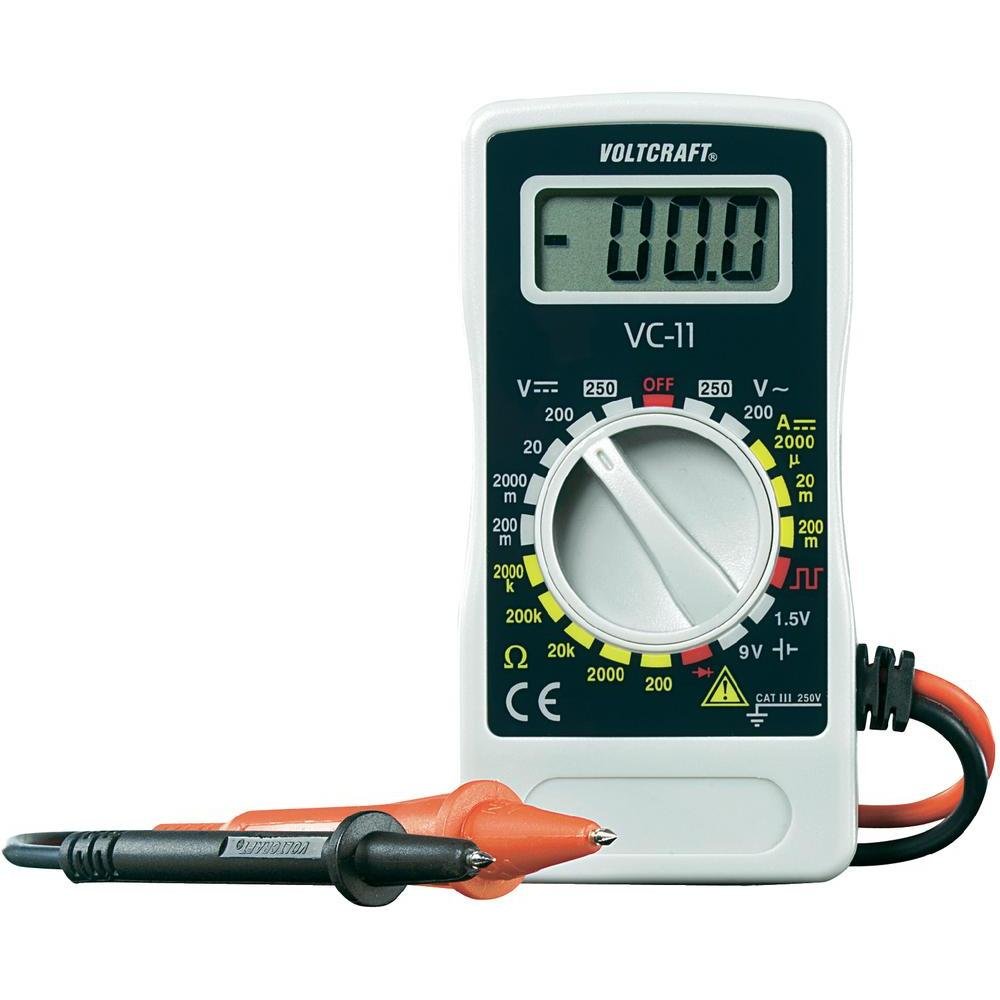
Figura 1: Frontal view of the Voltcraft VC-11 Digital Multimeter with test leads connected. This image shows the LCD display, rotary switch, and input terminals.

Figura 2: Angle view of the Voltcraft VC-11 Digital Multimeter, highlighting the compact design and the CE marking.

Figure 3: The Voltcraft VC-11 Digital Multimeter shown with its test leads detached, illustrating the input ports.
3.1 Components
- Pantalla LCD: Mostra lectures de mesura, unitats i indicadors de funció.
- Interruptor rotatiu: S'utilitza per seleccionar funcions i rangs de mesura.
- Preses d'entrada: Ports for connecting the test leads (COM, VΩmA).
- Cables de prova: Red and black leads for connecting to the circuit under test.
4. Configuració
4.1 Instal·lació de la bateria
The Voltcraft VC-11 requires a 9V battery for operation (not included). To install or replace the battery:
- Assegureu-vos que el multímetre estigui apagat i desconnecteu tots els cables de prova.
- Localitzeu la tapa del compartiment de la bateria a la part posterior del mesurador.
- Feu servir un tornavís per treure el cargol que fixa la tapa de la bateria.
- Traieu la coberta amb cura.
- Connect a new 9V battery to the battery clip, observing correct polarity.
- Col·loqueu la bateria al compartiment i torneu a col·locar la tapa, fixant-la amb el cargol.
4.2 Connexió dels cables de prova
Always connect the black test lead to the 'COM' (common) jack. Connect the red test lead to the appropriate input jack based on the desired measurement:
- Per al voltage (V), Resistance (Ω), Diode, and Continuity measurements, connect the red lead to the 'VΩmA' jack.
- For Current (A) measurements, connect the red lead to the 'VΩmA' jack (for mA range).
5. Instruccions de funcionament
Before taking any measurement, ensure the test leads are correctly connected and the rotary switch is set to the desired function and range.
5.1 Mesurar DC Voltage (V=)
- Ajusteu l'interruptor rotatiu al volum de CC desitjattage (V=) range (e.g., 200mV, 2V, 20V, 200V, 250V). If the voltage is unknown, start with the highest range and decrease as needed.
- Connect the black test lead to the 'COM' jack and the red test lead to the 'VΩmA' jack.
- Connecteu les sondes de prova en paral·lel al component o circuit que s'ha de mesurar.
- Llegeix el voltage valor a la pantalla LCD.
5.2 Mesurar AC Voltage (V~)
- Ajusteu l'interruptor rotatiu al volum de CA desitjattage (V~) range (e.g., 200V, 250V).
- Connect the black test lead to the 'COM' jack and the red test lead to the 'VΩmA' jack.
- Connect the test probes in parallel across the AC source or component.
- Llegeix el voltage valor a la pantalla LCD.
5.3 Measuring DC Current (A=)
- Set the rotary switch to the desired DC Current (A=) range (e.g., 2000µA, 20mA, 200mA).
- Connect the black test lead to the 'COM' jack and the red test lead to the 'VΩmA' jack.
- ADVERTIMENT: To measure current, the meter must be connected in series with the circuit. Break the circuit and insert the meter.
- Connect the test probes in series with the circuit.
- Llegiu el valor actual a la pantalla LCD.
5.4 Mesura de la resistència (Ω)
- Assegureu-vos que el circuit estigui desenergitzat abans de mesurar la resistència.
- Set the rotary switch to the desired Resistance (Ω) range (e.g., 200Ω, 2kΩ, 20kΩ, 200kΩ, 2000kΩ).
- Connect the black test lead to the 'COM' jack and the red test lead to the 'VΩmA' jack.
- Connecteu les sondes de prova al component que s'ha de mesurar.
- Llegiu el valor de la resistència a la pantalla LCD.
5.5 Prova de díodes
- Assegureu-vos que el circuit estigui desenergitzat.
- Set the rotary switch to the Diode symbol (usually next to resistance).
- Connect the black test lead to the 'COM' jack and the red test lead to the 'VΩmA' jack.
- Connecteu la sonda vermella a l'ànode i la sonda negra al càtode del díode. La pantalla mostrarà el volum directe.tage gota.
- Reverse the probes. The display should show 'OL' (Overload) for a good diode.
5.6 Prova de continuïtat
- Assegureu-vos que el circuit estigui desenergitzat.
- Set the rotary switch to the Continuity symbol (usually next to diode/resistance).
- Connect the black test lead to the 'COM' jack and the red test lead to the 'VΩmA' jack.
- Connecteu les sondes de prova a través del circuit o component.
- If the resistance is below a certain threshold (typically 30-50Ω), the meter will emit an audible beep, indicating continuity.
6. Manteniment
6.1 Neteja
Netegeu el comptador amb anuncisamp drap i un detergent suau. No utilitzeu abrasius ni dissolvents. Assegureu-vos que el mesurador estigui completament sec abans d'utilitzar-lo.
6.2 Substitució de la bateria
When the battery symbol appears on the LCD display, the 9V battery needs to be replaced. Refer to section 4.1 for battery installation instructions.
7. Solució De Problemes
| Problema | Causa possible | Solució |
|---|---|---|
| Sense pantalla o pantalla tènue | Bateria baixa o baixa | Substituïu la bateria de 9V. |
| Lectures incorrectes | Incorrect function/range selected Poor test lead connection Damaged test leads | Select the correct function and range. Ensure test leads are firmly connected. Inspect and replace damaged test leads. |
| Es mostra "OL" (sobrecàrrega) | Measurement exceeds selected range Open circuit (for resistance/current) | Select a higher range. Check for breaks in the circuit. |
8. Especificacions
- Marca: VOLTCRAFT
- Número de model: VC11
- Fabricant: VOLTCRAFT
- Pes del producte: Approximately 9.07 g (without packaging)
- Dimensions del paquet: 14.8 x 8 x 3.6 cm
- Classificació de la categoria: CAT III 250V
- Visualització: 2000 recomptes
- Font d'alimentació: Pila de 9V (no inclosa)
9. Informació de la garantia
This product is covered by a standard manufacturer's warranty. Please refer to the warranty card included with your purchase or contact your retailer for specific terms and conditions. The warranty typically covers defects in materials and workmanship under normal use.
10. Atenció al client
For technical assistance, troubleshooting, or service inquiries, please contact Voltcraft customer support or your local distributor. Contact information can usually be found on the manufacturer's weblloc web o a l'embalatge del producte.