
Introducció
Gràcies per la compraasing the Optimus F-1760 16-inch Wave Oscillating Stand Fan. This manual provides important information regarding the safe operation, assembly, maintenance, and troubleshooting of your fan. Please read these instructions thoroughly before use and retain them for future reference.

Image: The Optimus F-1760 stand fan positioned in a bedroom, showcasinel seu disseny i mida en relació amb els mobles.
Instruccions importants de seguretat
Quan utilitzeu aparells elèctrics, sempre s'han de seguir les precaucions bàsiques per reduir el risc d'incendi, descàrrega elèctrica i lesions a les persones, incloses les següents:
- Llegiu totes les instruccions abans d'utilitzar aquest ventilador.
- Use this fan only as described in this manual. Other uses not recommended may cause fire, electric shock, or injury to persons.
- To protect against electrical shock, do not place fan in window, immerse unit, plug or cord in water or spray with liquids.
- És necessària una supervisió estreta quan qualsevol aparell és utilitzat per o a prop dels nens.
- Unplug fan from outlet when not in use, when moving fan from one location to another, and before cleaning.
- Do not operate fan in the presence of explosive and/or flammable fumes.
- No col·loqueu el ventilador ni cap peça a prop d'una flama oberta, de cuina o d'un altre aparell de calefacció.
- Do not operate fan with a damaged cord or plug, or after the fan malfunctions or has been dropped or damaged in any manner.
- Eviteu el contacte amb les peces mòbils.
- Per desconnectar, agafa l'endoll i estira de la presa de corrent. No tireu mai del cordó.
- Feu servir sempre sobre una superfície plana i seca.
- No pengeu ni munteu el ventilador a la paret ni al sostre.
- No feu funcionar sense les graelles del ventilador col·locades correctament.
- This product employs overload protection (fuse). A blown fuse indicates an overload or short-circuit situation. If the fuse blows, unplug the product from the outlet. Replace the fuse as per the servicing instructions (follow product marking for proper fuse rating) and check the product. If the replacement fuse blows, a short-circuit may be present and the product should be discarded or returned to an authorized service facility for examination and/or repair.
Muntatge i muntatge
The Optimus F-1760 fan requires minimal assembly. Ensure all components are present and undamaged before proceeding.
- Muntatge de la base: Attach the weighted base legs to the main pole. Ensure they are securely fastened to provide stability. The base is designed to be sturdy, with weights at the ends of the feet.
- Ajust d'alçada: The fan's height can be adjusted. Loosen the height adjustment knob on the pole, extend or retract the pole to the desired height, and then securely tighten the knob.
- Capçal del ventilador adjunt: Ensure the fan head is securely attached to the top of the pole. The motor housing and fan blade are plastic, while the grill is metal.
- Col·locació: Place the fan on a dry, level surface. Ensure there is adequate space around the fan for proper air circulation and oscillation.
Instruccions de funcionament
The Optimus F-1760 fan offers multiple control options and features for customized comfort.
Tauler de control
The fan features a 4-position push-button switch on the pole for basic operation.
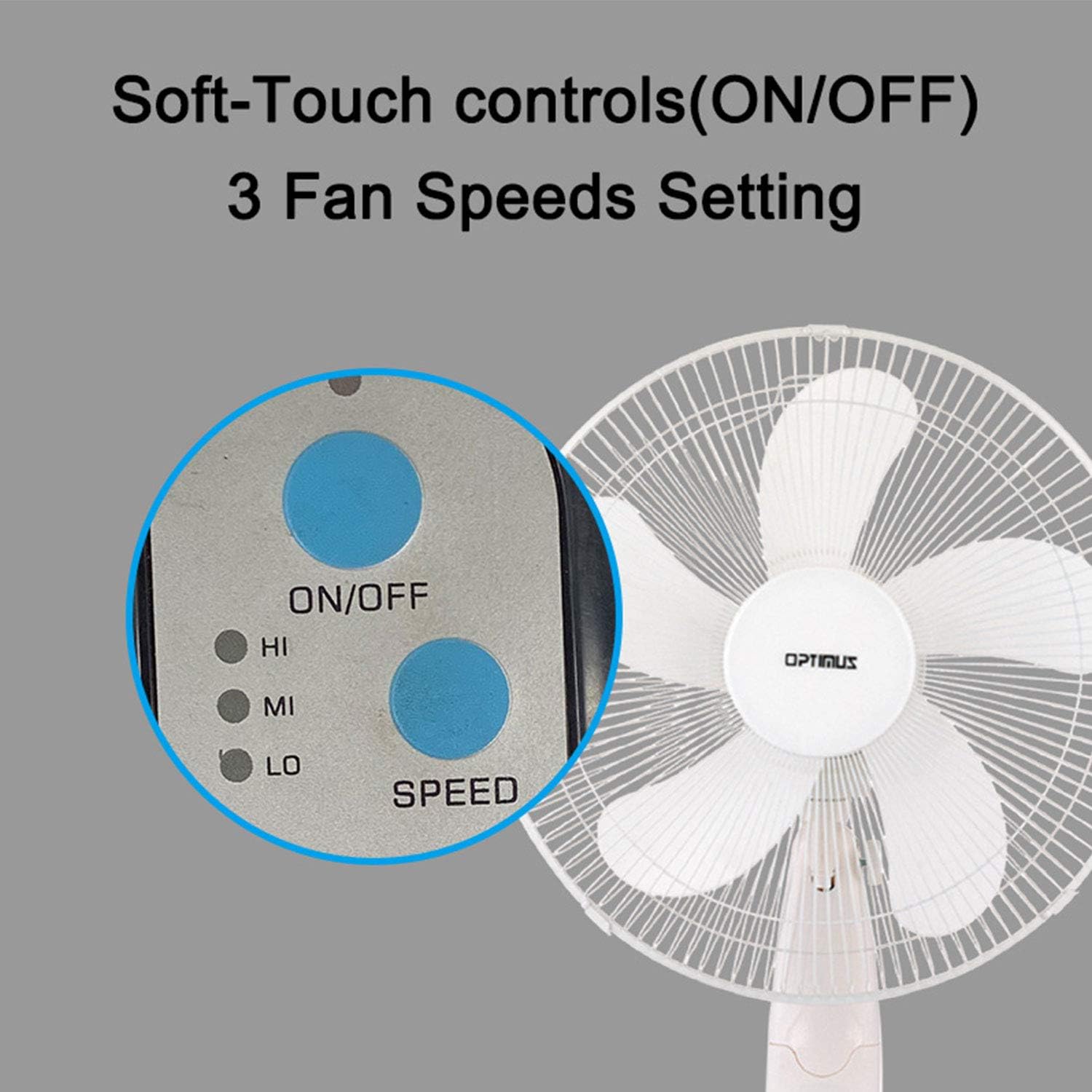
Image: The fan's soft-touch control panel, showing buttons for ON/OFF and SPEED, with indicators for High (HI), Medium (MI), and Low (LO) fan speeds.
- ON/OFF: Premeu per encendre o apagar el ventilador.
- Configuració de velocitat: Select from Low, Medium, or High speeds. The 3-speed, energy-saving, whisper-quiet operation motor provides efficient airflow.
Control remot
The fan comes with a remote control for convenient operation from a distance. (Batteries not included).

Image: The remote control for the fan, featuring buttons for Mode, Time, Speed, and ON/OFF functions.
- ON/OFF: Encén o apaga el ventilador.
- VELOCITAT: Cycles through the three fan speeds (Low, Medium, High).
- Mode: Selects between different wind modes.
- HORA: Activates and sets the shut-off timer.
Modes de vent
The fan offers three distinct wind modes to suit your preference:

Image: The fan's control panel highlighting the MODE button and indicators for Normal, Natural, and Sleep wind modes.
- Mode normal: The fan blows at a constant speed based on your selected setting.
- Mode natural: The fan speed fluctuates to mimic a natural breeze.
- Mode de repòs: The fan operates at a lower, quieter speed, ideal for sleeping, with gentle speed variations.
Oscil·lació
The F-1760 features unique wave oscillation for comprehensive air distribution.

Image: A diagram illustrating the fan's capability for both vertical (up/down) and horizontal (left/right) wave oscillation, providing wider air coverage.
- Up/Down & Left/Right Wave Oscillating: Activates a unique oscillation pattern that moves the fan head both horizontally and vertically, distributing air throughout the room.
- To stop oscillation, press the oscillation button again.
Funció de temporitzador
Configura el ventilador perquè s'apagui automàticament després d'un període especificat.

Image: The fan's control panel showing the TIME button and indicators for 1 hour (1H), 2 hours (2H), and 4 hours (4H) timer settings. The fan can be programmed for up to 7 hours.
- The timer can be set for 1, 2, 4, or up to 7 hours. Press the TIME button repeatedly to cycle through the desired duration.
Manteniment i Neteja
Una neteja regular ajuda a mantenir el rendiment del ventilador i n'allarga la vida útil.
- Abans de la neteja: Desendolleu sempre el ventilador de la presa de corrent abans de netejar-lo.
- Neteja exterior: Utilitzeu un suau, damp drap per netejar les superfícies exteriors del ventilador. No utilitzeu productes de neteja abrasius ni dissolvents.
- Grill Cleaning: The metal grill can be cleaned with a soft brush or vacuum cleaner to remove dust. For thorough cleaning, the grill may need to be carefully removed.
- Neteja de fulles: If necessary, the fan blades can be cleaned. Ensure the fan is completely off and unplugged. The care instructions specify "Hand Wash" for components.
- Emmagatzematge: Quan no l'utilitzeu durant períodes prolongats, guardeu el ventilador en un lloc fresc i sec, preferiblement en el seu embalatge original.
Resolució de problemes
| Problema | Causa possible | Solució |
|---|---|---|
| El ventilador no s'encén. | No power supply. Blown fuse. | Ensure the fan is plugged into a working outlet. Check the fuse in the plug and replace if necessary (refer to safety instructions for fuse replacement). |
| Fan operates but air movement is weak. | Low speed setting. Dust accumulation on blades/grill. | Increase the fan speed. Clean the fan blades and grills as per maintenance instructions. |
| El control remot no funciona. | Dead batteries. Obstruction between remote and fan. | Replace batteries in the remote control. Ensure a clear line of sight between the remote and the fan's receiver. |
| Fan changes speed automatically or unexpectedly. | Interference from other remote controls (e.g., TV remote). | This fan may respond to frequencies from other remote controls. Try operating the fan manually or repositioning the fan/other devices to minimize interference. |
| Fan makes clicking noises during oscillation. | Normal operation of oscillation gears. | A slight clicking noise from the oscillation gears can occur during normal operation. If the noise is excessive or new, ensure the fan head is securely attached. |
| Fan feels unstable. | Base not properly assembled or tightened. Uneven surface. | Ensure all base components are securely fastened and the fan is placed on a firm, level surface. |
Especificacions
- Nom del model: F-1760
- Marca: Optimus
- Diàmetre del ventilador: 16 polzades
- Disseny de ventilador elèctric: Ventilador de terra
- Font d'alimentació: Elèctric amb cable
- Wattage: 60 watts
- Voltage: 6 Volts
- Nombre de fulles: 3
- Configuració de velocitat: 3 RPM (Low, Medium, High)
- Mètode de control: Comandament a distància, polsador
- Característiques especials: Up/Down & Left/Right Wave Oscillating, Adjustable Height, Timer Function (up to 7 hours), Wind Modes (Normal, Natural, Sleep)
- Ús interior/exterior: Interior
- Pes de l'article: 9.9 lliures
- Components inclosos: Producte, Manual
Informació de la garantia
This Optimus F-1760 fan comes with a Garantia limitada d'1 any from the date of purchase. This warranty covers defects in materials and workmanship under normal use. It does not cover damage resulting from misuse, accident, alteration, or unauthorized repair. Please retain your proof of purchase for warranty claims.
Atenció al client
For technical assistance, warranty claims, or questions regarding your Optimus F-1760 fan, please contact Optimus customer service. Refer to the product packaging or the official Optimus weblloc web per obtenir la informació de contacte més actualitzada.