
VTech 80-109744
VTech Schulstart Laptop E Instruction Manual
Model: 80-109744
1. Introducció
This manual provides essential information for the safe and effective use of your VTech Schulstart Laptop E. This learning computer is designed for children aged 6 and up, offering 160 educational games in both German and English. It covers subjects such as letters, words, mathematics, nature, science, and creativity.
Si us plau, llegiu aquest manual detingudament abans de fer servir el dispositiu i conserveu-lo per a futures consultes.
2. Informació de seguretat
ADVERTIMENT: Choking hazard due to small parts that can be swallowed. Not suitable for children under 36 months.
ADVERTIMENT: Strangulation hazard. Keep packaging materials away from children.
- Superviseu sempre els nens durant l'ús.
- No exposeu el dispositiu a temperatures extremes ni a la llum solar directa.
- Keep the device dry. Do not immerse in water or other liquids.
- Netegeu el dispositiu amb un drap suau i sec. No utilitzeu productes de neteja abrasius.
- Assegureu-vos que les piles estiguin inserides correctament d'acord amb les marques de polaritat.
- Traieu les bateries esgotades ràpidament.
- No barregeu piles velles i noves, o diferents tipus de piles.
- Les bateries no recarregables no s'han de recarregar.
- Les bateries recarregables només es poden carregar sota la supervisió d'un adult.
- Traieu les piles recarregables de la joguina abans de carregar-la.
- Els terminals d'alimentació no s'han de curtcircuitar.
3. Contingut del paquet
The VTech Schulstart Laptop E package includes:
- 1 x VTech Schulstart Laptop E
- 1 x Cursor Mouse
- 3 x AA Demonstration Batteries (for test purposes only)
Note: A VTech power adapter and VTech laptop bag are sold separately and are not included.
4. Configuració
4.1 Instal·lació de la bateria
The device requires 3 AA batteries. The included demonstration batteries are for testing purposes only and should be replaced with new batteries for regular use.
- Localitza el compartiment de la bateria a la part inferior del portàtil.
- Amb un tornavís, obriu la tapa del compartiment de la bateria.
- Remove the old demonstration batteries (if present).
- Introduïu 3 piles AA noves, assegurant-vos de la polaritat correcta (+/-) tal com s'indica a l'interior del compartiment.
- Substituïu la tapa del compartiment de la bateria i fixeu-la amb el cargol.

Figure 4.1: Battery installation guide. Replace demonstration batteries with new ones for extended play.
4.2 Connecting the Cursor Mouse
The VTech Schulstart Laptop E comes with a wired cursor mouse for interactive play.
- Locate the mouse port on the side of the laptop.
- Carefully insert the mouse connector into the port.
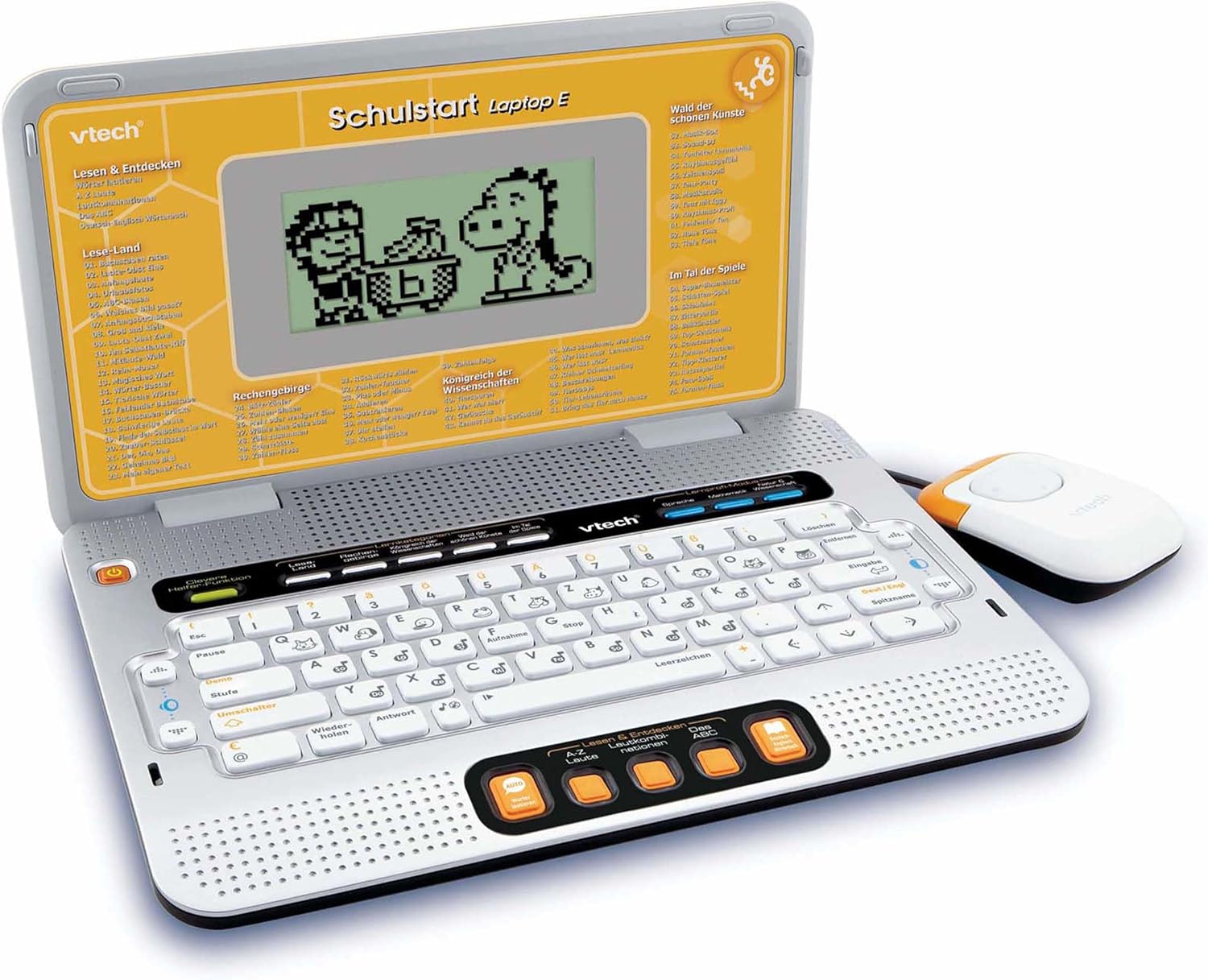
Figure 4.2: VTech Schulstart Laptop E with connected cursor mouse.
5. Instruccions de funcionament
5.1 Encès/Apagat
To turn on the laptop, press the Poder button, usually located on the top left of the keyboard area. To turn off, press the Poder button again or the laptop will automatically shut down after a period of inactivity to conserve battery life.
5.2 Selecció de la llengua
The VTech Schulstart Laptop E supports both German and English. You can switch between languages using the dedicated language selection button or through the settings menu, if available. Refer to the on-screen prompts for initial setup.
5.3 Game Categories and Selection
The laptop features 160 educational games categorized as follows:
- Language Tools: 5 programes
- Letters & Words: 23 programes
- Matemàtiques: 16 programes
- Nature & Science: 12 programes
- Creativitat: 12 programes
- Logic & Games: 12 programes
Use the arrow keys and the Enter button on the keyboard, or the cursor mouse, to navigate through the menu and select a game.

Figure 5.1: Navigating game categories on the VTech Schulstart Laptop E.
5.4 Tutor Function and Learning Modes
The laptop includes a Tutor function and a Learning Pro mode to enhance the learning experience:
- Tutor Function: Features 5 direct-dial keys for language tools (sounds, phonics, sound combinations, ABC with example words, German-English dictionary). These programs assist with letter pronunciation and reading.
- Learning Pro Mode: Offers progressive learning through increasing difficulty levels, adapting to the child's progress.
- Smart Helper Function: Provides additional hints and tips in many educational games upon request.

Figure 5.2: Child using the VTech Schulstart Laptop E's interactive learning features.
6. Manteniment
6.1 Neteja
To clean the VTech Schulstart Laptop E, use a soft, slightly damp drap. No utilitzeu productes químics agressius ni netejadors abrasius. Assegureu-vos que el dispositiu estigui apagat i desconnectat de qualsevol font d'alimentació abans de netejar-lo.
6.2 Emmagatzematge
Store the laptop in a cool, dry place away from direct sunlight and extreme temperatures. If the device will not be used for an extended period, remove the batteries to prevent leakage.

Figure 6.1: Optional VTech laptop bag for storage and transport (sold separately).
7. Solució De Problemes
| Problema | Causa possible | Solució |
|---|---|---|
| El dispositiu no s’encén. |
|
|
| La pantalla està en blanc o parpelleja. |
|
|
| Keys or mouse not responding. |
|
|
| El so està distorsionat o absent. |
|
|
8. Especificacions
- Número de model: 80-109744
- Dimensions (L x A x A): 4 x 28 x 20 cm (1.57 x 11.02 x 7.87 polzades)
- Pes: 1.29 kg (2.84 lliures)
- Edat recomanada: 6 anys i més
- Bateries: 3 x AA (not included for regular use)
- Idiomes: alemany, anglès
- Nombre de jocs: 160
- Data de llançament: 31 de juliol de 2010
9. Garantia i Suport
For warranty information and customer support, please refer to the official VTech website or contact your local VTech distributor. Keep your purchase receipt as proof of purchase.
Oficial de VTech Weblloc: www.vtech.com
Ask a question about this manual
Ask about setup, troubleshooting, compatibility, parts, safety, or missing instructions. Manuals+ will review the question and use this page’s manual context to help answer it.