
1. Configuració
1.1 Desembalatge i inspecció inicial
Carefully remove your ASUS K52F-A2B laptop from its packaging. Inspect the laptop and all accessories for any signs of damage. The package should contain the laptop, AC adapter, power cord, and documentation.
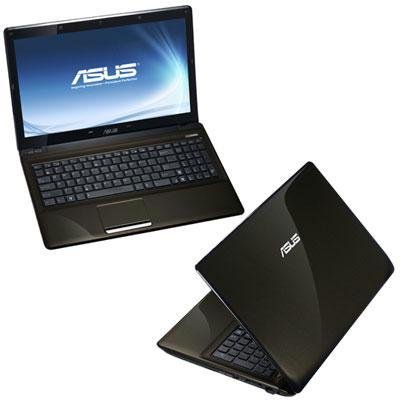
Image 1.1: The ASUS K52F-A2B laptop. This image shows the closed laptop from an angle, highlighting its dark brown finish and sleek design.
1.2 Connexió de l'adaptador de CA
Before initial use, connect the AC adapter to the laptop and a power outlet. This ensures the battery is charged and provides stable power for setup.
- Connecteu l'adaptador de CA al connector d'alimentació que hi ha al lateral del portàtil.
- Connecteu el cable d'alimentació a l'adaptador de CA.
- Connecteu l'altre extrem del cable d'alimentació a una presa de corrent amb connexió a terra.
1.3 Encès inicial
Once the AC adapter is connected, open the laptop lid and press the power button. The laptop will begin its initial boot sequence. Follow the on-screen instructions to complete the operating system setup (Windows 7 Professional 64-bit).
2. Operating Your ASUS K52F-A2B Laptop
2.1 Engegada/Apagada i Mode de repòs
- Encès: Premeu el botó d'engegada que es troba a sobre del teclat.
- Apagar: Click the Start button, then select 'Shut down'.
- Mode de repòs: Close the laptop lid or select 'Sleep' from the Start menu. Press the power button or any key to wake the laptop.
2.2 Ús del teclat i del touchpad
The ASUS K52F-A2B features a full-sized keyboard and a multi-touch touchpad.
- Teclat: Disseny QWERTY estàndard amb tecles de funció (Fn) per a la brillantor, el volum i altres controls del sistema.
- Touchpad: Supports multi-touch gestures for scrolling, zooming, and navigation. Refer to the operating system's help for detailed gesture information.
2.3 Connexió de dispositius externs
Your laptop provides various ports for connecting external devices:
- Ports USB: Per connectar dispositius USB com ara ratolins, teclats i emmagatzematge extern.
- Port HDMI: Connects to external displays or TVs for high-definition video and audio output.
- Port VGA: Connects to older external monitors or projectors.
- Preses d'àudio: Per a auriculars i micròfons.
- Port Ethernet: Per a connexions de xarxa per cable.
2.4 Using the Optical Disk Drive
The laptop includes a Super Multi Optical Disk Drive for reading and writing CDs and DVDs.
- Premeu el botó d'expulsió de la unitat per obrir la safata.
- Place a CD or DVD onto the tray with the label side facing up.
- Empenyeu suaument la safata cap a dins del portàtil fins que es tanqui amb un clic.
3. Manteniment
3.1 Neteja del portàtil
Una neteja regular ajuda a mantenir l'aspecte i la funcionalitat del portàtil.
- Pantalla: Utilitzeu un drap suau i sense pelusa dampNetegeu amb aigua o un netejador de pantalles. No ruixeu líquid directament sobre la pantalla.
- Teclat i Casing: Feu servir un drap suau i sec. Per a la brutícia persistent, utilitzeu un drap lleugerament sec.ampened with mild soap and water can be used. Ensure the laptop is powered off and unplugged before cleaning.
- Reixetes: Use compressed air to clear dust from the cooling vents to prevent overheating.
3.2 Cura de la bateria
Per maximitzar la durada i el rendiment de la bateria:
- Eviteu descarregar completament la bateria amb freqüència.
- Guardeu el portàtil en un lloc fresc i sec quan no el feu servir durant períodes prolongats.
- Si l'emmagatzemeu durant molt de temps, carregueu la bateria al 50% aproximadament abans de guardar-la.
3.3 Actualitzacions de programari
Regularly update your operating system and drivers to ensure optimal performance and security. Check the ASUS support website for the latest drivers for your K52F-A2B model.
4. Solució De Problemes
This section addresses common issues you might encounter with your ASUS K52F-A2B laptop.
4.1 Problemes d'energia
- El portàtil no s'encén: Ensure the AC adapter is securely connected to both the laptop and a working power outlet. Check if the power outlet is functional. If the battery is completely drained, allow it to charge for a few minutes before attempting to power on.
- Laptop shuts down unexpectedly: This could indicate overheating. Ensure cooling vents are clear and the laptop is on a hard, flat surface.
4.2 Problemes de visualització
- No es mostra a la pantalla: Connect an external monitor to the VGA or HDMI port to check if the issue is with the laptop's internal display. Press Fn+F8 to toggle display output modes.
- Pantalla atenuada: Adjust screen brightness using the Fn+F5 (dim) and Fn+F6 (bright) function keys.
4.3 Problemes de connectivitat
- El Wi-Fi no es connecta: Ensure Wi-Fi is enabled (often via a function key, e.g., Fn+F2). Check network settings in Windows.
- Dispositiu USB no reconegut: Prova de connectar el dispositiu a un port USB diferent. Assegura't que els controladors del dispositiu estiguin instal·lats.
4.4 Operating System Recovery
The ASUS K52F-A2B comes with Windows 7 Professional. For system recovery or reinstallation, it is recommended to use the recovery partition or create recovery media as instructed by ASUS. Note that official support for downgrading to Windows XP Pro may be limited, and recovery media for Windows 7 Pro might need to be created by the user.
5. Especificacions tècniques
| Característica | Especificació |
|---|---|
| Número de model | K52F-A2B |
| Processador | Intel Core i3-350M (2.26 GHz) |
| Sistema operatiu | Windows 7 Professional de 64 bits |
| Mostra | 15.6-inch HD (1366x768) LED |
| Gràfics | Intel GMA HD (Integrated) |
| Memòria RAM | 3 GB DDR3 1066MHz (Max 8GB) |
| Emmagatzematge | 320 GB Hard Drive (5400 RPM) |
| Unitat òptica | DVD SuperMulti |
| Connectivitat sense fil | 802.11bgn |
| Ports | HDMI, VGA, USB, Audio Jacks |
| Weblleva | 0.3 MP |
| Pes | 5.8 lliures |
6. Garantia i Suport
6.1 Informació de la garantia
Your ASUS K52F-A2B laptop comes with the following warranty coverage:
- Garantia global d'2 any
- 1-Year Accidental Damage Warranty
- 30-Day Zero Bright Dot Guarantee
- 2-way FREE shipping for repairs
6.2 Suport tècnic
Per obtenir assistència tècnica, descàrregues de controladors o més informació, visiteu el lloc web de suport oficial d'ASUS. website. 24/7 technical support is available as part of your warranty.
For the most up-to-date support contact information, please refer to the documentation included with your product or visit www.asus.com/support.