
1. Introducció
The VTech Disney Princess Magical Learn and Go is an electronic learning toy designed to engage children in educational play. This device emulates a smartphone and features four Disney Princesses who guide the child through various learning activities. It is designed to help develop skills such as letter recognition, alphabet order, spelling, logic, and music. The toy incorporates an LCD screen, gem-style arrow buttons, and a QWERTY keyboard layout for an interactive learning experience.
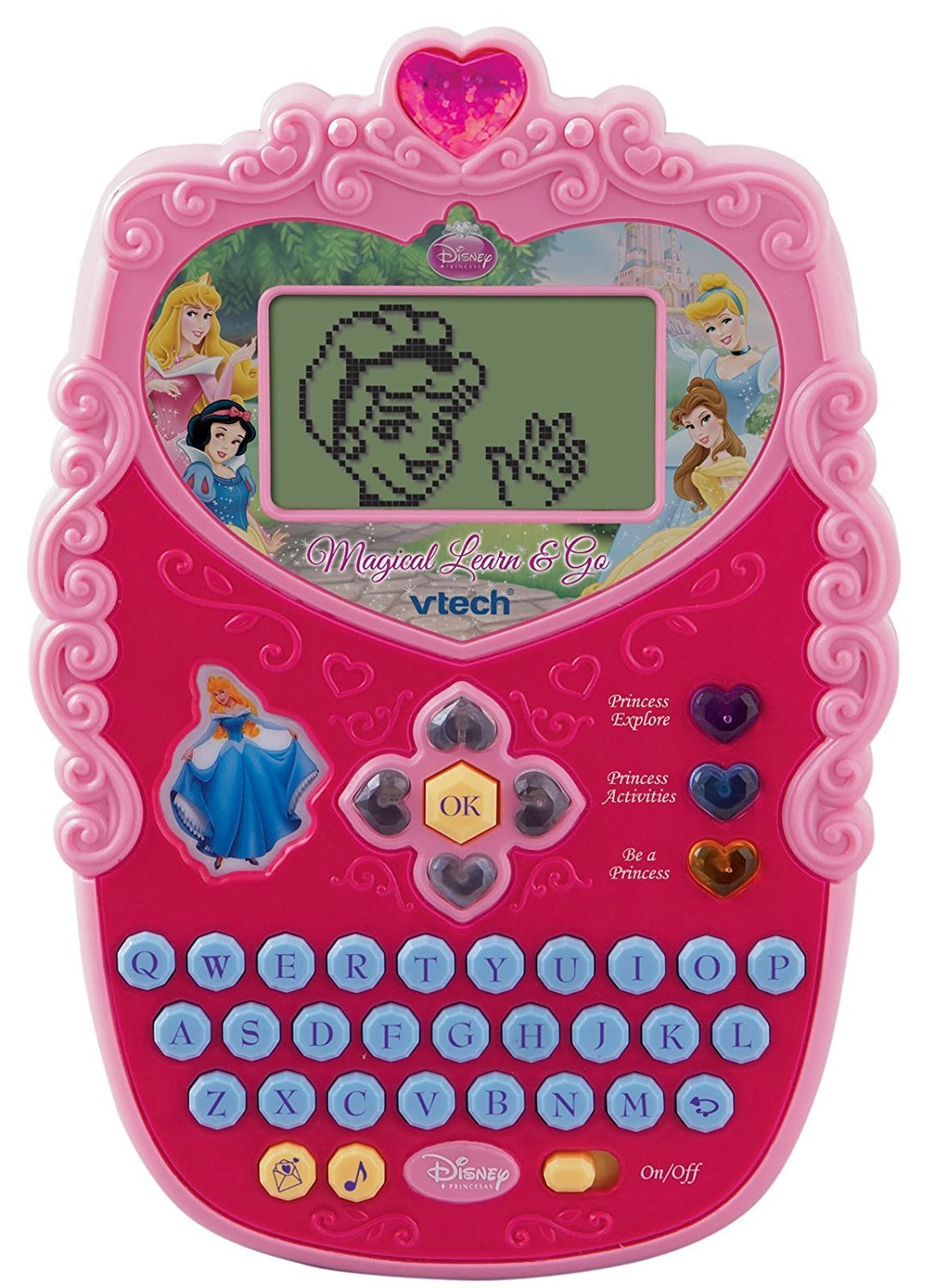
Image 1.1: The VTech Disney Princess Magical Learn and Go device. This image displays the overall design of the electronic learning toy, highlighting its compact, princess-themed appearance.
2. Contingut del paquet
Upon opening the package, ensure all components are present. The box should contain:
- One VTech Disney Princess Magical Learn and Go electronic learning toy.
- Three AA batteries (pre-installed or included separately).
- Aquest manual d'instruccions.

Image 2.1: The VTech Disney Princess Magical Learn and Go toy shown in its retail packaging. The packaging highlights key features and the Disney Princess branding.
3. Característiques del producte
The VTech Disney Princess Magical Learn and Go offers several features designed for educational engagement:
- Interactive Princesses: Features Cinderella, Belle, Snow White, and Aurora to guide learning.
- E-Card Reception: Girls can receive virtual e-cards from their favorite princesses.
- Teclat QWERTY: A full QWERTY keyboard layout for familiar computer-like play and typing practice.
- Pantalla LCD: A clear LCD screen displays activities and animations.
- Gem-Style Arrow Buttons: Intuitive navigation buttons for selecting options and interacting with games.
- Múltiples modes de joc: Three distinct modes of play to vary the learning experience.
- Eight Learning Activities: Includes activities focusing on letter recognition, alphabet order, spelling, logic, and music.
- Disseny elegant: A princess-themed design to appeal to young users.
4. Configuració
4.1 Instal·lació de la bateria
The VTech Disney Princess Magical Learn and Go requires three (3) AA batteries for operation. Batteries may be pre-installed for demonstration purposes. If replacing batteries:
- Localitzeu el compartiment de la bateria a la part posterior de la unitat.
- Amb un tornavís, afluixeu el cargol de la tapa del compartiment de la bateria i traieu la tapa.
- Insert three new AA batteries, ensuring correct polarity (+/-) as indicated inside the compartment.
- Torneu a col·locar la tapa del compartiment de la bateria i estrenyeu el cargol fermament.
Informació important sobre la bateria:
- Use only fresh batteries of the required type.
- No barregeu piles velles i noves.
- No barregeu piles alcalines, estàndard (carboni-zinc) o recarregables (níquel-cadmi).
- Traieu les piles esgotades de la joguina.
- Traieu les piles si la joguina no s'utilitzarà durant un període prolongat.
- Eliminar les piles amb seguretat. No llenceu les piles al foc.
4.2 Encès/Apagat
To turn the unit on, locate the On/Off switch, typically found on the side or bottom of the device, and slide it to the "On" position. To turn the unit off, slide the switch to the "Off" position.
5. Instruccions de funcionament
The Magical Learn and Go toy is designed for intuitive play. Familiarize yourself with the main controls:
- Pantalla LCD: Displays all visual content, including activities, letters, and princess animations.
- Teclat QWERTY: Used for typing letters, words, and interacting with spelling activities.
- Gem-Style Arrow Buttons: Navigate through menus, select options, and move characters within games.
- Botó D'acord: Confirma seleccions o accions.
- Princess Buttons: Dedicated buttons to interact with specific princesses or access princess-themed content.
5.1 Modes of Play
The toy features three distinct modes of play. Use the mode selection buttons (if present) or navigate through the main menu to choose a mode:
- Mode d'aprenentatge: Focuses on educational activities like letter recognition, spelling, and logic puzzles.
- Mode de música: Engages children with melodies, sounds, and musical activities.
- Creative/Role-Play Mode: Allows for imaginative play, such as receiving e-cards from princesses or engaging in princess-themed scenarios.
5.2 Learning Activities
There are eight built-in learning activities. Select an activity from the main menu using the arrow buttons and the OK button. Examples of activities include:
- Letter identification and pronunciation.
- Alphabetical order challenges.
- Basic spelling games.
- Logic puzzles.
- Musical note recognition.

Image 5.1: A child interacting with the VTech Disney Princess Magical Learn and Go toy. This demonstrates the product in use, highlighting its handheld design and user interface.
6. Manteniment
6.1 Neteja
To clean the toy, wipe it with a slightly damp cloth. Do not use harsh chemicals or abrasive cleaners. Ensure the toy is completely dry before storage or further use.
6.2 Emmagatzematge
Store the toy in a cool, dry place away from direct sunlight and moisture. If the toy will not be used for an extended period, remove the batteries to prevent leakage.
7. Solució De Problemes
If the VTech Disney Princess Magical Learn and Go is not functioning as expected, please refer to the following common issues and solutions:
| Problema | Solució |
|---|---|
| La unitat no s'encén. |
|
| La pantalla està en blanc o parpelleja. |
|
| El so està distorsionat o absent. |
|
| Els botons no responen. |
|
8. Especificacions
| Característica | Detall |
|---|---|
| Dimensions del producte | 4.78 x 7.06 x 1.44 polzades |
| Pes de l'article | 13.6 unces |
| Número de model | 80-116900 |
| Edat recomanada | 4 - 7 anys |
| Piles necessàries | 3 piles AA (incloses) |
| Fabricant | VTech |
| Data de llançament | 12 de juny de 2010 |
9. Informació de seguretat
Please read and follow these safety precautions to ensure safe operation of the toy:
- This toy is intended for children aged 4-7 years. Adult supervision is recommended.
- Do not immerse the toy in water or expose it to excessive moisture.
- Avoid dropping the toy or subjecting it to strong impacts.
- Do not attempt to disassemble or modify the toy, as this may cause damage or injury.
- Mantingueu les piles fora de l'abast dels nens petits. En cas d'ingestió, consulteu immediatament un metge.
- In rare cases, prolonged use of electronic toys may cause skin irritation. If irritation occurs, discontinue use.
10. Garantia i Suport
VTech products are manufactured with high-quality materials and undergo rigorous testing. For detailed warranty information, please refer to the warranty card included with your purchase or visit the official VTech website. For technical support or customer service inquiries, please contact VTech customer support through their official channels.
Oficial de VTech Weblloc: www.vtechkids.com