1. Introducció
The Polk Audio SWA500 Power Amplifier is engineered to provide dedicated power for Polk Audio CSW Series built-in subwoofers. This Class D digital amplifier delivers 500 watts into 4 ohms, ensuring robust and distortion-free bass performance. Its design prioritizes long-term reliability and efficient operation. This manual provides essential information for the safe and effective installation, operation, and maintenance of your SWA500 ampmés viu.
2. Instruccions de seguretat importants
- Read these instructions thoroughly before operating the ampmés viu.
- Conserveu aquestes instruccions per a referència futura.
- Presteu atenció a tots els avisos del producte i d'aquest manual.
- Follow all instructions for safe use and installation.
- No utilitzeu aquest aparell a prop d'aigua o humitat.
- Netegeu només amb un drap sec.
- No bloquegeu cap obertura de ventilació. Instal·leu-ho d'acord amb les instruccions del fabricant.
- No instal·leu a prop de cap font de calor com ara radiadors, registres de calor, estufes o altres aparells (inclosos amplificadors) que produeixen calor.
- No anul·leu el propòsit de seguretat de l'endoll polaritzat o de connexió a terra. Un endoll polaritzat té dues fulles, una més ampla que l'altra. Un endoll de connexió a terra té dues fulles i una tercera punta de connexió a terra. La fulla ampla o la tercera punta es proporcionen per a la vostra seguretat. Si l'endoll proporcionat no encaixa a la vostra presa de corrent, consulteu un electricista per substituir la presa obsoleta.
- Eviteu que el cable d'alimentació sigui trepitjat o pessigat, especialment als endolls, els endolls i el punt on surten de l'aparell.
- Utilitzeu només accessoris/accessoris especificats pel fabricant.
- Desendolleu aquest aparell durant les tempestes amb llamps o quan no l'utilitzeu durant llargs períodes de temps.
- Demaneu tot el servei a personal de servei qualificat. El manteniment és necessari quan l'aparell s'ha fet malbé d'alguna manera, com ara el cable d'alimentació o l'endoll està danyat, s'ha vessat líquid o han caigut objectes a l'aparell, l'aparell ha estat exposat a la pluja o la humitat, no funciona amb normalitat. , o s'ha deixat caure.
ADVERTIMENT: Per reduir el risc d'incendi o descàrrega elèctrica, no exposeu aquest aparell a la pluja o la humitat.
3. Configuració i connexions
Abans de fer cap connexió, assegureu-vos que amplifier is powered off and unplugged from the AC outlet. The SWA500 is designed to power up to two Polk Audio CSW Series subwoofers of the same model.
3.1. SPEX Circuit Card Installation
The SWA500 amplifier utilizes SPEX circuit cards to optimize its performance for specific CSW subwoofer models. Ensure the correct SPEX card for your subwoofer model is inserted into the designated slot on the rear panel of the amplifier. These cards provide custom frequency shaping for optimal bass response.
3.2. Connexions del panell posterior
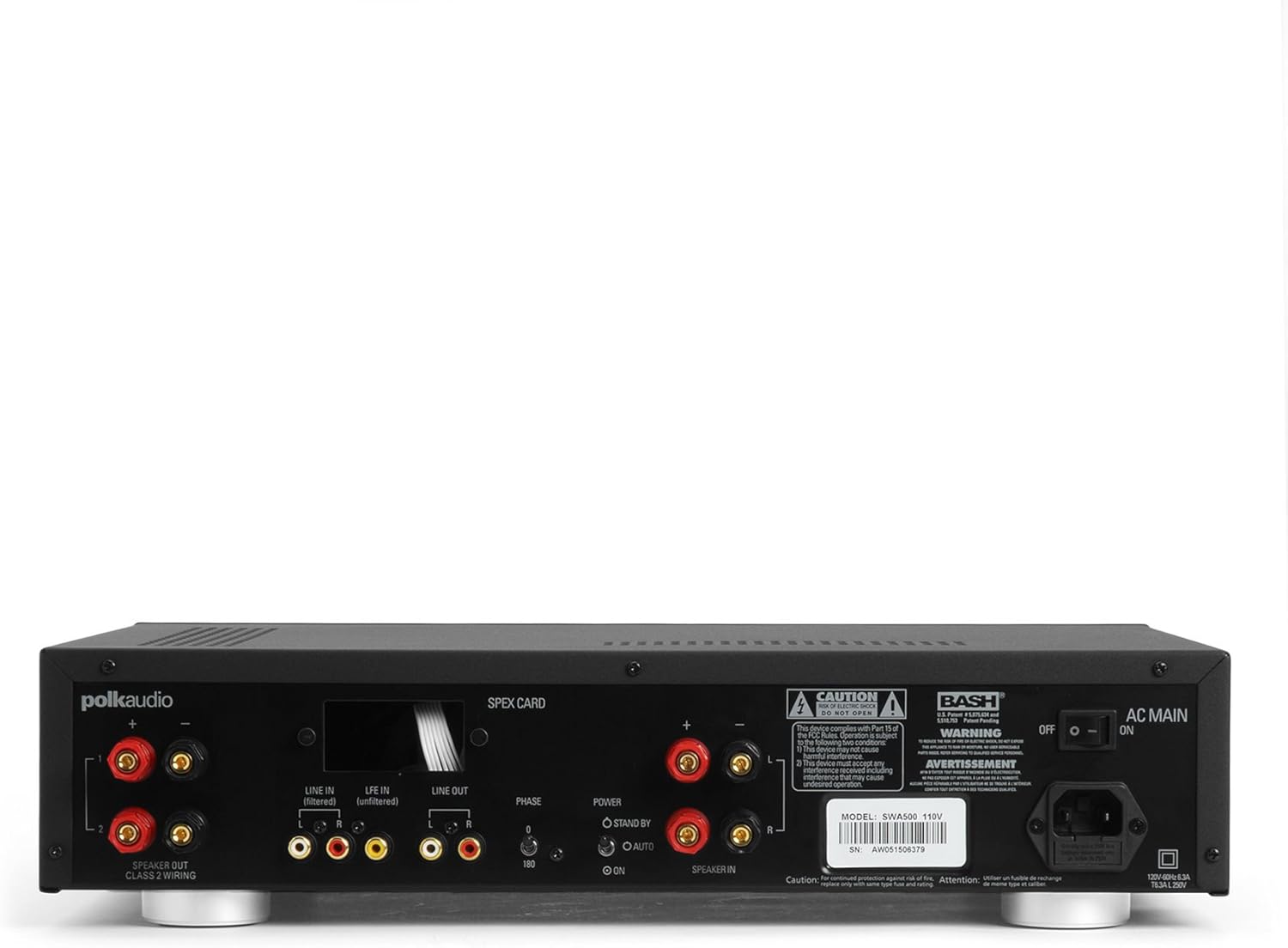
Figure 1: Rear panel of the SWA500 amplifier, illustrating various connection points including Line In, Line Out, Speaker Out, SPEX Card slot, Phase switch, Power mode switch, and AC Main input.
- Line In (Filtered/Unfiltered): Connect your audio source (e.g., AV receiver's subwoofer output) to the appropriate Line In jacks using RCA cables. The "Filtered" input applies a low-pass filter, while "Unfiltered" bypasses it, useful if your source provides its own filtered signal.
- Sortida de línia: These RCA outputs can be used to pass the audio signal to another amplifier or device.
- Sortida de l'altaveu: Connect your Polk Audio CSW subwoofer(s) to these terminals using appropriate speaker wire. Ensure correct polarity (+ to + and - to -). The SWA500 supports Class 2 wiring.
- Interruptor de fase: Adjust this switch (0° or 180°) to optimize the subwoofer's phase with your main speakers for seamless sound integration.
- Commutador de mode d’alimentació: Select between "ON" (always on), "AUTO" (turns on when an audio signal is detected), or "STANDBY" (low power mode, awaiting signal).
- CA principal: Connect the supplied power cord to this input and then to a suitable AC power outlet.
4. Funcionament
Once all connections are made and the amplifier is plugged in, you can begin operating your SWA500.
4.1. Controls del tauler frontal

Figure 2: Front panel of the SWA500 amplifier, featuring the Power button, Protection indicator, Low Pass Filter control, and Volume control.
- Botó d'encesa: Premeu per girar amplifier on or off. The power indicator light will illuminate when the unit is on.
- Indicador de protecció: This light illuminates if the amplifier enters protection mode due to overheating or an electrical fault. If this occurs, turn off the amplifier, check connections, and allow it to cool before restarting.
- Low Pass Filter (80Hz - 120Hz): This knob adjusts the upper frequency limit of the subwoofer's output. Adjust this to blend the subwoofer's sound seamlessly with your main speakers. Start with a setting around 80Hz and adjust by ear.
- Volume (Min - Max): This knob controls the overall output level of the subwoofer. Adjust to achieve the desired bass intensity relative to your main speakers.
4.2. Initial Sound Adjustment
Begin with the Low Pass Filter set to a mid-point (e.g., 100Hz) and the Volume knob at a low setting. Play a familiar piece of music or movie scene. Gradually increase the Volume until the bass is noticeable but not overpowering. Then, fine-tune the Low Pass Filter and Phase switch to achieve the most natural and integrated sound with your main speakers. The goal is for the subwoofer to enhance the low frequencies without drawing attention to its location.
5. Manteniment
- Neteja: Disconnect the power cord before cleaning. Use a soft, dry cloth to wipe the exterior surfaces of the amplifier. Do not use liquid cleaners or aerosol sprays.
- Ventilació: Assegureu-vos que les obertures de ventilació de la amplifier are not blocked. Proper airflow is crucial for preventing overheating and maintaining long-term reliability.
- Emmagatzematge: Si emmagatzema el amplifier for an extended period, unplug it from the power outlet and store it in a cool, dry place, away from direct sunlight and extreme temperatures.
6. Solució De Problemes
If you experience issues with your SWA500 amplificador, consulteu la guia de resolució de problemes següent:
| Problema | Causa possible | Solució |
|---|---|---|
| Sense llum indicadora d'alimentació | Power cord not connected; AC outlet not active; Power switch off. | Ensure power cord is securely connected. Check AC outlet with another device. Press the front panel power button. |
| No hi ha so del subwoofer | Incorrect input connection; Speaker wires loose or incorrect polarity; Volume too low; SPEX card missing or incorrect; Amplifier in standby/auto mode without signal. | Verify RCA input connections. Check speaker wire connections and polarity. Increase volume. Ensure correct SPEX card is installed. Set Power Mode switch to "ON" for testing. |
| Distorted or poor quality sound | Volume too high; Incorrect Low Pass Filter setting; Phase mismatch; Damaged speaker wire or subwoofer. | Reduce volume. Adjust Low Pass Filter. Toggle Phase switch (0°/180°). Inspect speaker wires and subwoofer for damage. |
| Protection indicator illuminated | Overheating; Short circuit in speaker wiring; Ampfalla de lifier. | Apagueu amplifier and allow to cool. Check speaker wiring for shorts. If problem persists, contact customer support. |
7. Especificacions
- Model: SWA500
- Potència de sortida: 500 watts a 4 ohms
- AmpTipus més viu Classe D Digital
- Compatibilitat: Designed for Polk Audio CSW Series built-in subwoofers (requires specific SPEX circuit card)
- Filtre de pas baix: Adjustable (Front Panel)
- Control de volum: Adjustable (Front Panel)
- Control de fase: 0°/180° (Rear Panel)
- Modes d'alimentació: ON, AUTO, STANDBY (Rear Panel)
- Dimensions del producte: 1 x 1 x 1 inches (approximate, as per provided data)
- Pes de l'article: 12.25 lliures
- Fabricant: Polk Àudio
- Data de primera disponibilitat: 18 d'abril de 2005
8. Garantia i Suport
For specific warranty information, please refer to the warranty card included with your product or visit the official Polk Audio weblloc web. Conserveu el rebut de compra com a comprovant de compra per a reclamacions de garantia.
If you require technical assistance or have questions not covered in this manual, please contact Polk Audio customer support. Contact information can typically be found on the official Polk Audio weblloc web o a l'embalatge del producte.
Polk Audio Oficial Weblloc: www.polkaudio.com