
1. Introducció
The DigiTech JamMan Stereo Looper Delay Pedal (Model JML2) is an advanced looping and phrase sampling device designed for musicians. It allows users to record, play back, and overdub multiple layers of audio in stereo, offering extensive memory capacity and versatile connectivity options. This manual provides detailed instructions for setting up, operating, and maintaining your JamMan Stereo Looper.
2. Característiques clau
- Stereo Looping: Record and play back audio in true stereo.
- Extensive Memory: Store over 35 minutes of CD-quality loops in 99 internal memories.
- SD Card Expansion: Utilize an optional SDHC memory card for over 16 hours of additional storage across 99 more slots.
- Connectivitat USB: Connect to a computer for loop organization and archiving using the JamManager software.
- Reverse Playback: Play loops in reverse for creative effects.
- Entrada de micròfon: Balanced XLR mic input with dedicated gain control for dynamic and self-powered microphones.
- Entrada auxiliar: Import music from external devices like CD or MP3 players.
- Metrònom: Built-in metronome with multiple rhythm sounds and time signatures.
- Pedals: Four heavy-duty footswitches for intuitive looping control and loop selection.
- Modes d'aturada: Three distinct stop modes: Stop, Finish, and Fade.
- Rhythm Output: Dedicated output for sending a click track to keep other musicians in sync.
- Construcció robusta: Durable metal chassis designed for reliability.
3. Configuració
Before operating your JamMan Stereo Looper, ensure all connections are made correctly. Refer to the rear panel diagram for input and output locations.
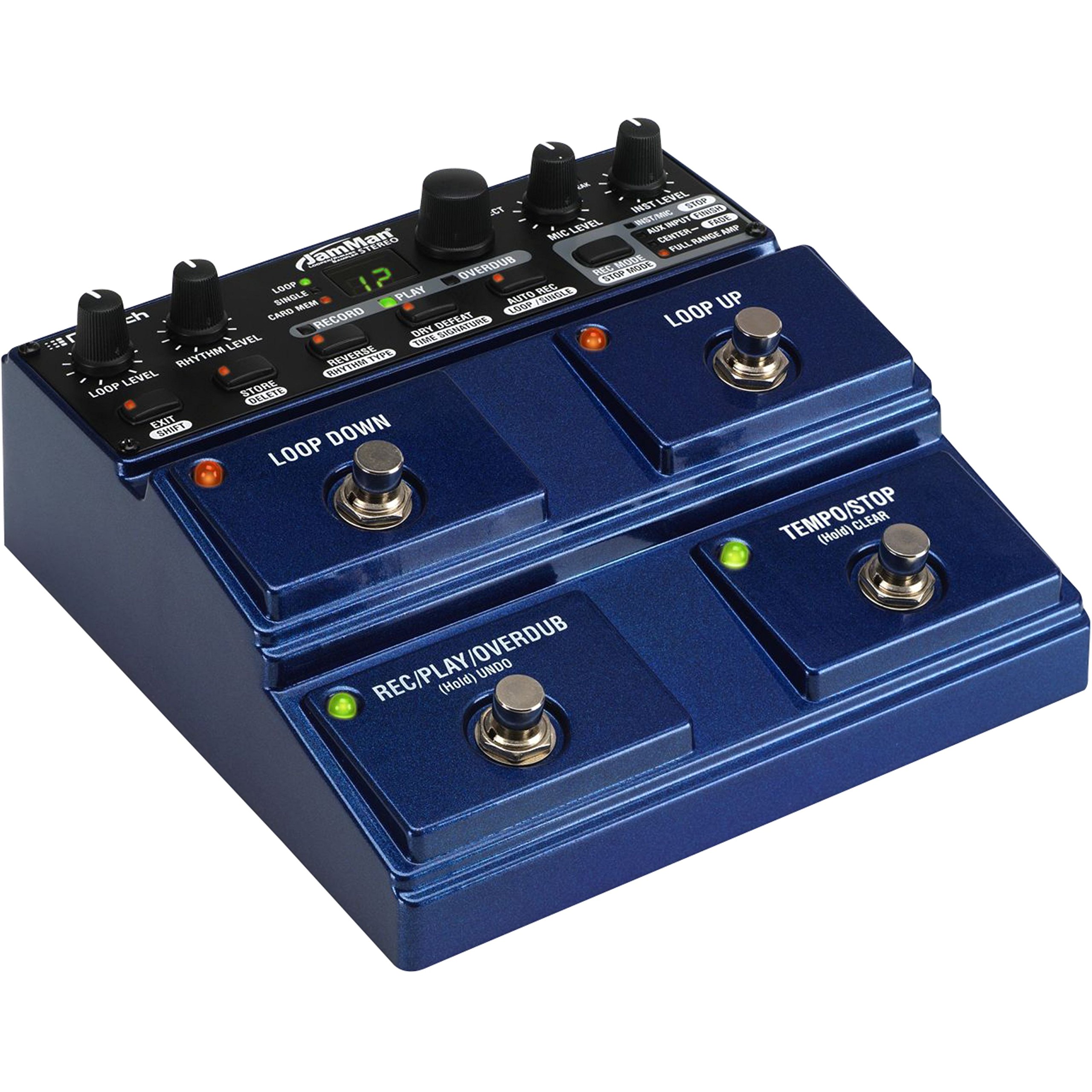
Figure 3.1: Rear Panel Connections. This image displays the rear panel of the JamMan Stereo Looper, highlighting the MIC INPUT (XLR), LEFT (Mono) OUT, RIGHT OUT, RHYTHM OUT, HEADPHONE jack, LEFT (Mono) IN, RIGHT IN, AUX INPUT, FOOTSWITCH input, MEMORY CARD slot, USB port, and 9VAC power input.
3.1 Connexió d'alimentació
Connect the included 9VAC, 1300mA power supply to the 9VAC input jack on the rear panel. Plug the power supply into a suitable AC outlet.
3.2 Connexions d'àudio
- Entrada d'instrument: Connect your instrument (e.g., guitar, keyboard) to the LEFT (Mono) IN jack. For stereo instruments, connect the second output to the RIGHT IN jack.
- Entrada de micròfon: For microphone use, connect an XLR cable from your microphone to the ENTRADA DE MIC. Ajusteu el NIVELL MIC knob on the top panel.
- Entrada auxiliar: To import audio from an external device (e.g., MP3 player), connect it to the Entrada d’ajuda jack.
- Sortida d'àudio: Connecteu el LEFT (Mono) OUT al teu amplifier or mixer. For stereo output, also connect the DRET FORA.
- Auriculars: For monitoring, connect headphones to the dedicated headphone jack.
- Rhythm Output: If using an external device for rhythm synchronization, connect it to the RHYTHM OUT.
3.3 Instal·lació de la targeta de memòria
The JamMan Stereo Looper supports SDHC memory cards for expanded storage. Insert an SDHC card into the TARGETA DE MEMÒRIA slot on the rear panel until it clicks into place. To eject, push the card in again.
3.4 Connexió USB
Connect the JamMan Stereo Looper to your computer using a USB cable for use with the JamManager software. This allows for loop management and archiving.
4. Instruccions de funcionament
The JamMan Stereo Looper features intuitive controls for recording, playback, and loop management. Familiarize yourself with the top panel controls and footswitches.

Figure 4.1: Top Panel Controls. This image shows the top control panel of the JamMan Stereo Looper, including knobs for LOOP LEVEL, RHYTHM LEVEL, MIC LEVEL, INST LEVEL, and SELECT. It also displays the RECORD, PLAY, OVERDUB buttons, the LOOP/SINGLE/CARD MEM display, and various function buttons like STORE/DELETE, REVERSE/RHYTHM TYPE, DRY DEFEAT/TIME SIGNATURE, AUTO REC/LOOP/SINGLE, REC MODE/STOP MODE, and the four large footswitches: LOOP DOWN, LOOP UP, REC/PLAY/OVERDUB (Hold UNDO), and TEMPO/STOP (Hold CLEAR).
4.1 Basic Looping Functions
- Gravació d'un bucle:
- Premeu el botó REC/PLAY/OVERDUB footswitch once to start recording. The RECORD LED will illuminate.
- Play your desired phrase.
- Premeu el botó REC/PLAY/OVERDUB footswitch again to stop recording and immediately begin playback. The PLAY LED will illuminate.
- Sobredoblatge:
- Mentre es reprodueix un bucle, premeu la tecla REC/PLAY/OVERDUB footswitch once to enter overdub mode. The OVERDUB LED will illuminate.
- Play additional layers over your existing loop.
- Premeu el botó REC/PLAY/OVERDUB footswitch again to exit overdub mode and continue playback.
- Aturant la reproducció:
- Premeu el botó TEMPO/STOP footswitch once to stop the current loop.
- The stop mode can be configured using the REC MODE/STOP MODE button (Stop, Finish, Fade).
- Desfer/Refer:
- To undo the last overdub, hold the REC/PLAY/OVERDUB footswitch for approximately 2 seconds.
- To redo the undone overdub, hold the REC/PLAY/OVERDUB footswitch again for 2 seconds.
- Clearing a Loop:
- To clear the current loop, hold the TEMPO/STOP footswitch for approximately 2 seconds.
4.2 Loop Selection and Storage
- Navigating Loops: Utilitza el LOOP UP i LOOP DOWN footswitches to select different loop memories. The display will show the current loop number.
- Saving Loops: After creating a loop, press the STORE/DELETE botó. Utilitza el SELECCIONA knob to choose a memory location, then press STORE/DELETE de nou per confirmar.
- Deleting Loops: To delete a loop, select the desired loop, then hold the STORE/DELETE button for approximately 2 seconds. Confirm deletion if prompted.
- Card Memory: To access loops stored on an SDHC card, ensure the card is inserted and select "CARD MEM" using the appropriate button or menu option.
4.3 Funcions avançades
- Reverse Playback: Premeu el botó REVERSE/RHYTHM TYPE button to toggle reverse playback for the current loop.
- Metronome/Rhythm: Premeu el botó REVERSE/RHYTHM TYPE button (when not in reverse mode) to cycle through rhythm types. Adjust rhythm level with the NIVELL DE RITME perilla.
- Control de tempo: Toqueu TEMPO/STOP footswitch multiple times to set the tempo for the metronome or for tempo-synced effects.
- JamManager Software: For advanced loop management, connect the JamMan Stereo Looper to your computer via USB and use the DigiTech JamManager software. This software allows you to organize, archive, and transfer loops between the pedal and your computer.
5. Manteniment
Proper maintenance ensures the longevity and optimal performance of your DigiTech JamMan Stereo Looper.
- Neteja: Feu servir un drap suau i sec per netejar l'exterior de la unitat. Eviteu productes de neteja o dissolvents abrasius.
- Emmagatzematge: When not in use, store the pedal in a cool, dry place away from direct sunlight and extreme temperatures.
- Font d'alimentació: Always use the original DigiTech power supply or a compatible replacement with the correct voltage and current ratings (9VAC, 1300mA).
- Pedals: The heavy-duty footswitches are designed for durability, but avoid excessive force.
- Actualitzacions de firmware: Check the DigiTech website periodically for any available firmware updates for your JamMan Stereo Looper.
6. Solució De Problemes
If you encounter issues with your JamMan Stereo Looper, refer to the following common solutions:
| Problema | Causa possible | Solució |
|---|---|---|
| Sense sortida de so. | Incorrect cable connections, low volume levels, incorrect input/output selection. |
|
| Poor sound quality or noise. | Guanys inadequatstaging, faulty cables, interference, low-quality power supply. |
|
| Loops not saving or loading. | Memory full, faulty SD card, incorrect save procedure. |
|
| JamManager software not recognizing the device. | USB cable issue, driver problem, software version. |
|
7. Especificacions
| Característica | Detall |
|---|---|
| Número de model | JML2 |
| Pes de l'article | 2.22 lliures (1.01 kg) |
| Dimensions del producte | 6.84 x 6.7 x 2.89 polzades (17.37 x 17.02 x 7.34 cm) |
| Memòria interna | 35 minutes of CD-quality audio, 99 loops |
| Memòria externa | SDHC card slot (up to 16+ hours, 99 additional loops) |
| Font d'alimentació | Corded Electric, 9VAC, 1300mA |
| Interfície del maquinari | USB |
| Format del senyal | Analògic |
| Color | Blau |
8. Garantia i Suport
For warranty information and technical support, please refer to the official DigiTech weblloc web o contacteu directament amb el servei d'atenció al client. Conserveu el comprovant de compra per a reclamacions de garantia.
DigiTech Official Weblloc: digitech.com