
AudioCodes MP-118
Manual d'usuari de la passarel·la VoIP AudioCodes MediaPack MP-118
Model: MP118/4S/4O/SIP
Marca: AudioCodes
Introducció
This manual provides comprehensive instructions for the installation, operation, and maintenance of the AudioCodes MediaPack MP-118 Analog VoIP Gateway. The MP-118 is designed to connect traditional analog devices and PSTN/ISDN networks to VoIP services, supporting 4 FXS and 4 FXO analog lines.
Producte acabatview
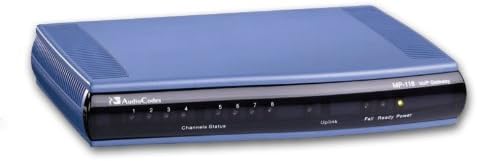
Figura 1: Frontal view of the AudioCodes MediaPack MP-118 VoIP Gateway. The front panel features status LEDs for channels, uplink, and power.
The AudioCodes MediaPack MP-118 is a robust analog VoIP gateway, facilitating the integration of legacy telephony equipment with modern IP communication systems. It includes 4 FXS ports for connecting analog phones or fax machines and 4 FXO ports for connecting to PSTN lines or PBX extensions. The device operates on a single 100/10 BaseT Ethernet connection and is powered by an AC power supply.
Configuració i instal·lació
Contingut del paquet
- AudioCodes MediaPack MP-118 VoIP Gateway
- Adaptador de corrent alterna
- Cable Ethernet
- Guia d'inici ràpid (si escau)
Connexió de la passarel·la
- Connexió d'alimentació: Connect the provided AC power adapter to the gateway's power input and then to a standard electrical outlet.
- Connexió de xarxa: Connect an Ethernet cable from the gateway's 100/10 BaseT port to your network switch or router.
- FXS Port Connection: Connect analog phones, fax machines, or other FXS-compatible devices to the FXS ports (typically labeled 1-4).
- FXO Port Connection: Connect PSTN lines or PBX extensions to the FXO ports (typically labeled 5-8).
Configuració Inicial
Upon initial power-up, the gateway will perform a self-test. Refer to the En funcionament section for details on LED indicators. Network configuration and SIP registration typically require access to the device's web-based management interface or command-line interface. Consult the full administration guide for detailed configuration steps, including IP address assignment, SIP server registration, and dial plan setup.
Funcionament del Gateway
Indicadors LED
The front panel of the MP-118 features several LED indicators to provide status information:
- LED d'alimentació: Indicates power status. Solid green typically means the device is powered on and operating correctly.
- LED a punt: Indicates system readiness. Solid green when the gateway is fully initialized and ready for operation.
- Uplink LED: Indicates Ethernet link status. Blinking or solid green indicates network activity.
- Channel Status LEDs (1-8): Each LED corresponds to an FXS or FXO port.
- Apagat: Port is idle or not connected.
- Verd sòlid: Port is active (e.g., phone off-hook, call in progress).
- Verd intermitent: May indicate a specific status like ringing or a configuration issue, depending on firmware.
Basic Call Operations
Once configured, analog devices connected to the FXS ports can make and receive calls via the VoIP network. FXO ports allow calls to be routed between the VoIP network and the PSTN. The gateway supports basic conference call capabilities and multi-line operation, depending on the connected devices and SIP server configuration.
Manteniment
- Actualitzacions de firmware: Periodically check the AudioCodes support website for firmware updates. Keeping the firmware current ensures optimal performance and security.
- Neteja: Clean the exterior of the device with a soft, dry cloth. Do not use liquid cleaners or aerosols. Ensure ventilation openings are clear of dust.
- Condicions ambientals: Ensure the gateway is operated within recommended temperature and humidity ranges to prevent damage. Avoid direct sunlight and excessive heat.
- Configuració de còpia de seguretat: Regularly back up the gateway's configuration settings to prevent data loss in case of a reset or failure.
Resolució de problemes
| Problema | Causa possible | Solució |
|---|---|---|
| Sense indicació LED d'engegada | L'adaptador de corrent està desconnectat o defectuós. | Check power connections. Ensure the adapter is securely plugged into the gateway and a working electrical outlet. Test the outlet with another device. |
| Uplink LED is off | Ethernet cable disconnected or network issue. | Verify the Ethernet cable is securely connected to both the gateway and the network device. Check network switch/router status. Try a different Ethernet cable. |
| Analog phone has no dial tone | FXS port not connected, not configured, or SIP registration failure. | Ensure the phone is correctly plugged into an FXS port. Check the channel status LED. Verify SIP registration status via the gateway's management interface. Consult your VoIP service provider. |
| Cannot make or receive calls via PSTN | FXO port not connected, not configured, or PSTN line issue. | Ensure the PSTN line is correctly plugged into an FXO port. Check the channel status LED. Verify FXO port configuration and dial plan settings. Test the PSTN line directly. |
Especificacions
| Característica | Detall |
|---|---|
| Número de model | MP118/4S/4O/SIP |
| Ports analògics | 4 FXS (Foreign Exchange Subscriber) for analog devices, 4 FXO (Foreign Exchange Office) for PSTN/PBX lines |
| Protocols VoIP | SIP (Session Initiation Protocol), MGCP, H.323 |
| Interfície Ethernet | Single 100/10 BaseT |
| Font d'alimentació | Corded Electric (AC Power Supply) |
| Dimensions (L x A x A) | 8.66 x 6.77 x 1.65 polzades (220 x 172 x 42 mm) |
| Pes | 1.1 lliures (500 grams) |
| Dispositius compatibles | VoIP services, PSTN/ISDN networks, analog devices (phones, fax machines, answering machines), computer systems |
| Capacitat de trucades de conferència | Bàsica |
| Operació multilínia | Admet |
Informació de la garantia
AudioCodes products typically come with a standard manufacturer's warranty. For specific warranty terms and conditions, including duration and coverage, please refer to the warranty card included with your product or visit the official AudioCodes weblloc web. Conserveu el comprovant de compra per a reclamacions de garantia.
Atenció al client
For technical assistance, advanced configuration guides, or further support, please visit the official AudioCodes support portal or contact their customer service department. You may find additional resources, FAQs, and software downloads on their weblloc.
- AudioCodes Official Weblloc: www.audiocodes.com
- Portal de suport: Consulteu l'oficial website for the latest support contact information and resources.
Documents relacionats - MP-118
 |
AudioCodes MP-1xx ATA Survivability Configuration Guide for Zoom Phone Learn how to configure AudioCodes MP-1xx ATA devices for survivability in a Zoom Phone environment, enabling extension-to-extension dialing when Zoom connectivity is lost. |
 |
Notes de la versió 4.4.6 de l'adaptador de telèfon AudioCodes MP-20x Notes de la versió 4.4.6 de l'adaptador telefònic de la sèrie MP-20x d'AudioCodes, que detallen les noves funcions, les restriccions resoltes, els problemes coneguts i les especificacions del dispositiu. |
 |
AudioCodes EMS User's Manual v6.4: Element Management System Guide Comprehensive user's manual for AudioCodes Element Management System (EMS) v6.4. Learn to manage, configure, monitor, and troubleshoot AudioCodes Media Gateways and Servers with this detailed guide. |
 |
AudioCodes Mediant 4000 SBC User's Manual (Version 7.2) Comprehensive user manual for the AudioCodes Mediant 4000 Session Border Controller (SBC) Version 7.2. Covers configuration, management, maintenance, and troubleshooting for enterprise and service provider VoIP networks. |
 |
AudioCodes AcBootP Utility User's Guide User's Guide for AudioCodes AcBootP Utility, detailing installation, configuration of BootP/TFTP server settings, client management, monitoring, and troubleshooting for Multi-Service Business Routers and VoIP Media Gateways. |
 |
AudioCodes SBC-Gateway Release Notes Version 7.6 Technical release notes for AudioCodes Session Border Controllers and Media Gateways, version 7.6. Includes new features, system capacity specifications, and supported SIP standards. |
Ask a question about this manual
Ask about setup, troubleshooting, compatibility, parts, safety, or missing instructions. Manuals+ will review the question and use this page’s manual context to help answer it.