
1. Introducció
The BUFFALO Giga Switching Hub LSW3-GT-24NSR is a 24-port Gigabit Ethernet switch designed for high-speed network environments. It is ideal for small to medium-sized offices and workplaces requiring robust and reliable network connectivity. This device supports full Gigabit speeds across all ports, ensuring efficient data transfer.
Key features include a fanless design for silent operation and enhanced reliability, as well as a loop detection function to prevent network disruptions caused by accidental network loops.
2. Informació de seguretat
Si us plau, llegiu i comprengui les següents precaucions de seguretat abans d'utilitzar el dispositiu per evitar lesions o danys.
- Font d'alimentació: Feu servir només l'adaptador de corrent proporcionat. Assegureu-vos que la presa de corrent compleixi amb el voltatge especificat.tage requisits.
- Ventilació: No bloquegeu les obertures de ventilació. Assegureu-vos que hi hagi un flux d'aire adequat al voltant del dispositiu per evitar el sobreescalfament.
- Medi ambient: Avoid exposing the device to water, high humidity, extreme temperatures, or direct sunlight.
- Manipulació: Do not drop or subject the device to strong impacts. Do not attempt to open or repair the device yourself. Refer all servicing to qualified personnel.
- cables: Ensure all network cables are properly connected and secured.
3. Contingut del paquet
Verifiqueu que tots els elements siguin presents al paquet:
- BUFFALO Giga Switching Hub LSW3-GT-24NSR Unit
- Cable d'alimentació
- Rack Mount Brackets (if included with your model)
- Peus de goma (per a col·locació a l'escriptori)
4. Configuració
4.1 Instal·lació física
The LSW3-GT-24NSR can be installed on a desktop or mounted in a 19-inch equipment rack.
Ubicació d'escriptori:
- Attach the included rubber feet to the bottom of the unit to prevent slipping and provide stability.
- Place the unit on a flat, stable surface with adequate ventilation.
Muntatge en bastidor:
- Attach the rack mount brackets to the sides of the unit using the provided screws.
- Secure the unit into a standard 19-inch equipment rack using appropriate rack screws (not included).
4.2 Connexió de cables de xarxa
Connect your network devices (computers, servers, other switches) to any of the 24 RJ-45 ports on the front panel using standard Ethernet cables (Category 5e or higher recommended for Gigabit speeds).

Figura 1: Panell frontalview with 24 Ethernet Ports and Status LEDs.
4.3 Connexió de potència
- Connect the power cable to the AC IN port on the rear of the device.
- Connecteu l'altre extrem del cable d'alimentació a una presa de corrent adequada.
- The device will power on automatically. The POWER LED on the front panel should illuminate.

Figura 2: Panell posteriorview with AC IN Power Port.
5. Instruccions de funcionament
5.1 Indicadors LED
The front panel features several LED indicators to monitor the status of the switch and its ports.
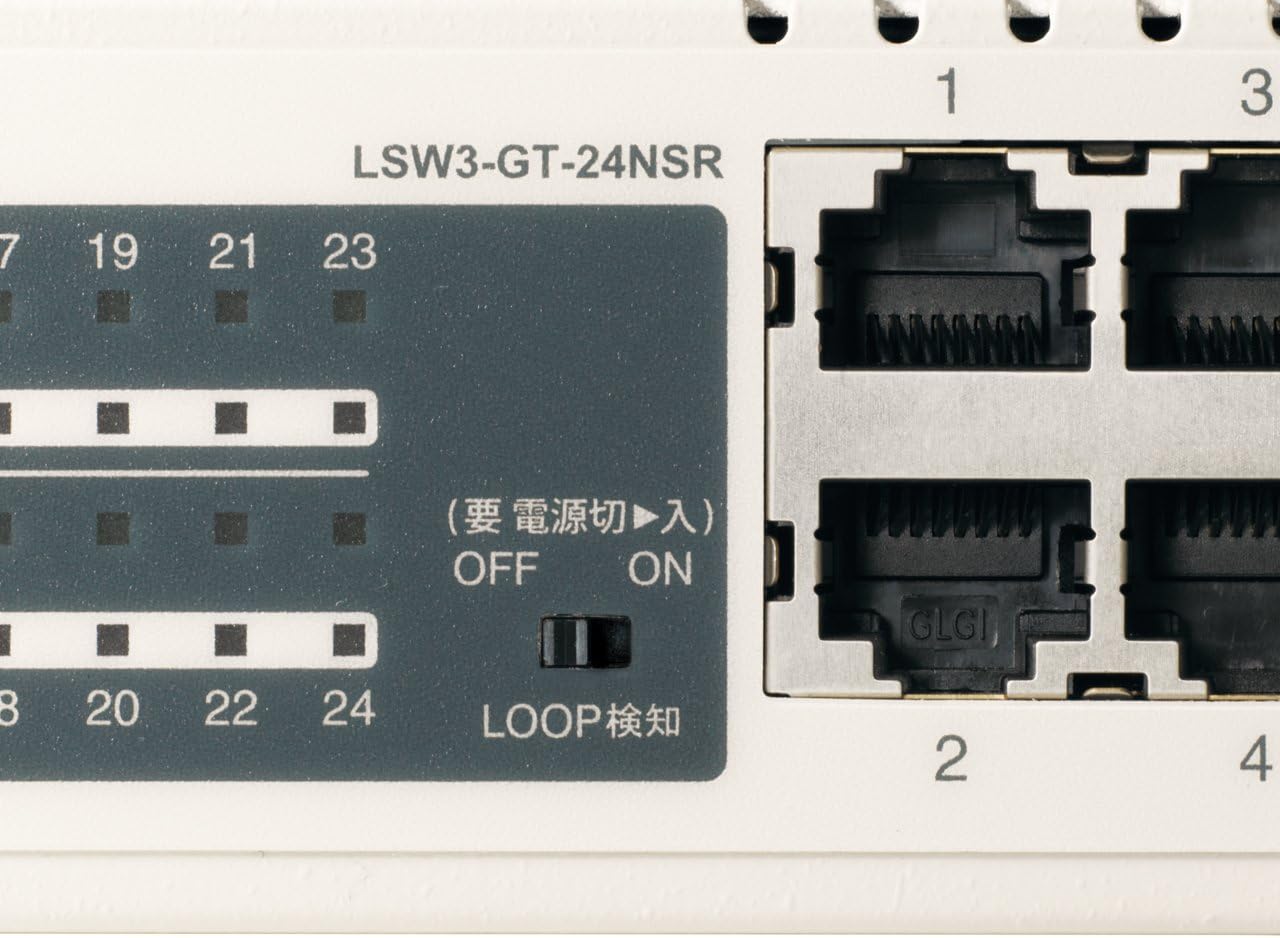
Figura 3: Detallada view of LED Indicators and Loop Detection Switch.
| Nom del LED | Estat | Descripció |
|---|---|---|
| PODER | On | El dispositiu està encès. |
| ENLLAÇ / ACT (per port) | On | A network device is connected and a link is established. |
| Parpellejant | Les dades s'estan transmetent o rebent a través del port. | |
| 1000/100/10M (per port) | Verd | Port is operating at 1000 Mbps (Gigabit Ethernet). |
| Taronja | Port is operating at 100 Mbps (Fast Ethernet). | |
| Apagat | Port is operating at 10 Mbps (Ethernet). | |
| LOOP DETECT | On | A network loop has been detected. |
5.2 Funció de detecció de bucles
The LSW3-GT-24NSR features a hardware switch for enabling or disabling the loop detection function. This function helps prevent network instability caused by accidental network loops.
Figure 4: Loop Detection Switch (ON/OFF).
- ACTIVITAT: Loop detection is active. If a loop is detected, the corresponding port will be automatically shut down to prevent network broadcast storms, and the LOOP DETECT LED will illuminate.
- DESACTIVAT: Loop detection is disabled.
It is recommended to keep the loop detection function ON for network stability.
6. Manteniment
6.1 Neteja del dispositiu
To maintain optimal performance, periodically clean the exterior of the switch.
- Desconnecteu el cable d'alimentació abans de netejar.
- Utilitzeu un drap suau i sec per netejar la superfície.
- Do not use liquid cleaners, aerosols, or solvents, as these may damage the casing o components interns.
6.2 Consideracions ambientals
Ensure the device is operated within its specified environmental conditions:
- Temperatura: De 0 °C a 40 °C (32 °F a 104 °F)
- Humitat: 10% a 85% (sense condensació)
7. Solució De Problemes
If you encounter issues with your BUFFALO Giga Switching Hub, refer to the following common problems and solutions.
7.1 Sense poder
- Símptoma: El LED POWER està apagat.
- Solució: Check if the power cable is securely connected to both the device and the power outlet. Ensure the power outlet is functional.
7.2 No Link or Slow Speed on a Port
- Símptoma: The LINK/ACT LED for a connected port is off, or the 1000/100/10M LED indicates a lower speed than expected (e.g., 100M instead of 1000M).
- Solució:
- Verifiqueu que el cable Ethernet estigui connectat correctament pels dos extrems.
- Try a different Ethernet cable. Ensure it is a Category 5e or higher cable for Gigabit speeds.
- Connecteu el dispositiu a un port diferent del commutador.
- Check the network adapter settings on the connected device (computer, server) to ensure it is configured for auto-negotiation or the correct speed.
7.3 Network Instability / LOOP DETECT LED is On
- Símptoma: The LOOP DETECT LED is illuminated, and network performance is degraded or unstable.
- Solució:
- A network loop has been detected. This typically occurs when two ports on the same switch (or different switches) are connected to each other, creating an infinite data path.
- Carefully inspect your network cabling to identify and remove any redundant connections that form a loop.
- If the loop detection switch is ON, the affected port will be automatically shut down. Once the loop is resolved, the port should resume normal operation.
8. Especificacions
| Característica | Descripció |
|---|---|
| Marca | BÚFAL |
| Número de model | LSW3-GT-24NSR |
| Recompte de ports | 24 ports RJ-10 100/1000/45BASE-T |
| Capacitat de commutació | 48 Gbps (sense bloqueig) |
| Taxa de reenviament | 35.7 Mpps |
| Mida de la taula d’adreces MAC | 8K entrades |
| Suport de marc jumbo | Fins a 9 KB |
| Característiques | Auto-MDI/MDIX, Auto-Negotiation, Loop Detection Function, Fanless Design |
| Font d'alimentació | Font d'alimentació interna de CA |
| Dimensions (L x P x A) | (Specific dimensions not provided in source, typical for 1U rackmount) |
| Pes | (Specific weight not provided in source) |
| Temperatura de funcionament | 0 °C a 40 °C |
| Humitat de funcionament | 10% a 85% (sense condensació) |
9. Garantia i Suport
This BUFFALO product is covered by a manufacturer's warranty. Please refer to the warranty card included with your product or visit the official BUFFALO weblloc web per obtenir informació detallada sobre els termes i condicions de la garantia.
For technical support, product registration, or further assistance, please visit the official BUFFALO support weblloc web o poseu-vos en contacte amb el seu departament d'atenció al client. Normalment, podeu trobar la informació de contacte al fabricant weblloc o a l'embalatge del producte.