
Introducció
This manual provides essential information for the safe and efficient operation of your Brookstone iDesign Tower Stereo System. Please read this manual thoroughly before using the product and retain it for future reference.
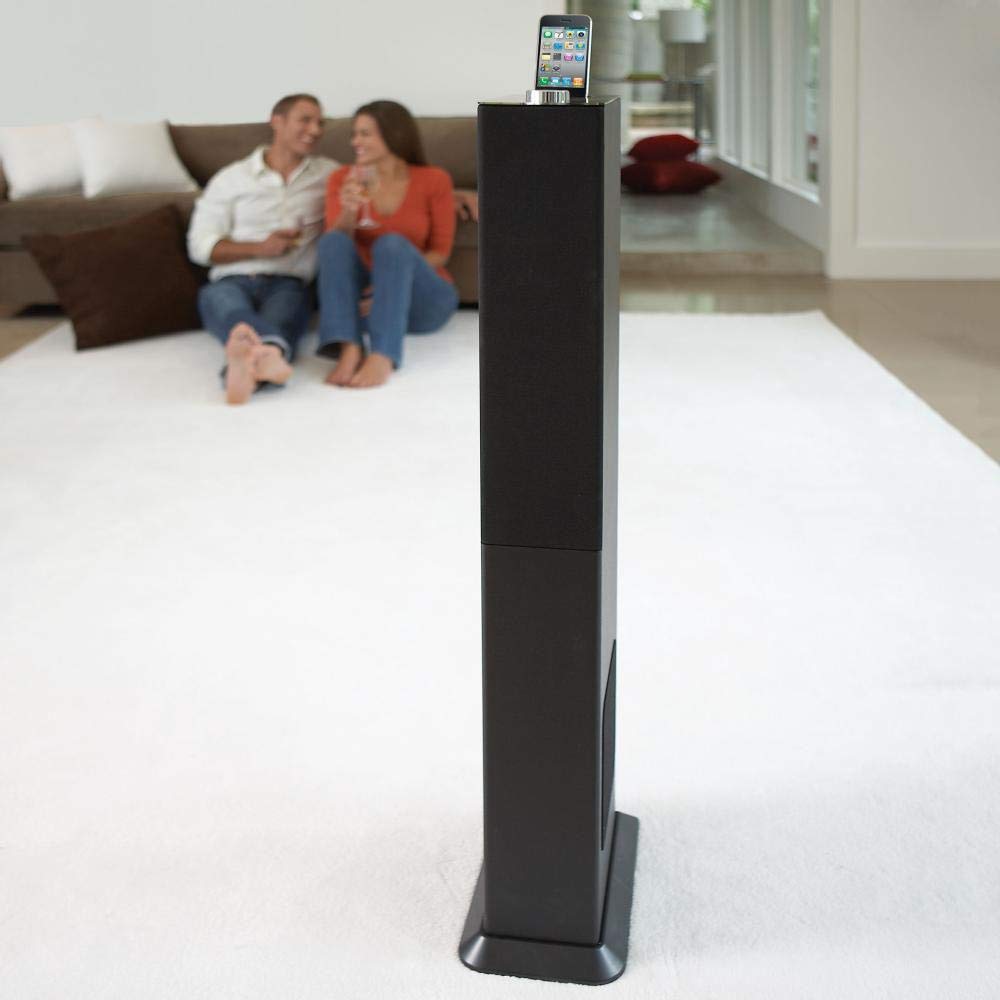
Image: The Brookstone iDesign Tower Stereo System, a tall, slender speaker unit designed for audio playback and device charging.
Informació de seguretat
- Font d'alimentació: Feu servir només l'adaptador de corrent especificat. Assegureu-vos que el volumtage coincideix amb la vostra font d'alimentació local.
- Ventilació: No bloquegeu cap obertura de ventilació. Instal·leu-ho d'acord amb les instruccions del fabricant.
- Aigua i humitat: No exposeu aquest aparell a la pluja ni a la humitat. No col·loqueu objectes plens de líquids, com ara gerros, sobre l'aparell.
- Calor: No instal·leu a prop de cap font de calor com ara radiadors, registres de calor, estufes o altres aparells (inclosos amplificadors) que produeixen calor.
- Neteja: Netegeu només amb un drap sec.
- Manteniment: Demaneu tot el servei a personal de servei qualificat. Cal fer servei quan l'aparell s'hagi fet malbé d'alguna manera.
Contingut del paquet
Si us plau, comproveu que tots els elements siguin presents al paquet:
- iDesign Tower Stereo System
- Control remot
- Adaptador d'alimentació
- Manual d'usuari (aquest document)
- Note: iPod/iPhone devices are not included.
Producte acabatview
The iDesign Tower Stereo System features a sleek design with integrated speakers and a docking station for compatible Apple devices. It includes a backlit on/volume knob and a remote control for convenient operation, delivering full, deep bass, crisp, clear highs, and warm middle tones.
Components principals:
- Reixes d'altaveus: Multi-angled speakers for room-filling sound.
- Docking Port: For iPod and iPhone devices (1st and 2nd generation iPod touch, iPod classic, 4th and 5th generation iPod nano, iPhone 3GS, iPhone 3G, iPhone).
- On/Volume Knob: Backlit control for power and volume adjustment.
- Entrada auxiliar: For connecting other audio devices (cable not included).
- Entrada d'alimentació: Per connectar l'adaptador de corrent.
- Sensor de control remot: Rep senyals del comandament a distància.
Configuració
1. Col·locació
Place the iDesign Tower Stereo System on a stable, flat surface. Ensure there is adequate space around the unit for proper ventilation. Avoid placing it in direct sunlight or near heat sources.
2. Connexió d'alimentació
- Connect the power adapter cable to the Power Input port on the back of the iDesign Tower Stereo System.
- Connecteu l'adaptador d'alimentació a una presa de corrent estàndard.
3. Device Docking (iPod/iPhone)
The system is designed for specific iPod and iPhone models:
- iPod touch (1st and 2nd generation)
- iPod classic
- iPod nano (4th and 5th generation)
- iPhone 3GS
- iPhone 3G
- iPhone
Carefully align your compatible iPod or iPhone device with the docking port and gently push it down until it is securely seated. The device will begin charging automatically when docked and the system is powered on.
4. Auxiliary Input (Optional)
To connect other audio devices (e.g., MP3 players, CD players) that are not compatible with the docking port, use a 3.5mm audio cable (not included) to connect the device's headphone output to the Auxiliary Input port on the iDesign Tower Stereo System.
Instruccions de funcionament
1. Encendre/apagar
Press the On/Volume knob to turn the system on or off. The knob will illuminate when the system is powered on.
2. Control de volum
Rotate the On/Volume knob clockwise to increase the volume and counter-clockwise to decrease it. You can also adjust the volume using the remote control.
3. Selecció de la font
The system automatically detects a docked iPod or iPhone. If an auxiliary device is connected, you may need to select the input source using the remote control (if available) or by cycling through inputs with a dedicated button (refer to remote control section for details).
4. Ús del control remot
The included remote control allows you to manage playback functions (play, pause, skip tracks) and volume for your docked iPod or iPhone from a distance. Point the remote control towards the sensor on the front of the tower system.
5. Dispositius de càrrega
When a compatible iPod or iPhone is docked and the system is powered on, the device will charge automatically.
Manteniment
Neteja
Wipe the exterior of the system with a soft, dry cloth. Do not use liquid cleaners or aerosol sprays, as these may damage the finish or internal components. Ensure the system is unplugged before cleaning.
Emmagatzematge
If storing the system for an extended period, unplug it from the power outlet and store it in a cool, dry place, away from direct sunlight and extreme temperatures.
Resolució de problemes
| Problema | Causa possible | Solució |
|---|---|---|
| Sense poder | L'adaptador de corrent no està connectat o la presa de corrent no funciona. | Ensure power adapter is securely connected to the system and a working wall outlet. |
| No sound from docked device | Device not properly docked; volume too low; device not playing. | Re-seat the device in the dock. Increase system volume and device volume. Ensure music is playing on the device. |
| No sound from auxiliary input | Auxiliary cable not connected; incorrect source selected; volume too low. | Ensure auxiliary cable is securely connected. Select auxiliary input. Increase system and source device volume. |
| El comandament a distància no funciona | Piles esgotades; comandament a distància no apuntat al sensor; obstrucció. | Replace remote control batteries. Point remote directly at the sensor. Remove any obstructions between remote and system. |
| El dispositiu no es carrega | Device not compatible; system not powered on; device not properly docked. | Verify device compatibility (see Setup section). Ensure system is powered on. Re-seat the device in the dock. |
Especificacions
- Model: B003YB9T2C
- Marca: Brookstone
- Dimensions del paquet: 42.6 x 14 x 8.6 polzades
- Pes de l'article: 28.3 lliures
- Primer disponible: 10 de març de 2010
- Compatibilitat: iPod touch (1st/2nd gen), iPod classic, iPod nano (4th/5th gen), iPhone 3GS, iPhone 3G, iPhone.
Garantia i Suport
For warranty information and customer support, please refer to the documentation included with your purchase or visit the official Brookstone weblloc web. Conserveu el comprovant de compra per a reclamacions de garantia.
"Made for iPod" and "Made for iPhone" mean that an electronic accessory has been designed to connect specifically to iPod or iPhone, respectively, and has been certified by the developer to meet Apple performance standards. Apple is not responsible for the operation of this device or its compliance with safety and regulatory standards. Please note that the use of this accessory with iPod or iPhone may affect wireless performance.