
Introducció
This manual provides comprehensive instructions for the operation and maintenance of your Memorex MI4703 Dual Alarm Clock Radio. This device features a dual alarm system, an integrated docking station for iPod and iPhone, and an FM/AM radio. Please read this manual thoroughly before use to ensure proper functionality and to maximize your product experience.
Informació important de seguretat
- Font d'alimentació: Use only the specified power adapter. Do not expose the unit to water or moisture.
- Ventilació: Assegureu-vos que hi hagi una ventilació adequada. No bloquegeu les obertures de ventilació.
- Neteja: Unplug the unit before cleaning. Use a soft, dry cloth. Do not use liquid cleaners.
- Bateries: For time backup, install 2 AAA batteries (not included). Do not mix old and new batteries or different types of batteries. Remove batteries if the unit is not used for extended periods.
- Col·locació: Place the unit on a stable, flat surface. Avoid direct sunlight, heat sources, and excessive dust.
- Manteniment: No intenteu atendre aquest producte vosaltres mateixos. Consulteu tots els serveis a personal de servei qualificat.
Contingut del paquet
Verifiqueu que tots els elements siguin presents al paquet:
- Memorex MI4703 Dual Alarm Clock Radio Unit
- Adaptador de corrent alterna
- Manual d'usuari (aquest document)
Característiques del producte
- Dual alarm settings for separate wake-up times.
- Integrated docking station for iPod and iPhone charging and playback.
- FM/AM digital radio tuner.
- Six-option display dimmer for adjustable brightness.
- Sleep timer and nap functions.
- Auxiliary input for connecting other audio devices.
Configuració
1. Connexió d'alimentació
Connect the AC power adapter to the DC IN jack on the back of the unit, then plug the adapter into a standard wall outlet. The unit will power on and the display will illuminate.
2. Battery Installation (for Time Backup)
For backup power to maintain time settings during a power outage, install 2 AAA batteries (not included) into the battery compartment located on the bottom of the unit. Ensure correct polarity (+/-) as indicated inside the compartment. These batteries do not power the unit for operation, only for time memory.
3. Configuració inicial de l'hora
When first powered on, the time display may flash. To set the time:
- Manteniu premut el botó HORA CONFIGURADA fins que els dígits de les hores parpellegin.
- Utilitza el HORA i MINUT botons per ajustar l'hora.
- Premeu HORA CONFIGURADA de nou per confirmar i sortir del mode de configuració de l'hora.
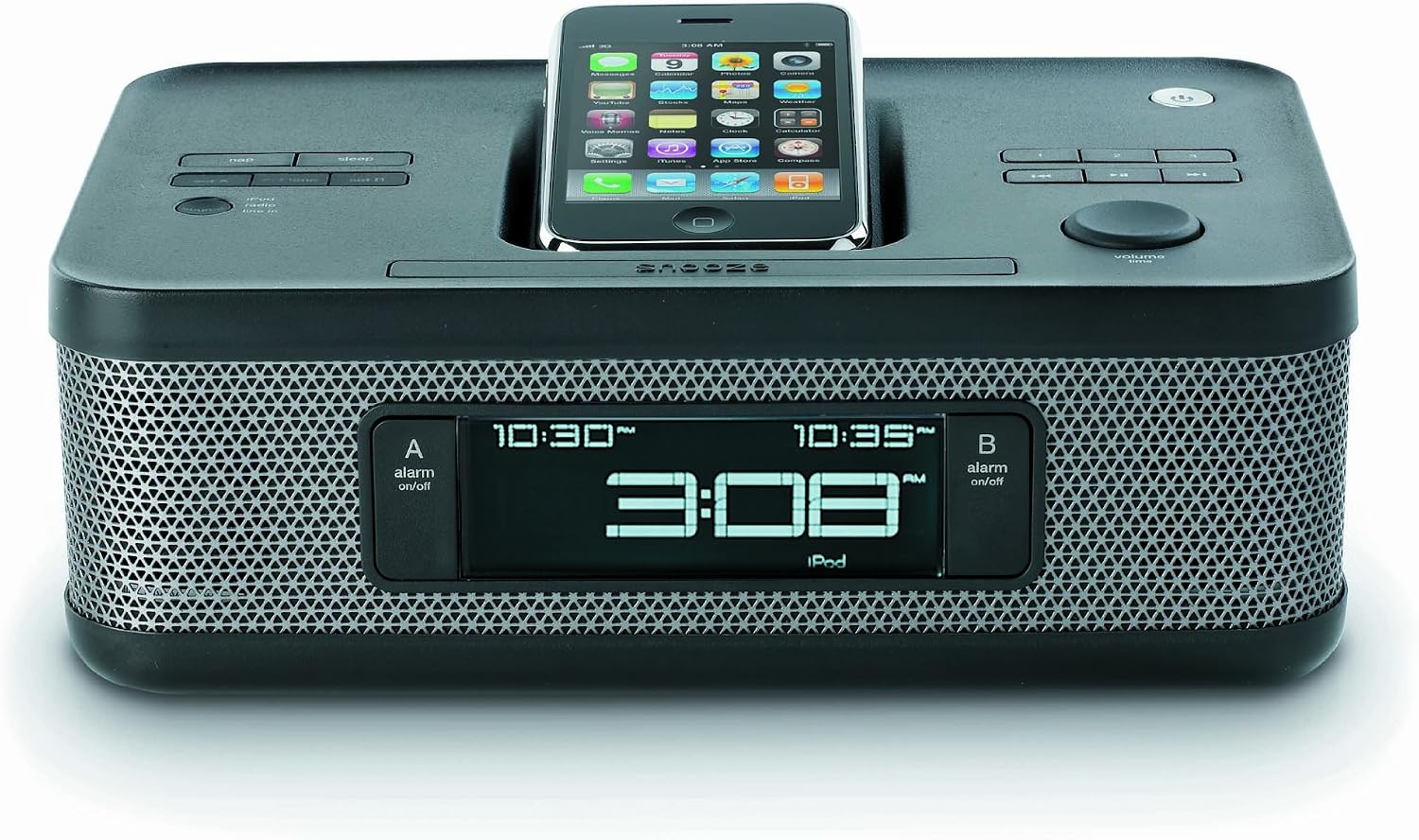
Image: The Memorex MI4703 Dual Alarm Clock Radio, showcasing its sleek black design and the integrated docking station. An iPod is shown docked in the lay-flat cradle, illustrating how devices are positioned for charging and playback.
Instruccions de funcionament
1. Configuració d'alarmes
La unitat disposa de dues alarmes independents (Alarma 1 i Alarma 2).
- Manteniu premut el botó ALARMA 1 or ALARMA 2 botó fins que l'hora de l'alarma parpellegi.
- Utilitza el HORA i MINUT botons per configurar l'hora d'alarma desitjada.
- Premeu el corresponent ALARMA premeu el botó de nou per seleccionar la font de l'alarma: Zumbador, Ràdio, o iPod / iPhone. The selected icon will appear on the display.
- Premeu el botó ALARMA el botó una vegada més per confirmar i activar l'alarma.
- Per desactivar una alarma activa, premeu el botó corresponent ALARMA button. To temporarily silence, press DORMITAR.
2. Using the iPod/iPhone Dock
The integrated dock allows you to play audio from and charge your compatible iPod or iPhone device.
- Carefully place your iPod or iPhone onto the docking connector. Ensure it is seated properly. The unique lay-flat design helps protect your device.
- El dispositiu començarà a carregar-se automàticament.
- Premeu el botó MODE button repeatedly until "iPod" or "iPhone" is selected as the audio source.
- Use the controls on your device or the unit's VOLUM knob to adjust playback.
- To remove your device, gently lift it from the dock.
Nota: Some protective cases may prevent proper docking. It may be necessary to remove the case before docking your device.
3. Operació de ràdio
Per escoltar la ràdio:
- Premeu el botó MODE button repeatedly until "FM" or "AM" is selected.
- Utilitza el TUNE + or MINTEGIA - botons per ajustar manualment la freqüència.
- Mantén premut TUNE + or MINTEGIA - per cercar automàticament la següent emissora disponible.
- Per desar una emissora com a preajust:
- Sintonitza l'emissora desitjada.
- Manteniu premut el botó PRESET fins que el número preestablert parpellegi.
- Utilitza el TUNE + or MINTEGIA - buttons to select the desired preset number (1-10).
- Premeu PRESET de nou per salvar.
- To recall a preset station, press the PRESET Premeu el botó repetidament per anar passant per les emissores desades.
4. Regulador d'intensitat de la pantalla
Premeu el botó DIMMER button repeatedly to cycle through the six brightness levels of the display. Select the level most comfortable for your environment.
5. Sleep Timer and Nap Function
The sleep timer allows you to fall asleep to music, and the nap function provides a short alarm.
- Temporitzador de son: Premeu el botó DORMIR button repeatedly to set the duration (e.g., 90, 60, 30, 15 minutes, or OFF). The unit will automatically turn off after the selected time.
- Nap Function: Premeu el botó NAP button repeatedly to set a short alarm duration (e.g., 10, 20, 30 minutes, or OFF). The buzzer will sound after the selected time.
Manteniment
- Neteja: Wipe the unit with a soft, dry, lint-free cloth. Do not use abrasive cleaners, waxes, or solvents.
- Pols: Keep the docking connector free of dust and debris to ensure proper connection with your device.
- Substitució de la bateria: Replace the AAA backup batteries annually or if the time resets frequently during power interruptions.
Resolució de problemes
| Problema | Causa possible | Solució |
|---|---|---|
| La unitat no s'encén. | L'adaptador de corrent no està connectat o la presa de corrent està defectuosa. | Assegureu-vos que l'adaptador de CA estigui ben connectat a la unitat i a una presa de corrent que funcioni. |
| Time resets after power outage. | Les bateries de reserva estan gastades o no estan instal·lades. | Install 2 new AAA batteries or replace existing ones in the battery compartment. |
| L'iPod/iPhone no es carrega ni no reprodueix. | Device not properly docked; protective case interfering; device compatibility issue. | Ensure device is firmly seated on the connector. Remove any protective cases. Verify device compatibility with the dock. |
| Alarm volume is too loud/soft. | Alarm volume is fixed and not user-adjustable. | This model has a fixed alarm volume. Consider using a different alarm source (e.g., buzzer if radio is too loud). |
| La recepció de la ràdio és deficient. | Antena no estesa; interferències. | Fully extend the FM wire antenna. Reposition the unit for better reception. Avoid placing near other electronic devices that may cause interference. |
Especificacions
- Model: MI4703
- Font d'alimentació: AC 120V ~ 60Hz (via included adapter)
- Còpia de seguretat de la bateria: 2 piles AAA (no incloses)
- Freqüències de ràdio: FM, AM
- Característiques: Dual Alarm, iPod/iPhone Docking, FM/AM Radio, Aux-in, Sleep Timer, Nap Function, Dimmer
- Dimensions: Approximately 2 lbs (Weight)
Garantia i Suport
Memorex products are designed for reliability and performance. For specific warranty information, please refer to the warranty card included with your purchase or visit the official Memorex website. For technical support or service inquiries, please contact Memorex customer service through their official channels.