
Introducció
The Archos 28 Internet Tablet is a compact, Wi-Fi enabled device designed for multimedia playback, internet browsing, and application use. Featuring a 2.8-inch touchscreen and running on the Android platform, it offers a portable solution for digital entertainment and connectivity.
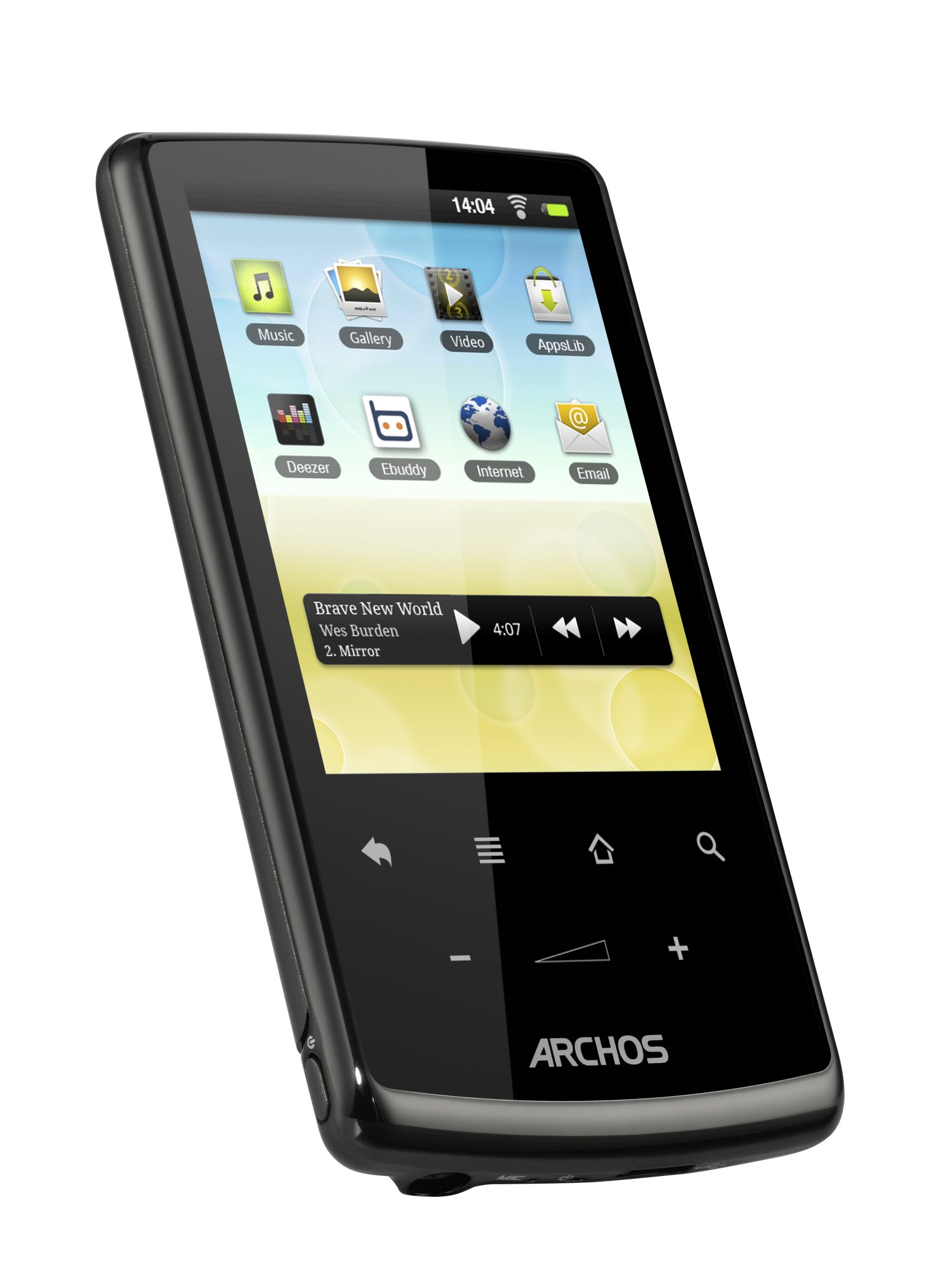
Què hi ha a la caixa
Verifiqueu que tots els elements estiguin presents a l'embalatge:
- Archos 28 Internet Tablet
- Auriculars
- Cable USB estàndard
- Guia d'inici ràpid
- Legal and Safety Notice
Configuració
Càrrega inicial
Before first use, connect the Archos 28 to a power source using the provided USB cable and a compatible USB power adapter (not always included) or a computer's USB port. Allow the device to charge fully.
Encès/Apagat
- To power on: Press and hold the power button until the Archos logo appears.
- To power off: Press and hold the power button, then select 'Power off' from the options on the screen.
Connexió Wi-Fi
The Archos 28 is Wi-Fi enabled. To connect to a wireless network:
- Aneu al menú Configuració.
- Select 'Wireless & networks'.
- Activa la Wi-Fi.
- Seleccioneu la xarxa desitjada de la llista i introduïu la contrasenya si se us demana.
Instruccions de funcionament
Interfície d'usuari
The device operates on the Android platform, featuring five customizable home screens. Icons can be arranged, moved, or removed by touch. The device includes an accelerometer for screen orientation and a graphical accelerator (3D OpenGL ES 2.0) for enhanced visual effects and 3D applications.
Navegació per pantalla tàctil
The 2.8-inch QVGA (320 x 240 pixel) touchscreen allows for navigation and interaction with applications. Use finger gestures such as tapping, swiping, and pinching (if supported by the application) to control the device.
Reproducció multimèdia
The Archos 28 supports various multimedia formats:
- Música: Utilize the dedicated music application with features like 3D cover animation and a mini music widget. Supported audio formats include MP3 (CBR & VBR), WMA, WMA-Pro 5.1, WAV (PCM/ADPCM), AAC, AAC+ 5.13, OGG Vorbis, FLAC, and AC3 5.1.
- Vídeo: The video player supports MPEG-4, H.264, WMV/VC1, Motion JPEG, and MPEG 2 codecs with AVI, MP4, MOV, 3GP, MPG, PS, TS, VOB, MKV, FLV, RM, RMVB, ASF, and WMV extensions.
- Fotos: View images using the Gallery application. Supported image formats include JPEG, BMP, PNG, and GIF.
Internet Browsing and Email
Access the internet using the built-in web browser and manage emails with the pre-installed email application. A Wi-Fi connection is required for these functions.
Aplicacions
Download additional applications from the AppsLib store. This marketplace offers a variety of apps, including games, online music players, and communication tools, to enhance device functionality.
Manteniment
Firmware and OS Updates
The Archos 28 is designed to automatically download the latest firmware and operating system updates when connected to Wi-Fi. Ensure your device is connected to a stable Wi-Fi network to receive these updates, which provide performance improvements and new features.
Neteja
To clean the device, use a soft, lint-free cloth. Avoid using abrasive cleaners or solvents, which can damage the screen or casing.
Resolució de problemes
If you encounter issues with your Archos 28, consider the following:
- El dispositiu no respon: If the device freezes, press and hold the power button for approximately 10 seconds to force a restart.
- Problemes de connectivitat Wi-Fi: Ensure Wi-Fi is enabled and you are within range of a known network. Verify the network password. Restarting the device or the Wi-Fi router may resolve connection problems.
- Rendiment de l'aplicació: Close unused applications to free up system resources. If an app is consistently crashing, try uninstalling and reinstalling it.
- Durada de la bateria: Reduce screen brightness, disable Wi-Fi when not in use, and close background applications to conserve battery power.
Especificacions
| Característica | Detall |
|---|---|
| Marca | Archos |
| Nom del model | Toca |
| Número de model | 501562 |
| Capacitat d'emmagatzematge de memòria | 4 GB |
| Mida de la pantalla | 2.8 polzades |
| Resolució de pantalla màxima | 320 x 240 (QVGA) |
| Velocitat del processador | 0.8 GHz |
| Sistema operatiu | Android (version may vary with updates) |
| Tecnologia de connectivitat | Wi-Fi (802.11b, 802.11g, 802.11n) |
| Interfície del maquinari | USB |
| Battery Average Life (Audio) | 16 hores |
| Battery Average Life (Video) | 4 hores |
| Battery Average Life (Web Browsing) | 6 hores |
| Pes de l'article | 2.4 unces |
| Entrada de la interfície humana | Pantalla tàctil |
| Color | Negre |
| UPC | 690590515628 |
Garantia i Suport
Informació de la garantia
The Archos 28 Internet Tablet comes with a one-year limited warranty. Please refer to the Legal and Safety Notice included in your product packaging for full details regarding warranty terms and conditions.
Atenció al client
For technical assistance, troubleshooting, or warranty claims, please visit the official Archos support website or contact their customer service department. Contact information can typically be found in the Quick Start Guide or on the manufacturer's weblloc.