
Introducció
The GIGABYTE GM-M7600 is a wireless precision optical mouse designed for comfortable and reliable use. This manual provides instructions for setting up, operating, maintaining, and troubleshooting your device.
Contingut del paquet
Si us plau, comproveu el contingut del paquet per assegurar-vos que hi hagi tots els elements:
- GIGABYTE GM-M7600 Wireless Optical Mouse
- Portable Nano USB Receiver
- 2 x piles AAA
Configuració
1. Instal·lació de bateries
The GM-M7600 mouse requires two AAA batteries for operation. The batteries are included in the package.
- Localitzeu la tapa del compartiment de la bateria a la part inferior del ratolí.
- Feu lliscar o aixequeu suaument la tapa per obrir el compartiment.
- Insert the two AAA batteries, ensuring the positive (+) and negative (-) terminals align correctly with the markings inside the compartment.
- Tanqueu bé la tapa del compartiment de la bateria.
2. Connexió del receptor USB
The mouse connects to your computer via a portable Nano USB receiver.
- Locate the Nano USB receiver. It may be stored inside the mouse's battery compartment or packaged separately.
- Plug the Nano USB receiver into an available USB port on your computer (Laptop or Personal Computer).
- Your operating system (e.g., Windows XP, Linux) should automatically detect and install the necessary drivers. This process may take a few moments.
- Un cop instal·lats els controladors, el ratolí ja està llest per al seu ús.
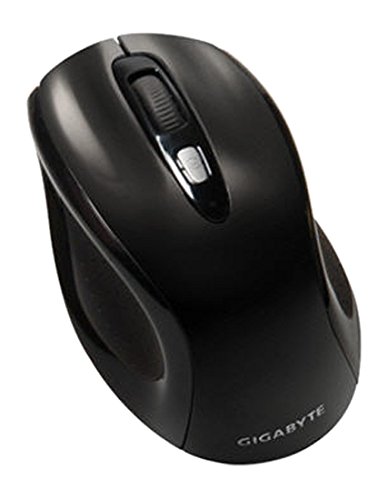
Figura 1: GIGABYTE GM-M7600 Wireless Optical Mouse. This image displays the ergonomic design of the mouse, highlighting its form factor and the location of its buttons. The Nano USB receiver is typically stored within the mouse or connected to a computer's USB port.
Instruccions de funcionament
1. Encès / apagat
The mouse typically has a power switch on its underside. Slide the switch to the 'ON' position to activate the mouse. Slide it to 'OFF' when not in use to conserve battery life.
2. Ajust de DPI (sensibilitat)
The GM-M7600 features an adjustable DPI switch, allowing you to change the mouse sensitivity between 800 DPI and 1600 DPI. This switch is usually located near the scroll wheel. Press the DPI button to toggle between the two sensitivity settings.
3. Funcions bàsiques del ratolí
- Clic esquerre: Botó principal per seleccionar elements, obrir files, i interactuant amb el programari.
- Clic dret: Botó secundari per accedir als menús contextuals i a les opcions addicionals.
- Roda de desplaçament: S'utilitza per desplaçar-se pels documents i web pàgines. També pot funcionar com a botó de clic central.
Manteniment
1. Neteja
Per mantenir un rendiment i un aspecte òptims:
- Disconnect the mouse from your computer and turn off the power switch.
- Utilitzeu un drap suau i sense pelusa lleugerament dampEsbandiu amb aigua o una solució netejadora suau per netejar la superfície del ratolí.
- Eviteu utilitzar productes químics agressius, netejadors abrasius o ruixar líquids directament sobre el ratolí.
- Clean the optical sensor area on the underside of the mouse with a dry cotton swab to remove any dust or debris.
2. Substitució de la bateria
When the mouse performance degrades or it stops responding, it may be time to replace the batteries.
- Apagueu el ratolí amb l'interruptor d'alimentació.
- Open the battery compartment as described in the 'Installing Batteries' section.
- Traieu les piles AAA velles.
- Insert two new AAA batteries, observing the correct polarity (+/-).
- Tanqueu el compartiment de la bateria i torneu a engegar el ratolí.
Resolució de problemes
If you encounter issues with your GIGABYTE GM-M7600 mouse, try the following solutions:
- El ratolí no respon:
- Assegureu-vos que el ratolí estigui encès.
- Comproveu si les piles estan correctament instal·lades i tenen prou càrrega. Substituïu-les si cal.
- Ensure the Nano USB receiver is securely plugged into a working USB port on your computer. Try a different USB port.
- Reinicieu l'ordinador.
- Moviment erràtic del cursor:
- Netegeu el sensor òptic de la part inferior del ratolí.
- Assegureu-vos que feu servir el ratolí sobre una superfície adequada. Eviteu superfícies molt reflectants o transparents.
- Check for any wireless interference. Move the mouse closer to the receiver or away from other wireless devices.
- DPI switch not working:
- Assegureu-vos que el ratolí estigui encès i connectat.
- Premeu fermament el botó DPI.
Especificacions
| Nom del model | GM-M7600 |
| Marca | GIGABYTE |
| Tecnologia de connectivitat | 2.4GHz Radio Frequency Wireless |
| Detecció de moviment | Òptic |
| DPI ajustable | 800/1600 DPI |
| Nombre de botons | 3 (Esquerra, Dreta, Roda de desplaçament/Clic central) |
| Font d'alimentació | 2 piles AAA (incloses) |
| Tipus de receptor | Portable Nano USB Receiver |
| Dispositius compatibles | Ordinador portàtil, ordinador personal |
| Suport del sistema operatiu | Linux, Windows XP |
| Material de tancament | Plastic with Rubberized Finish |
| Color | Negre |
Garantia i Suport
For warranty information and technical support, please refer to the warranty card included with your product or visit the official GIGABYTE weblloc. Conserveu el rebut de compra per a reclamacions de garantia.