
Manual d'usuari del sistema de subwoofer Sunstech XD TH-35 Home Cinema 5.1
Model: TH-XD 35
1. Introducció
This manual provides essential information for the safe and efficient operation of your Sunstech XD TH-35 Home Cinema 5.1 Subwoofer System. Please read this manual thoroughly before using the product and retain it for future reference.
The Sunstech XD TH-35 is a 5.1 channel home cinema system designed to deliver an immersive audio experience for movies, music, and games. It includes a main unit (DVD/CD/DivX player), a subwoofer, and five satellite speakers.
2. Informació de seguretat
ADVERTÈNCIA: per reduir el risc de descàrrega elèctrica, no traieu la coberta (ni la part posterior). No hi ha peces que puguin ser reparades per l'usuari a l'interior. Demani el servei a personal de servei qualificat.
- Font d'alimentació: Assegureu-vos que la font d'alimentació voltage coincideix amb l'etiqueta de classificació de la unitat.
- Ventilació: No bloquegeu cap obertura de ventilació. Instal·leu-ho d'acord amb les instruccions del fabricant.
- Aigua i humitat: No exposeu aquest aparell a la pluja ni a la humitat. No col·loqueu objectes plens de líquids, com ara gerros, a sobre de l'aparell.
- Calor: No instal·leu a prop de cap font de calor com ara radiadors, registres de calor, estufes o altres aparells (inclosos amplificadors) que produeixen calor.
- Neteja: Desendolleu aquest aparell durant tempestes o quan no l'utilitzeu durant llargs períodes de temps. Netegeu-lo només amb un drap sec.
- Manteniment: Demaneu tot el servei a personal de servei qualificat. El manteniment és necessari quan l'aparell s'ha fet malbé d'alguna manera, com ara el cable d'alimentació o l'endoll està danyat, s'ha vessat líquid o han caigut objectes a l'aparell, l'aparell ha estat exposat a la pluja o la humitat, no funciona amb normalitat. , o s'ha deixat caure.
3. Contingut del paquet
Si us plau, comproveu que tots els elements que s'enumeren a continuació estiguin inclosos al vostre paquet:
- Main Unit (DVD/CD/DivX Player)
- Subwoofer
- Front Left Satellite Speaker
- Front Right Satellite Speaker
- Center Satellite Speaker
- Rear Left Satellite Speaker
- Rear Right Satellite Speaker
- Control remot
- Cables d'àudio/vídeo
- Manual d'usuari (aquest document)
4. Producte acabatview
The Sunstech XD TH-35 system comprises a central player unit, a powerful subwoofer, and five compact satellite speakers, along with a remote control for convenient operation.
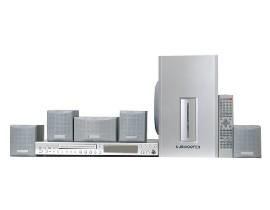
Figura 4.1: Acabatview of the Sunstech XD TH-35 Home Cinema 5.1 Subwoofer System, showing the main unit, subwoofer, five satellite speakers, and remote control.
4.1 Main Unit (DVD/CD/DivX Player)
This unit serves as the central control hub, featuring disc playback capabilities for CD, DVD, and DivX formats. It includes various input/output ports for connecting to your television and other audio sources.
4.2 subwoofer
The subwoofer is responsible for reproducing low-frequency sounds, adding depth and impact to your audio experience. It connects directly to the main unit.
4.3 altaveus satèl·lit
Five satellite speakers (Front Left, Front Right, Center, Rear Left, Rear Right) provide the surround sound experience, distributing audio across your listening area for immersive soundscapes.
4.4 Control remot
The included remote control allows for convenient adjustment of volume, input selection, playback controls, and other system settings from a distance.
5. Configuració
5.1 Col·locació dels altaveus
Optimal speaker placement is crucial for achieving the best 5.1 surround sound experience.
- Ponent del centre: Place directly above or below your television, centered.
- Altaveus frontals esquerre/dret: Position these speakers equidistant from the television, forming an equilateral triangle with your primary listening position.
- Altaveus posteriors esquerre/dret: Place these speakers to the sides or slightly behind your primary listening position, at ear level or slightly above.
- subwoofer: The subwoofer can be placed anywhere in the room, but typically performs well in a corner or near a wall to enhance bass response. Experiment with placement for best results.
5.2 Connexió dels altaveus
- Identify the speaker output terminals on the main unit and the corresponding input terminals on each speaker.
- Connect the Front Left speaker to the "FL" terminal, Front Right to "FR", Center to "CEN", Rear Left to "RL", and Rear Right to "RR".
- Connect the subwoofer to the dedicated "SUBWOOFER OUT" port on the main unit.
- Ensure all connections are secure and the correct polarity (+ to + and - to -) is observed for each speaker wire.
5.3 Connecting to a Television/Display
Use the provided audio/video cables to connect the main unit to your television. Common connection types include:
- Vídeo compost: Connect the yellow video output from the main unit to the yellow video input on your TV.
- Àudio estèreo: Connect the red and white audio outputs from the main unit to the corresponding red and white audio inputs on your TV.
- (Note: Depending on your TV and the system's capabilities, other connections like S-Video or Component Video might be available for better picture quality. Refer to your TV's manual for input options.)
5.4 Connexió d'alimentació
- Once all audio/video and speaker connections are made, plug the main unit's power cord into a wall outlet.
- Turn on the main unit using the power button on the front panel or the remote control.
6. Instruccions de funcionament
6.1 Reproducció bàsica
- Encès: Premeu el botó PODER botó de la unitat principal o del comandament a distància.
- Insereix disc: Gently insert a CD, DVD, or DivX disc into the disc tray. The tray will automatically close, and playback should begin.
- Seleccioneu l'entrada: If the system does not automatically switch to disc playback, press the ENTRADA or FONT button on the remote to select the correct input.
- Control de volum: Utilitza el VOL + i VOLUM - buttons on the remote to adjust the master volume.
- Controls de reproducció: Ús JUGAR, PAUSA, STOP, SALTAR, i Avançar/rebobinar ràpidament buttons for disc navigation.
6.2 Configuració d'àudio
Access the system's on-screen menu (usually by pressing CONFIGURACIÓ or MENÚ on the remote) to adjust audio settings such as:
- Speaker Levels: Adjust the individual volume levels for each speaker (Front, Center, Rear, Subwoofer) to balance the sound.
- Configuració del retard: Compensate for different distances of speakers from the listening position.
- Modes de so: Select from various preset sound modes (e.g., Movie, Music, Game) or customize equalizer settings.
6.3 Funcions de control remot
The remote control provides full functionality for the system. Familiarize yourself with the button layout for easy operation.
(Note: A detailed diagram of the remote control with button descriptions would typically be included here in a physical manual.)
7. Manteniment
7.1 Neteja de la unitat
Per mantenir l'aspecte i el rendiment del sistema:
- Exterior: Netegeu les superfícies exteriors amb un drap suau i sec. No utilitzeu productes de neteja abrasius, ceres ni dissolvents.
- Safata de disc: Mantingueu la safata del disc neta i sense pols. Eviteu tocar la lent que hi ha a dins.
- Ventilació: Assegureu-vos que les obertures de ventilació estiguin netes de pols i deixalles per evitar el sobreescalfament.
7.2 Cura del disc
Handle discs by their edges. Store discs in their cases when not in use to prevent scratches and dust accumulation. Clean discs with a soft, lint-free cloth, wiping from the center outwards.
7.3 Piles del comandament a distància
If the remote control's range decreases or it becomes unresponsive, replace the batteries with new ones of the specified type (e.g., AAA). Ensure correct polarity when inserting new batteries.
8. Solució De Problemes
If you encounter problems with your system, refer to the following table for common issues and solutions.
| Problema | Causa possible | Solució |
|---|---|---|
| Sense poder | Cable d'alimentació no connectat; Presa de corrent defectuosa | Comproveu la connexió del cable d'alimentació; proveu una presa de corrent diferent |
| Sense so | Volume too low; Incorrect input selected; Speaker wires loose/incorrectly connected | Increase volume; Select correct input; Check all speaker connections and polarity |
| Cap imatge | Video cable loose/incorrectly connected; Incorrect TV input selected | Check video cable connections; Select correct input on TV |
| El disc no es reprodueix | Disc inserted incorrectly; Disc is dirty or scratched; Disc format not supported | Re-insert disc correctly; Clean or replace disc; Check disc compatibility (CD, DVD, DivX) |
| El comandament a distància no funciona | Piles esgotades o inserides incorrectament; Obstrucció entre el comandament a distància i la unitat | Replace batteries, check polarity; Remove obstructions; Ensure remote is pointed at the unit's sensor |
If the problem persists after trying these solutions, please contact Sunstech customer support or a qualified service technician.
9. Especificacions
| Característica | Detall |
|---|---|
| Nom del model | TH-XD 35 |
| Marca | Sunstech |
| Configuració de so envoltant | 5.1 (5 Speakers + 1 Subwoofer) |
| Wattage | 170 watts |
| Tipus de suports compatibles | CD, DVD, DivX |
| ASIN | B0044ALAEM |
| Primera data disponible | 21 de febrer de 2020 |
10. Garantia i Suport
For warranty information and customer support, please refer to the warranty card included with your product or visit the official Sunstech weblloc web. Conserveu el comprovant de compra per a reclamacions de garantia.
Assistència en línia: www.sunstech.com/support (This is a placeholder link, please replace with the actual support URL si està disponible)
Contacte: Refer to your regional Sunstech contact information for service inquiries.