
1. Introducció
This manual provides detailed instructions for the installation, operation, and maintenance of your Foxconn TSAA725 ATX Tower Case. Please read this manual thoroughly before beginning installation to ensure proper setup and safe use of the product. Keep this manual for future reference.
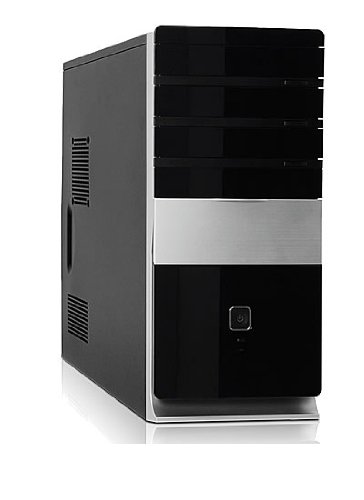
Imatge: Frontal view of the Foxconn TSAA725 ATX Tower Case, showcasing its design and front panel ports.
2. Informació de seguretat
Observeu les següents precaucions de seguretat per evitar danys al producte o lesions personals:
- Always disconnect the power supply from the wall outlet before opening the computer case or performing any installation/maintenance.
- Handle internal components with care to avoid electrostatic discharge (ESD) damage. Use an anti-static wrist strap if available.
- Assegureu-vos que hi hagi una ventilació adequada al voltant de la carcassa per evitar el sobreescalfament.
- Do not expose the case to moisture or extreme temperatures.
- Mantingueu les peces petites allunyades dels nens.
3. Contingut del paquet
Verifiqueu que tots els elements siguin presents al paquet:
- Foxconn TSAA725 ATX Tower Case
- Font d'alimentació de 350 W (preinstal·lada)
- Accessory kit (screws, standoffs, cable ties)
- Aquest manual d'instruccions
4. Característiques clau
The Foxconn TSAA725 ATX Tower Case offers the following features:
- Material: 0.5mm SGCC Alloy Steel construction for durability.
- Suport de la placa base: Compatible with ATX and Micro ATX motherboards.
- Baies en cotxe:
- 3x 5.25" External Bays
- 2x 3.5" External Bays
- 4x 3.5" Internal Bays
- Sistema de refrigeració:
- 1x 80/92/120mm rear fan support (fan not included)
- Optional 1x 80/92/120mm front fan support (fan not included)
- 80mm Air Duct for CPU cooling.
- Panell d'E/S frontal:
- 2 ports USB 2.0
- 1x Presa per a auriculars
- 1x presa de micròfon
- Font d'alimentació: Integrated 350W Power Supply.
5. Configuració i instal·lació de components
Follow these steps to install your computer components into the Foxconn TSAA725 case:
- Preparar el cas:
Place the case on a flat, stable surface. Remove the side panel(s) by unscrewing the thumbscrews at the rear of the case and sliding the panel backward.
- Instal·leu la placa base:
Install the necessary standoffs onto the motherboard tray according to your motherboard's form factor (ATX or Micro ATX). Carefully place the motherboard onto the standoffs, aligning the screw holes. Secure the motherboard with screws provided in the accessory kit.
- Install Drives (HDD/SSD):
For 3.5" internal drives, slide the drive into an available 3.5" internal bay and secure it with screws from the side. For 5.25" external drives (e.g., optical drives), remove the front panel bay cover, slide the drive in from the front, and secure it with screws.
- Instal·leu les targetes d'expansió:
Remove the appropriate expansion slot covers at the rear of the case. Insert your graphics card or other expansion cards into the PCIe/PCI slots on the motherboard and secure them with screws.
- Connectar els cables:
Connect the power supply cables to the motherboard (24-pin ATX, 4/8-pin CPU), graphics card (if applicable), and drives (SATA power). Connect the front panel cables (USB, audio, power switch, reset switch, LED indicators) to the corresponding headers on the motherboard. Refer to your motherboard manual for header locations.
- Gestió de cables:
Route cables neatly to improve airflow and aesthetics. Use cable ties from the accessory kit if needed.
- Tanca el cas:
Once all components are installed and cables are connected, reattach the side panel(s) and secure them with the thumbscrews.
6. Instruccions de funcionament
After successful assembly, connect your peripherals (monitor, keyboard, mouse) and power cable to the case. Press the power button on the front panel to start your computer.
Ports d'E/S del panell frontal:
- Ports USB 2.0: Per connectar dispositius USB com ara teclats, ratolins i emmagatzematge extern.
- Auriculars Jack: Per connectar auriculars o altaveus.
- Presa de micròfon: Per connectar un micròfon.
- Botó d'encesa: Per encendre o apagar l'ordinador.
- Botó de restabliment: Per reiniciar l'ordinador.
7. Manteniment
Regular maintenance helps ensure optimal performance and longevity of your computer case:
- Neteja de pols: Periodically clean dust from inside the case, especially from fans and heatsinks, using compressed air. Ensure the computer is powered off and unplugged before cleaning.
- Neteja exterior: Netegeu l'exterior de la carcassa amb un drap suau iamp drap. Eviteu productes de neteja o dissolvents abrasius.
- Gestió de cables: Periodically check cable routing to ensure no cables are obstructing airflow or fan operation.
8. Solució De Problemes
Si teniu problemes, consulteu les solucions habituals següents:
- Computer does not power on:
- Ensure the power cable is securely connected to both the case's power supply and the wall outlet.
- Check if the power supply switch (if present) is in the 'ON' position.
- Verifiqueu que el cable del botó d'engegada del panell frontal estigui connectat correctament a la placa base.
- No display on monitor:
- Ensure the monitor is powered on and connected to the correct video output on your graphics card or motherboard.
- Torneu a col·locar els mòduls de la targeta gràfica i de la RAM.
- Ports USB que no funcionen:
- Verifiqueu que els cables USB del panell frontal estiguin connectats correctament als capçaleres USB de la placa base.
- Proveu de connectar el dispositiu a un altre port USB.
9. Especificacions
| Característica | Detall |
|---|---|
| Marca | FOXCONN |
| Model | TSAA725-ISO450 |
| Material | 0.5mm SGCC Alloy Steel |
| Compatibilitat amb la placa base | ATX, Micro ATX |
| Drive Bays (External) | 3x 5.25", 2x 3.5" |
| Badies d'unitat (internes) | 4x 3.5" |
| Suport del sistema de refrigeració | 1x 80/92/120mm rear fan, 1x 80/92/120mm front fan (optional), 80mm Air Duct |
| Ports d'E / S frontals | 2x USB 2.0, 1x Headphone, 1x Microphone |
| Font d'alimentació | 350W (Integrated) |
| Dimensions del producte (LxWxH) | 50.17 x 24.13 x 54.61 cm |
| Pes de l'article | 6.96 kg |
10. Garantia i Suport
For warranty information and technical support, please refer to the official Foxconn weblloc web o poseu-vos en contacte amb el vostre distribuïdor local. Conserveu el comprovant de compra per a reclamacions de garantia.
Recursos en línia: For additional support and updated drivers, visit the official Foxconn support page.
Nota: Els termes de la garantia poden variar segons la regió.