
Quantum J-32U Portable CD/MP3 Player, USB, Radio, and Cassette Recorder User Manual
Model: J-32U
1. Introducció
Gràcies per la compraasing the Quantum J-32U Portable CD/MP3 Player, USB, Radio, and Cassette Recorder. This device is designed to provide versatile audio playback and recording capabilities in a compact, portable unit. Please read this manual thoroughly before operating the unit to ensure proper use and to maximize its performance.
Conserveu aquest manual com a referència futura.
2. Instruccions de seguretat importants
- Font d'alimentació: Operate the unit only from the power source indicated on the marking label.
- Ventilació: No bloquegeu cap obertura de ventilació. Instal·leu-ho d'acord amb les instruccions del fabricant.
- Aigua i humitat: No utilitzeu aquest aparell a prop d'aigua o humitat.
- Neteja: Netegeu només amb un drap sec.
- Calor: No instal·leu a prop de cap font de calor com ara radiadors, registres de calor, estufes o altres aparells (inclosos amplificadors) que produeixen calor.
- Manteniment: Demaneu tot el servei a personal de servei qualificat. Cal fer servei quan l'aparell s'hagi fet malbé d'alguna manera.
- Bateries: Dispose of used batteries according to local regulations. Do not expose batteries to excessive heat.
3. Contingut del paquet
Si us plau, comproveu que els següents elements estiguin inclosos al vostre paquet:
- Quantum J-32U Portable Audio System
- Cable d'alimentació CA
- Manual d'usuari (aquest document)
4. Producte acabatview
4.1 Tauler frontal
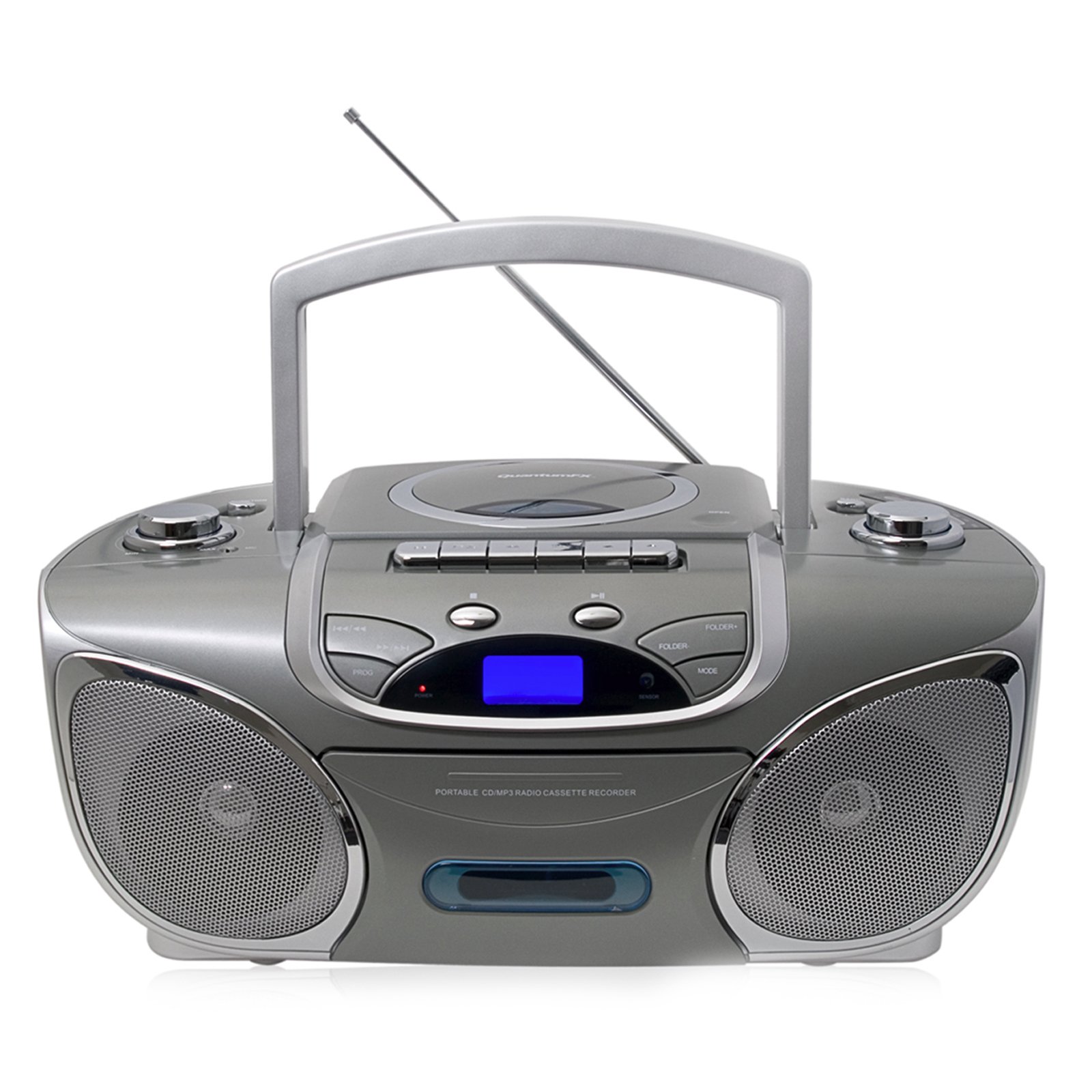
Imatge: Frontal view of the Quantum J-32U, showing the speaker grilles, display, and control buttons.
- Ponents: Stereo speakers for audio output.
- Pantalla LCD: Shows current mode, track number, and radio frequency.
- Botons de funció: Play/Pause, Stop, Skip/Search (Forward/Backward).
- Control de volum: Rotary knob to adjust audio output level.
- Botó de mode: Selects between CD, USB/SD, Radio, and Cassette modes.
4.2 Tauler superior
Imatge: Superior view of the Quantum J-32U, highlighting the CD compartment, cassette deck, USB port, and SD/MMC slot.
- Compartiment de CD: Top-loading CD/MP3 disc tray.
- Plata de cassets: Per reproduir i gravar cintes de casset.
- Port USB: Per connectar unitats flaix USB.
- Ranura per a targetes SD/MMC: Per inserir targetes de memòria SD o MMC.
- Pom d'afinació: For manual radio frequency selection.
- Botons de control de casset: Play, Record, Fast Forward, Rewind, Stop/Eject.
4.3 Panell posterior
Imatge: Part posterior view of the Quantum J-32U, showing the AC power input and battery compartment.
- Entrada d'alimentació de CA: Connect the supplied AC power cord here.
- Compartiment de la bateria: For inserting batteries for portable operation.
- Antena FM: Antena telescòpica per a la recepció de ràdio FM.
5. Configuració
5.1 Engegar la unitat
The J-32U can be powered by AC mains or batteries.
Alimentació CA
- Assegureu-vos que la unitat estigui apagada.
- Connect the supplied AC power cord to the AC power input on the rear panel of the unit.
- Connecteu l'altre extrem del cable d'alimentació de CA a una presa de corrent estàndard.
Potència de la bateria
- Obriu la tapa del compartiment de la bateria al panell posterior.
- Insert the required number of "C" size batteries (not included), ensuring correct polarity (+/-).
- Tanqueu bé la tapa del compartiment de la bateria.
- Nota: Disconnect the AC power cord when operating on batteries.
6. Instruccions de funcionament
6.1 Funcionament general
- Encès/apagat: Premeu el botó PODER botó per encendre o apagar la unitat.
- Selecció del mode: Premeu el botó MODE button repeatedly to cycle through CD, USB/SD, Radio (AM/FM), and Cassette modes.
- Ajust de volum: Gira el VOLUM botó per augmentar o disminuir el nivell del so.
Reproducció de CD/MP3 de 6.2
- Premeu el botó MODE botó per seleccionar el mode CD.
- Obriu la tapa del compartiment del CD.
- Place a CD or MP3 CD with the label side facing up.
- Tanqueu la tapa del compartiment del CD. La unitat llegirà el disc.
- Premeu el botó REPRODUCCIÓ/PAUSA per iniciar la reproducció.
- Premeu Saltar endavant or SALTAR ENRERE to navigate tracks.
- Mantén premut Saltar endavant or SALTAR ENRERE per avançar o rebobinar ràpidament dins d'una pista.
- Premeu el botó STOP botó per aturar la reproducció.
6.3 USB/SD/MMC Playback
- Inseriu una unitat flaix USB al port USB o una targeta SD/MMC a la ranura per a targetes.
- Premeu el botó MODE button to select USB/SD mode. The unit will automatically detect and begin playing MP3 files.
- Ús REPRODUCCIÓ/PAUSA, STOP, Saltar endavant, i SALTAR ENRERE buttons as with CD playback.
6.4 Radio Operation (AM/FM Stereo)
- Premeu el botó MODE botó per seleccionar el mode Ràdio.
- Esteneu l'antena telescòpica d'FM per a una millor recepció d'FM. Per a AM, gireu la unitat per a una recepció òptima.
- Gira el TUNING botó per seleccionar l'emissora de ràdio desitjada.
- The frequency will be displayed on the LCD screen.
6.5 Reproducció i gravació de cassets
Reproducció
- Premeu el botó MODE button to select Cassette mode.
- Premeu el botó PARAR/EXPULTAR button to open the cassette deck.
- Insert a cassette tape and close the deck.
- Premeu el botó JUGAR per iniciar la reproducció.
- Ús AVANT RÀPID or REBOBINAR botons per navegar per la cinta.
- Premeu PARAR/EXPULTAR per aturar la reproducció.
Recording (from CD/USB/SD/Radio)
- Inseriu una cinta de casset verge a la platina de cassets.
- Select the desired source (CD, USB/SD, or Radio) using the MODE botó.
- Start playback on the source (e.g., play a CD track, tune to a radio station).
- While the source is playing, press the REGISTRAR botó de la platina de casset. El JUGAR el botó també s'activarà.
- Per aturar la gravació, premeu el botó PARAR/EXPULTAR botó.
- Nota: Ensure the cassette tape has its record protection tabs intact for recording.
7. Manteniment
- Neteja de la unitat: Feu servir un drap suau i sec per netejar l'exterior de la unitat. No utilitzeu productes de neteja abrasius ni dissolvents.
- CD Lens Cleaning: If CD playback becomes erratic, use a commercially available CD lens cleaner disc to clean the laser lens.
- Neteja del capçal del casset: Periodically clean the cassette deck's heads, pinch rollers, and capstan with a cotton swab lightly dampamb alcohol isopropílic.
- Emmagatzematge: When not in use for extended periods, disconnect the AC power cord and remove batteries. Store the unit in a cool, dry place.
8. Solució De Problemes
| Problema | Causa possible | Solució |
|---|---|---|
| Sense poder | Cable de CA no connectat; piles esgotades o inserides incorrectament. | Check AC cord connection; Replace batteries or ensure correct polarity. |
| Sense so | Volume too low; Incorrect mode selected. | Augmenta el volum; Prem MODE to select correct source. |
| El CD salta o no es reprodueix | Disc dirty or scratched; CD compartment not closed; Disc inserted incorrectly. | Clean or replace disc; Close CD compartment firmly; Insert disc label side up. |
| Mala recepció de ràdio | Antena no estesa; Posició de la unitat. | Extend FM antenna fully; Rotate unit for better AM reception. |
| La cinta de casset no es reprodueix/grava | Tape incorrectly inserted; Record protection tab removed (for recording). | Ensure tape is correctly inserted; Cover record protection tab with tape for recording. |
9. Especificacions
- Model: J-32U
- Font d'alimentació: AC 120V ~ 60Hz or DC 9V (6 x "C" size batteries)
- Reproductor de CD: Top-loading CD/MP3 compatible
- USB/SD/MMC: Supports MP3 audio playback
- Freqüències de ràdio: AM/FM estèreo
- Plata de cassets: Playback and Recording function
- Ponents: estèreo
- Dispositius compatibles: MP3 Player, Smartphone (via USB/SD for file playback, not direct audio input)
- GTIN: 606540009864
10. Garantia i Suport
Quantum products are designed for reliability and performance. For warranty information, please refer to the warranty card included with your purchase or visit the official Quantum website. For technical support or service inquiries, please contact Quantum customer service.
Assistència en línia: www.quantumfx.com/support (Nota: Això és un marcador de posició URL as no specific support link was provided.)
Atenció al client: Refer to your product packaging or warranty card for contact details.