
1. Producte acabatview
The Konus Memox-10 Stopwatch (Model KO4261) is a versatile timing device designed for various applications, including sports, training, and general timekeeping. It features a digital display, multiple timing modes, and a memory function.

Figura 1: Frontal view of the Konus Memox-10 Stopwatch, showing the display and control buttons.
Les característiques clau inclouen:
- Visualització de l'hora actual
- Funció d'alarma
- Stopwatch with lap/split memory
- Pace mode (40-180 BPM)
- Temporitzador de compte enrere
- 10-week memory recall
2. Configuració
2.1. Engegada inicial i bateria
The Konus Memox-10 Stopwatch typically comes with a pre-installed battery. If the display is blank or dim, the battery may need replacement. Refer to the "Maintenance" section for battery replacement instructions.
2.2. Configuració de l'hora actual
- Premeu el botó MODE button repeatedly until the time display mode is shown.
- Manteniu premut el botó VOLTA/RESET button for a few seconds until the time digits begin to flash.
- Utilitza el ST/SPLIT botó per ajustar el dígit intermitent (hores, minuts, segons).
- Premeu el botó MODE botó per passar al dígit següent.
- Un cop finalitzada tota la configuració, premeu la tecla VOLTA/RESET botó per sortir del mode de configuració.
3. Instruccions de funcionament
3.1. Selecció de mode
Premeu el botó MODE button to cycle through the different functions: Time Display, Stopwatch, Alarm, Pace Mode, and Countdown Timer.
3.2. Funció de cronòmetre
- Navegueu al mode de cronòmetre amb la tecla MODE botó.
- Premeu ST/SPLIT per iniciar el cronòmetre.
- Premeu ST/SPLIT again to pause/stop the stopwatch.
- To record a lap or split time while the stopwatch is running, press VOLTA/RESET. The lap time will be displayed temporarily.
- To reset the stopwatch to zero, ensure it is stopped, then press VOLTA/RESET.
3.3. Funció d'alarma
- Navegueu al mode d'alarma mitjançant el botó MODE botó.
- Manteniu premut el botó VOLTA/RESET fins que els dígits de l'hora de l'alarma parpellegin.
- Utilitza el ST/SPLIT botó per ajustar les hores i els minuts.
- Premeu el botó MODE botó per canviar entre hores i minuts.
- Premeu VOLTA/RESET to save the alarm time and exit setting mode.
- Per activar/desactivar l'alarma, premeu ST/SPLIT mentre esteu en mode d'alarma. Apareixerà/desapareixerà una icona d'alarma a la pantalla.
3.4. Pace Mode
The pace mode allows you to set a desired beat per minute (BPM) from 40 to 180 BPM, providing an audible signal to help maintain a consistent rhythm.
- Navigate to the Pace mode using the MODE botó.
- Manteniu premut el botó VOLTA/RESET button until the BPM digits flash.
- Utilitza el ST/SPLIT button to adjust the BPM value.
- Premeu VOLTA/RESET to save the BPM and exit setting mode.
- Premeu ST/SPLIT to start the pace signal. Press again to stop.
3.5. Temporitzador de compte enrere
- Navigate to the Countdown Timer mode using the MODE botó.
- Manteniu premut el botó VOLTA/RESET button until the timer digits flash.
- Utilitza el ST/SPLIT botó per ajustar les hores, els minuts i els segons.
- Premeu el botó MODE button to move between hours, minutes, and seconds.
- Premeu VOLTA/RESET to save the countdown time and exit setting mode.
- Premeu ST/SPLIT to start the countdown. Press again to pause/resume.
- Quan el temporitzador arribi a zero, sonarà una alarma audible. Premeu qualsevol botó per aturar l'alarma.
3.6. Memory Recall (10-Week Memory)
The Memox-10 stopwatch stores up to 10 weeks of data. Specific details on how to access and navigate this memory are typically found in the full product manual. Generally, you would enter a dedicated memory mode and use the ST/SPLIT i VOLTA/RESET buttons to scroll through stored records.
4. Manteniment
4.1. Neteja
Netegeu el cronòmetre amb un drap suau i sec. Per a la brutícia resistent, netegeu lleugeramentamp cloth can be used, followed by immediate drying. Do not use abrasive cleaners or solvents, as these can damage the casing o pantalla.
4.2. Substitució de la bateria
When the display becomes dim or unresponsive, it's time to replace the battery. The Konus Memox-10 typically uses a standard button cell battery (e.g., CR2032).
- Localitza el compartiment de la bateria a la part posterior del cronòmetre.
- Amb un tornavís petit, obriu amb cura la tapa del compartiment de la bateria.
- Remove the old battery, noting its polarity (+/-).
- Introduïu una bateria nova amb la polaritat correcta.
- Substituïu la tapa del compartiment de la bateria i fixeu-la.
Elimineu les piles velles d'acord amb la normativa local.
4.3. Emmagatzematge
Guardeu el cronòmetre en un lloc fresc i sec, allunyat de la llum solar directa i de temperatures extremes. Si el guardeu durant un període prolongat, considereu treure la pila per evitar fuites.
5. Solució De Problemes
| Problema | Causa possible | Solució |
|---|---|---|
| La pantalla està en blanc o tènue. | Bateria baixa o esgotada. | Substituïu la bateria (vegeu la secció 4.2). |
| Els botons no responen. | Error temporal de programari o bateria baixa. | Remove and reinsert the battery. If problem persists, replace battery. |
| Hora incorrecta mostrada. | Hora no configurada correctament. | Reset the current time (refer to Section 2.2). |
| L'alarma no sona. | L'alarma no s'ha activat o el volum és massa baix (si és ajustable). | Ensure alarm is activated in Alarm mode (refer to Section 3.3). Check for any volume settings. |
6. Especificacions
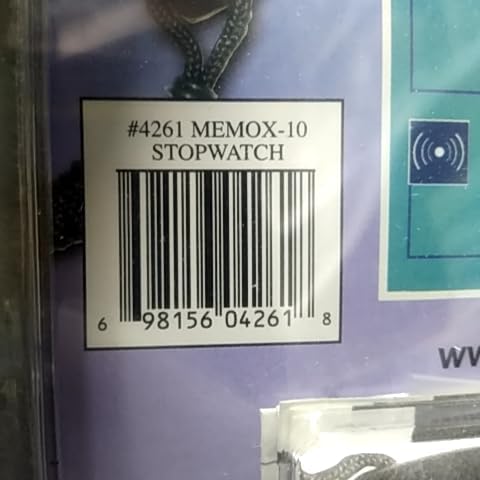
Figure 2: Packaging detail showing model number and UPC.
- Marca: Konus
- Model: Memox-10
- Número de producte: KO4261
- UPC: 698156042618
- Dimensions: Aproximadament 19.81 x 2.54 x 14.48 cm (7.8 x 1.0 x 5.7 polzades)
- Pes: Aproximadament 22.68 g (0.8 oz)
- Pace Mode Range: 40-180 BPM
- Memòria: 10 weeks of data
- Bateria: (Type not specified, typically button cell like CR2032)
7. Garantia i Suport
Konus products are manufactured to high-quality standards. For specific warranty information, please refer to the warranty card included with your product or visit the official Konus weblloc web. Conserveu el rebut de compra com a comprovant de compra.
Atenció al client:
For technical assistance, troubleshooting, or warranty claims, please contact Konus customer support. Contact details can typically be found on the product packaging or the official Konus weblloc.
- Weblloc: www.konus.com (Example, real URL pot variar)
- Correu electrònic: support@konus.com (Example)