
KODAK Z990
Kodak EasyShare Z990 Digital Camera Instruction Manual
Model: Z990 | Brand: KODAK
1. Introducció
The KODAK EASYSHARE MAX Camera, model Z990, is a high-performance digital camera designed to capture crisp, beautiful pictures and HD videos. Featuring a 12 MP BSI CMOS sensor and a powerful 30x optical zoom lens, it offers advanced capabilities for both novice and experienced photographers. This manual provides detailed instructions on setting up, operating, and maintaining your camera to ensure optimal performance.

Figure 1.1: Kodak EasyShare Z990 Digital Camera
This camera is equipped with Kodak's Smart Capture feature, which automatically identifies the scene and adjusts camera settings for optimal results. It also includes a dedicated Share button for easy uploading of photos and videos to social networks and email.
2. Què hi ha a la caixa
Before you begin, please ensure all the following items are included in your KODAK EASYSHARE MAX Camera package:
- KODAK EASYSHARE MAX Camera (Z990)
- KODAK Ni-MH Pre-charged Rechargeable Digital Camera Batteries (AA)
- KODAK USB AC adapter for in-camera charging
- Solució de càrrega
- Corretja de canell
- cable USB
- Lens cap with strap
- Corretja per al coll
- Guia de l'usuari (aquest document)
3. Configuració inicial
3.1. Instal·lació de bateries
Your camera uses AA Ni-MH rechargeable batteries. To install them:
- Localitzeu la porta del compartiment de la bateria a la part inferior de la càmera.
- Obriu la porta amb cura.
- Insert the four KODAK Ni-MH AA batteries according to the polarity indicators inside the compartment.
- Tanqueu bé la porta del compartiment de la bateria.
3.2. Càrrega de bateries
For optimal performance, fully charge the included Ni-MH batteries before first use. The included charger indicates charging status with green lights. Batteries are fully charged when they feel warm to the touch.
3.3. Inserció d'una targeta de memòria
The camera supports SD/SDHC memory cards up to 128 MB (internal memory is also 128 MB). A memory card is recommended for storing a large number of photos and videos.
- Localitza la ranura de la targeta de memòria, normalment al lateral o a la part inferior de la càmera.
- Insert the SD/SDHC card with the metal contacts facing the correct direction (refer to the diagram near the slot).
- Premeu la targeta fins que encaixi al seu lloc.
3.4. System Requirements for Computer Connection
To transfer photos and videos to your computer, ensure your system meets the following requirements:
- WINDOWS: WINDOWS XP SP2, VISTA, WINDOWS 7 or later; INTERNET EXPLORER 6.0 or higher.
- MACINTOSH: MACINTOSH 10.4, 10.5, 10.6 or higher; SAFARI 1.1 or higher.
- Maquinari: PENTIUM 4, 2.8 GHz processor or higher; 1 GB RAM and 64 MB video RAM; 300 MB hard drive space available; CD-ROM drive; Available USB port (1.1 or higher); 1024 x 768 display resolution.
4. Càmera acabadaview
Familiarize yourself with the main components and controls of your Kodak EasyShare Z990 camera.
4.1. Frontal i lateral Views
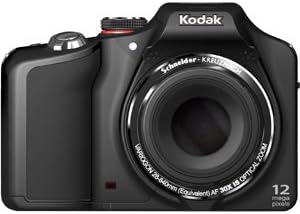
Figura 4.1: Frontal View
The front of the camera features the prominent 30x optical zoom lens, the built-in flash, and the autofocus assist lamp.
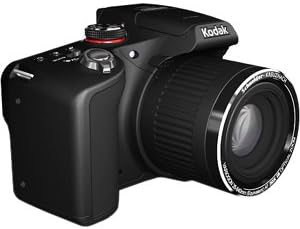
Figura 4.2: lateral View
The side of the camera typically houses ports for USB and HDMI connectivity, as well as the memory card slot.
4.2. Top Controls

Figura 4.3: Controls superiors
- Interruptor d'encesa/apagada: A momentary slide switch to power the camera on or off. The camera will automatically power off after about 20 seconds of inactivity if the lens cover is on.
- Marcador de mode: A rotary wheel with icons to select various shooting modes (e.g., Smart Capture, HDR, PASM, SCN).
- Botó de l'obturador: Premeu fins a la meitat per enfocar, completament per capturar una foto.
- Palanca de zoom: Surrounds the shutter button, used to zoom in (W) and out (T).
- Burst Mode Button: (Marked by 'pages' or 'frames') Activates continuous shooting.
- Macro/Focus Button: (Marked by a flower) Controls focusing bias (macro, super macro, infinity, manual focus).
- Self-Timer Button: Estableix un retard abans de fer una foto.
4.3. Rear Controls and LCD

Figura 4.4: Controls posteriors
- 3.0-inch HVGA High-Resolution LCD: Mostra en directe view, menús i reproducció.
- EVF/LCD Button: Toggles between the electronic viewfinder and the LCD screen.
- Botó de gravació: (Silver/Red button) Initiates video recording.
- Navigation Pad (Square/Silver): Used to navigate menus and select options (Up, Down, Left, Right, OK/Center button).
- Botó DISP: Displays additional functionality or information on the screen.
- Botó de flaix: (Lightning bolt icon) Controls flash modes (Auto, Off, Fill, Red-eye reduction).
- Magic Wand Button: Displays creative effects available in the current mode.
- Trash Can Button: Deletes selected photos or videos in review mode.
- Botó de reproducció: Switches between shooting mode and playback/review mode.
- Botó Compartir: Pre-assigns pictures for sharing to social networks or email when connected to a computer.
5. Funcionament de la càmera
5.1. Basic Photography (Smart Capture Mode)
For quick and easy photo taking, use the Smart Capture mode. This mode automatically analyzes the scene and adjusts camera settings for optimal results.
- Gireu el selector de mode a la posició RED Camera ICON.
- Enquadra la teva foto amb la pantalla LCD.
- Press the shutter button halfway down to allow the camera to focus. You will hear a beep once focus is achieved.
- Press the shutter button all the way down to capture the photo.
5.2. Advanced Shooting Modes (PASM)
The Z990 offers Program, Aperture Priority, Shutter Priority, and Manual modes for greater creative control.
- Mode automàtic del programa (P): The camera sets optimal shutter speed and aperture combination. You can adjust other settings like ISO, white balance, and color mode.
- Mode de prioritat d'obertura (A): You choose the aperture (f/stop), and the camera sets the shutter speed for correct exposure. This mode is useful for controlling depth of field.
- Shutter Priority Mode (S): You choose the shutter speed, and the camera sets the aperture. This mode is ideal for controlling motion blur (fast shutter for freezing action, slow shutter for blurring motion).
- Mode manual (M): You have full control over both aperture and shutter speed. Press the DISP button to view and adjust all manual settings on the LCD.
5.3. Scene Modes (SCN)
The SCN mode provides optimized settings for specific shooting situations. Turn the mode dial to SCN, then use the navigation pad to select from options like:
- Automàtic
- Esport
- Portrait (including Night Portrait, Self)
- Landscape (including Night Landscape, Sunset)
- Lluminós
- Focs artificials
- Llum de fons
- Nens
- Stage
- Flower (Macro)
5.4. Creative Modes and Effects
Explore various creative options by turning the mode dial to the Paint Brush ICON or using the Magic Wand button.
- HDR (alt rang dinàmic): Captures multiple exposures and combines them for a single image with extended dynamic range. Hold the camera very steady for best results.
- Dramatic: Enhances color and contrast for a more impactful image.
- Night Scene Long Exposure: Optimizes settings for capturing details in low-light scenes with longer shutter times.
- Intelligent Portrait: Applies intelligent processing for improved portrait shots.
- Photobooth Capture: Takes a series of four consecutive photos, styled as if taken in a traditional photobooth.
- Automatic Panorama: Guides you to capture a series of images that the camera automatically stitches together into a wide panoramic shot (180-degree horizontal or 120-degree vertical).
- Film Effects: Apply classic film looks such as KODACHROME, KODACOLOR, EKTACHROME, TRI-X, T-MAX, and Sepia.
5.5. Continuous Shooting (Burst Mode)
The camera can capture multiple frames per second for fast-moving subjects. Press the Burst Mode button on the top of the camera to activate. The camera can shoot up to 5 frames per second (fps) without flash, or up to 9 fps at 2 MP resolution (max 20 shots). Note that processing RAW files in burst mode may temporarily slow down camera responsiveness.
5.6. Gravació de vídeos
The Kodak EasyShare Z990 can record full 1080 HD video with stereo sound.
- Premeu la plata Botó de gravació (with the red bullseye) on the rear of the camera.
- The camera will immediately begin recording.
- Premeu el botó de gravació de nou per aturar la gravació.
Features include audio capture, on-camera editing, and the ability to create action prints (9-up) from video frames.
5.7. Playback and Sharing
Per tornarview les teves fotos i vídeos:
- Premeu el botó Botó de reproducció (arrow icon) on the rear of the camera.
- Use the navigation pad to scroll through your images and videos.
- For videos, press the OK button to play. Sound will come from the camera's speaker.
To share your content:
- Premeu el botó Botó Compartir after taking a picture or during playback.
- Select your preferred sharing destinations (e.g., FACEBOOK, email, KODAK Gallery).
- Connect your camera to a computer via USB, and your content will automatically upload to the selected destinations.
6. Manteniment
6.1. Cura de la bateria
- Always use the included KODAK Ni-MH rechargeable batteries and charger.
- Ensure the battery compartment door is handled with care to prevent damage.
- Traieu les piles si no fareu servir la càmera durant un període prolongat.
6.2. Neteja de la càmera
- Feu servir un drap suau i sense borrissol per netejar el cos de la càmera.
- Per a la lent, feu servir un drap i una solució especials per a la neteja de lents. Eviteu tocar la superfície de la lent amb els dits.
- No utilitzeu productes químics o materials abrasius.
7. Solució De Problemes
This section addresses common issues you might encounter with your Kodak EasyShare Z990.
- La càmera no s'encén: Ensure batteries are correctly installed and fully charged. Check that the lens cap is removed.
- HDR mode not working as expected: HDR requires the camera to be held very steady during capture. Any movement can cause the merging process to fail. Ensure you are zoomed out for optimal results.
- Continuous shooting (burst mode) slows down: When shooting in high-resolution JPEG or RAW formats, the camera may temporarily pause to transfer data to the memory card. This is normal behavior. Using smaller JPEG resolutions will allow for faster continuous shooting.
- Battery charger indicator: The green light on the Kodak charger stays on even when batteries are fully charged. Batteries are typically charged when they feel warm to the touch.
- Difficulty navigating menus: To exit a menu, often you need to navigate back to the first item in the menu, then press the UP arrow or a dedicated 'Back' button if available.
- Problemes amb la targeta de memòria: If a memory card is not recognized, try formatting it using the camera's 'Format' option in the setup menu (Wrench icon). Note that formatting will erase all data on the card.
8. Especificacions
| Característica | Especificació |
|---|---|
| Megapíxels | 12 MP BSI CMOS |
| Zoom òptic | 30x SCHNEIDER-KREUZNACH VARIOGON Lens |
| Zoom digital | 5x |
| Mida de la pantalla | 3.0 in. HVGA high-resolution LCD |
| Estabilització d'imatge | Òptic |
| Apertura màxima | f/2.8 (wide) |
| Distància focal mínima | 28 mm |
| Distància focal màxima | 840 mm |
| ISO Equivalents | 125, 200, 400, 800, 1600, 3200, 6400 |
| Velocitat d'obturació | 1/2000 sec. to 16 sec. (manual) |
| Resolució de vídeo | FHD 1080p (30 FPS) |
| Admet File Formats | JPEG, KDC (RAW), AVC (Video) |
| Memòria interna | 128 MB |
| Targetes de memòria compatibles | SD/SDHC |
| Tipus de bateria | AA (NiMH Rechargeable) |
| Connectivitat | HDMI, USB |
| Pes | 0.98 lliures |
9. Garantia i Suport
For information regarding product warranty, technical support, and service, please refer to the official KODAK website or contact KODAK customer service directly. Specific warranty terms and support options may vary by region and purchase date.